A colleague of mine runs a book club in which I participate and as we often do, we deviated from discussing the “book of the month” to discuss other matters. A recent discussion focused on his efforts to redo his online history courses using microlectures (an example). Ideas seem to “cross-fertilize” for me, and the idea of microlectures (microlearning) surfaced thoughts from recent reading I have been doing on how lectures tend to challenge quality note-taking, and how segmented lectures could improve the related studying that follows. By segmented lectures, I mean a lecture in which the presenter pauses to allow time for a student task. My personal exposure to segmented lectures came from a classroom redesign that faculty colleagues who received instructional development money created, in which students sat around tables to listen to lectures. This arrangement was intended to let the instructor pause and require students at each table to engage in some form of “active learning” task. The demos I witnessed did not involve note-taking, but as I will describe at a later point, comparing notes during these pauses could have been an option. My own classes were too large (180+) so even this special “lecture” setting would not have been adequate.
Microlectures, a subcategory of microlearning, tend to use short, focused videos in which an instructor explains a single key concept or specific skill. These tend to be videos rather than live presentations and are a common nonclassroom “just-in-time” learning approach. Most of us have experienced this approach without ever labeling it. When I spent a lot of time learning specific programming techniques (e.g., PHP), I purchased access to a service (Lynda) that offered video courses made up of short segments (3-10 minutes) covering specific skills. I see Lynda has morphed into something new, perhaps because it is easy to find similar videos at no cost from YouTube. Microlectures are common in what some would describe as “training” environments, but not in academic settings. However, It appears that “short presentation” videos made an appearance during the COVID years to hold the attention of those trying to learn under those circumstances, and they may be an example of what became known as a “flipped classroom” (short videos to watch before a class meeting). Now that our instructional situations have returned to more traditional approaches, the approach my history colleague is using seems relatively rare.
Segmented Lectures and Taking Notes
I created the phrase “segmented lectures” to describe a strategy I encountered while reading research studies that sought ways to improve lecture notes and the subsequent study experience based on those notes. The strategy required the instructor to pause during a traditional lecture to focus on improving the notes taken during the previous presentation segment. Hopefully, you can see how I connected this to the microlectures body of work. My personal interest as a digital note taker was piqued by research that claimed handwritten notes contributed to better understanding because handwriting is relatively slower than keyboarding, and to keep up, students have to select the most important content and summarize it instead of recording ideas verbatim. Through what I see as twisted logic, a less efficient process was somehow claimed to produce a more effective outcome.
The intersection of microlectures and note-taking becomes especially compelling when you examine what cognitive research reveals about how students actually capture and retain lecture material. Most educators and students think of note-taking as a two-stage activity: recording during class and reviewing before an exam. Researchers (e.g., Luo and colleagues) argue that this view overlooks the critical middle stage: note revision.
The practical problem revision addresses is important. When students take notes in a single pass during continuous speech, they typically capture only about a third of the important information presented. While main ideas are noted reasonably well, secondary details and deeper conceptual relationships drop off precipitously, leaving massive gaps. Because missing a concept from lecture notes reduces the likelihood of recalling it on an exam, note completeness directly dictates student achievement.
This is precisely where the design of segmented lectures and microlectures relates to these empirical findings. Researchers proposed that lectures might pause periodically to let students review the notes just taken and make adjustments. Some studies outlined specific ways to make these delays productive. For example, Flannigan and colleagues paired students to enrich their idea collection. When students compare notes with a partner, they prompt each other to recall omitted details and examples through collaborative retrieval. While sharing notes alone doesn’t automatically lift test scores, the interactive dialogue helps students identify blind spots in their individual records. It was this strategy that reminded me of the “active learning” concept I explained earlier.
Studies comparing different revision routines found that pausing periodically throughout a lesson to let students revise their notes yielded significantly better results than waiting until the entire lecture finished. Short, distributed revision breaks, say two to three minutes, allow students to use the fragments they just jotted down as immediate retrieval cues to fill in missing logic and flesh out partial thoughts before cognitive decay sets in.
Contrary to my expectations, Flanigan and collaborators tested the full sequence of recording, revising, and reviewing and found that students taking longhand notes benefited more from revision intervals than those typing on laptops. Longhand note-takers added roughly three times as many complete ideas during pause breaks and performed half a letter grade higher on subsequent assessments. I have no explanation for this difference.
Bringing these threads back to microlearning and segmented design, short, tightly focused instructional segments bounded by deliberate pauses offer a natural answer to the note-taking dilemma. Instead of treating lecture videos or classroom talks as uninterrupted streams of delivery, brief pauses transform passive viewing into active processing. Whether students use those two minutes to flesh out shorthand points, draw connections, or cross-check key takeaways, carving out dedicated time for revision converts a fleeting lecture into a durable, complete study record. (see Zheng).
Summary:
A lengthy lecture overwhelms most learners’ ability to take useful study notes. Both pausing during a lecture (segmented lectures) or using short, focused video lectures (microlectures) allow learners the time to create notes more effective for study.
Sources:
Flanigan, A. E., Kiewra, K. A., Lu, J., & Dzhuraev, D. (2023). Computer versus longhand note taking: Influence of revision. Instructional Science, 51(2), 251-284
Luo, L., Kiewra, K. A., & Samuelson, L. (2016). Revising lecture notes: how revision, pauses, and partners affect note-taking and achievement. Instructional Science, 44(1), 45-67.
I became interested in what I now describe as the great keyboarding versus handwritten note-taking controversy after I had retired from my career as an educational psychologist and I could no longer conduct research. I had studied student note-taking and related topics intended to improve student performance so I had experiences that seemed relevant. As retired people do, I looked for things to do that interested me and came across a book study group reading about personal knowledge management (PKM). These folks were old school so I learned about Niklas Luhmann’s Zettelkasten slip-based (think note card) system for storing, organizing, and applying notes over an extended period of time. The topic of whether implementations among lifelong learners such as the members of this group should use handwritten notes stored or modernized versions of the Zettelkasten stored digitally (think Obsidian) came up frequently again raised the handwriting vs. keyboarding controversy.
Unless they follow the research carefully, it is my impression that high school teachers and college profs are getting the message that learners are better off if they require students to take notes by hand. The issue is that learners’ attention can wander when they are online and have a device, but the most persuasive argument seems to be that learners, no matter how distractible, achieve greater understanding when taking notes by hand. I have tried to summarize the limitations of the handwriting is better argument in previous posts.
The desirability difficulty hypothesis
Why would this be the case? The most common explanation is based in the observation that students can record more information when using a keyboard because a keyboard tends to be faster than handwriting. On the surface, this difference might seem to advantage students who take notes on a tablet or laptop, as students who enter information faster would seem better able to keep up with a lecturer.
The desirable difficulty hypothesis is used to reach a different conclusion (Bork and Bork, 2011. Desirable difficulty is a learning condition that makes practice feel more effortful and often makes performance look worse in the moment, but improves long-term retention and transfer. It can apply in many areas (e.g., do you highlight or take notes when you read), but here is based on the proposal that the slower rate of handwritten notes in the context of the demanding rate of information presentation in a lecture forces students to make decisions about what they will get down on paper. They argue that students focus on the most important information and rework the auditory input in their own words. When writing about another of my personal interests, I would describe this as a generative rather than a passive process (verbatim notes). It always struck me that those who take notes using keyboards actually have more time to think rather than less and this assumes they ignore this advantage by being lazy.
If you have read Thinking fast and slow (Kahneman) you have encountered the researcher’s distinction between System 1 and System 2 thinking. Fast thinking is by definition, fast and effortless and slow thinking is deliberate and effortful. Kahneman probably wouldn’t conclude that we are by nature lazy thinkers, but he does claim that the default is to cognitive behavior that is fast to conserve mental energy. We have to make a deliberate effort to override this tendency. In this situation, unless learners purposefully summarize and personalize as they take notes, the default will be to record what you can. Handwriters are forced into thinking because of the greater stress they are under. They have no choice. Perhaps keyboarders could function differently, but don’t know or don’t care.
There are options to reduce the stress (the audio recording option) and create more effective notes when working with a computer or tablet.
As I have thought more about this I now wonder why the PKM folks use the same handwriting during lecture explanation to do the work they do. They are typically reading and, if listening to podcasts or YouTube, but have access to the pause button. Perhaps more to my issue with the desirable difficulty explanation for greater generative processing and the recommendations for the PKM folks to take their notes by hand is the lack of reasoning as to why desirable difficulty would even apply when you read. It might apply to something like highlighting versus taking notes, but given the control available to the reader, how would it relate to taking notes? If working memory was being overloaded by some combination of reading and taking notes, how would that work? You can’t do both at the same time. I have been trying to find research studies on keyboarding versus handwriting as applied to text content, but there seems to be very, very little.
The one study I could find (Shoen) was a graduate program thesis comparing handwritten and keyboarded notes from an “equivalent” audio and text source. The researcher made the same comment I just made about the lack of studies comparing typewritten (his term) and handwritten notes from text. The researcher found a main effect showing the advantage of “typed” notes and even an interaction showing that handwritten notes from audio produced lower retention than the other groups. This study focused on the encoding effect rather than a storage benefit, meaning the posttest was given soon after an interference task rather than after an effort to let participants consider the benefits of studying the notes.
One related point. I am differentiating annotation of written content from taking notes. My rationale is that writing a few words in the margins which can occur when reading a book is quantitatively and qualitatively different from adding a note to text content when using a digital reading platform such as a Kindle. There are not restrictions because of space and a very different opportunity to review (search, rework. etc) notes taken digitally.
Summary
This post focuses mainly on the desirable difficulty argument as an explanation for the superiority of handwritten notes. More specifically, I try to argue that those interested in taking notes from text or video, as is the case with most of the note-taking by PKM enthusiasts has little support from those claiming that there is research showing the benefits of handwritten notes.
Sources
Bjork, E. L., & Bjork, R. A. (2011). Making things hard on yourself, but in a good way: Creating desirable difficulties to enhance learning. Psychology and the real world: Essays illustrating fundamental contributions to society, 2(59-68), 56-64.
Kahneman, D., & Egan, P. (2011). Thinking, fast and slow. New York: Farrar, Straus and Giroux.
Schoen, Ian, “Effects of Method and Context of Note-taking on Memory: Handwriting versus Typing in Lecture and Textbook-Reading Contexts” (2012). Pitzer Senior Theses. Paper 20. http://scholarship.claremont.edu/pitzer_theses/20
I think of most of my posts as helping learners or teachers think about study behavior. I define study as what follows exposure to information, aimed at developing personal understanding and increasing the likelihood of retention and application. This perspective includes the processing experiences educators assign and the behaviors learners engage in on their own. In reality, educators tend to focus on the assignments they create and far less on what students do on their own, but this an issue I will save for another post. For those of us now operating completely on our own outside of any affiliation with a formal classroom, we study without guidance, if we make any efforts that could be described as study at all. Those providing “self-help” guidance have identified this final situation under headings such as personal knowledge management (PKM) and developing a second brain.
My occupational efforts originally focused on preparing future teachers. Now I write for practicing teachers and individuals interested in PKM-type strategies to get more value from their reading or video consumption. I try to offer specific behaviors people can implement and an understandable version of learning theory that is valid and interpretable. I have always felt it motivating to have some notion of how what you are doing is supposed to work. The perspective that fits this practical intent is called generative learning, which, as I interpret it, encourages educators and learners to view learning activities as external actions intended to promote productive internal (cognitive) behaviors. Perhaps a different way to consider this definition is to ask if you make an assignment how do you assume the activity will create productive thinking (as good a word as any in this context) in the individual who completes the assignment? What will this activity and the related thinking accomplish?
The Cognitive Behaviors – The Mental Tools
Cognitive processes are the active operations carried out in working memory to manipulate information. Here is my simplified description of the four basic mental tools:
Attend: Holding and maintaining specific ideas active in consciousness/working memory.
Link: Establishing connections between information units active in working memory or stored in LTM.
Elaborate: Generating or discovering new knowledge through the purposeful combination of active thoughts and stored memories.
Evaluate: Assessing whether a cognitive task or solution has been completed successfully.
Generative activities and retrieval practice are intended to influence these cognitive behaviors.
Generative Learning Activities
Fiorella and Mayer list eight generative activities that have received most research attention. This list groups the first four as strategies that transform information into a different representation—for example, turning text into a summary, map, drawing, or mental image. The last four involve elaborating on the material through retrieval, explanation, teaching, and practice or action. The central idea is that learning improves when students actively generate meaning through an active task.
The eight activities:
Summarizing
Mapping
Drawing
Imagining
Self-testing
Self-explaining
Teaching
Demonstrating
Recent efforts have popularized some of these activities using different labels. For example, mapping may be more familiar as concept mapping. Sketchnoting is a recent application that uses summarizing, mapping, and drawing. Taking notes might be described as summarizing, but also self-explaining. Writing to learn (writing across the curriculum) involves summarizing, explaining, and possibly teaching.
Some of these strategies change the form of the original information. A paragraph may become a summary, a set of relationships may become a map, or a verbal explanation may become a drawing. Other strategies elaborate on the material through retrieval, explanation, teaching, or action. In both cases, the learner – not just the teacher or the technology – is doing the essential work of making meaning.
This distinction matters. Giving students polished notes, slides, or an AI-generated summary may improve access to information, but it can also bypass the productive effort through which understanding develops. The goal is therefore not merely to provide better representations. It is to have students create, evaluate, and revise their own representations.
Sometimes you can use your own behavior to imagine a distinction between optional behaviors – I could do this or I could do that. Which is most generative? For example, I could highlight text I think is important as I read a book, or I could take notes from that book in my notebook. Both are external tasks, but what mental behaviors are involved? Researchers often contrast allowing students to look over (reread) learning materials versus various generative strategies – writing a summary, writing questions to be used later, listing personal examples that fit with the information to be learned.
Examples aside, I think it is valuable for educators to consider how the assignments they require or the study techniques students use encourage linking, elaboration, and evaluation. My own organization of external activities would look a little different, isolating self-testing (which I think is better described as retrieval practice) from other generative activities, but those preferences reflect how I think I can best offer a meaningful explanation to practitioners. The following section explains why.
Retrieval Practice
Yes, self-testing is included on the list of generative activities. I included it because Fiorella and Mayers did. Retrieval practice is a learning technique based on the idea that actively pulling information from memory strengthens it. The classic study making this argument involves a treatment and control condition. Both groups are exposed to new information. The control is allowed a specific amount of time to read (if text) and review this content. The treatment or retrieval practice, group is given less time to read and review, and this reduction in time is filled with closed-book questions. After a delay, the retrieval practice group, the group having shorter access to the learning and study content, demonstrates superior retention.
Retrieval practice may be a new term for you, but if you have created flashcards and then used these cards to prepare for an approaching examination, you already have engaged in retrieval practice. You practice without access to the original content (closed book). You try to remember and you typically can flip the card over after a failed effort at retrieval to check on what you could not remember. Retrieval practice has some surprising properties, including that it seems to be helpful even when retrieval fails.
Why is struggling to retrieve helpful? I have my own explanation based on a common memory experience. What do you do when struggling to remember someone’s name – say an individual you knew twenty years ago who held a specific position, such as your boss? The “tip of the tongue” phenomenon describes such situations when we cannot remember a specific thing but you feel certain if it is identified you will know what is proposed is what we were searching for. In this situation, you likely can remember other things. Can you see the person’s face? Can you remember your office and where the boss’s office was from yours? Can you remember events or stories in which you and this individual participated? What you are trying to do uses the cognitive behavior I described earlier as links. Our memories include more than items of information, but also links among these items. When we actively explore links within a short period of time, we create new connections among the items we have brought into our awareness (short-term memory) and we strengthen existing links. Future retrieval efforts will have more and stronger links to work with, helping us find what we are searching for.
Retrieving and Understanding
Obergassel and colleagues argue that while generative tasks and retrieval tasks do not encourage completely independent mental activity, generative and retrieval tasks have unique benefits in practice and it may be useful for educators and learners to ensure that both types of activities are present in the tasks assigned to learners. Simply put, generative learning activities help learners make sense of new information, and retrieval tasks ensure consolidation (I prefer retention). In practice, learners want both benefits. If they understand something immediately, but fail to retain this understanding, what is the point? The researchers therefore explored whether a combination of tasks involving generative activity AND retrieval practice would be superior to either task alone, or to neither task.
One observation I found helpful and perhaps meaningful to practicing educators was the difference between an open-book and a closed-book activity. The retrieval practice treatment used a cued recall task. Students studied a text explaining four concepts. To test recall, students typed a definition in response to a cue identifying one of the concepts, without access to the text. The generative treatment asked students to generate examples. So with access to their written text, a concept was presented and the student then had to offer a possible example of that concept.
The dependent variables in this research were retention and comprehension questions administered immediately after the study phase and after a one-week delay. The retention questions required the learners to write a definition of the four concepts covered in the study materials. The comprehension task included items in which a scenario was presented and the students were asked to create an example based on one of the concepts that fit that scenario. The other items provided examples and asked which concept fit the example.
The generative treatment, the retrievable practice group, and the treatment group receiving both all performed better than the rereading-only group. The group receiving both generative and retrieval practice tasks outperformed all other groups. When comparing the generative and retrieval practice groups. The generative group demonstrated an advantage on the immediate posttest when retrieval would have been easier.
The researchers concluded that retrieval practice and generative tasks overlap, but offer sufficiently distinct benefits that educators should provide students with both types of experience.
Boundary Conditions
Understanding options for generative and formative testing is important. Activities should suit the learning task. The “generative examples of” and “write a summary of” activities were well suited to the materials in the experiment I have just described but would not be suited say to a biochemistry class in which students were studying the Krebs Cycle. In that case, drawing and annotating a diagram of the cycle would make much more sense as a study technique.
Any external activity also costs time and mental effort. There is certainly such a thing as what students might describe as “busy work” when a specific task is inefficient. Again, consider the time required to make flashcards. This strategy seems efficient when appropriate to certain learning goals because there is benefit both in formulating the questions and easy use of the cards. The time to create and to use is minimal. This is an issue I have wondered about when it comes to a tactic such as Sketchnoting. Investing too much time in intricate artwork would be a trap that might catch some students.
Conclusion
Generative learning tasks and retrieval practice offer overlapping benefits impacting both understanding and long-term memory access. New research demonstrates that there are enough unique benefits it is worth students applying both as study strategies.
Resources
Fiorella, L., & Mayer, R. (2016). Eight Ways to Promote Generative Learning. Educational Psychology Review, 28(4), 717-741.
Obergassel, N., Renkl, A., Endres, T., Nückles, M., Carpenter, S. K., & Roelle, J. (2025). Combining generative tasks and retrieval tasks. Journal of Educational Psychology, 117(6), 980–997. https://doi.org/10.1037/edu0000949
I have written on several occasions about the educational potential of debate. Researchers who focus on this topic often use the alternative term “argumentation“. Debate requires a deep understanding of the contested topic and offers a concrete way to exercise critical thinking. It also involves a motivational element because it involves competition. I read some educational research on debate and made a personal connection, noting how quality argumentation differed from the arguments I read on social media. Most of my previous posts about argumentation are available on my blog.
A couple of years ago, I encountered a proposal that AI chatbots could serve as debate partners and saw a connection to Deanna Kuhn’s research, which investigated text messages as a way to develop argumentation skills because the process created a written record that could be analyzed and discussed. I saw a similar opportunity in the written record produced in an AI chat and the AI system could provide an opponent.
I had done little more with this idea until recently, but I began thinking about a more formal debate format and decided to see how AI would implement the format I had in mind.
Here is the prompt I have been exploring.
I want you to debate me on the topic of whether a computer and keyboard or handwriting on paper is the best note-taking approach. First, write a 200-word position statement supporting handwriting, and I will do the same for using a keyboard. After evaluating my position, write a challenge to my position. I will reply and challenge your position.
I chose this topic because I have read much of the related research and popular press and I think I understand the issues and competing positions. I also argue the less popular digital approach. This combination seemed a good combination to evaluate the experience.
The change I made from my previous approach to an AI debate was to add the expectation that each participant create an introductory position the two parties a way to identify what appeared to be issues that were in disagreement. One more thing, while I first explored this experience using an AI subscription I use (Claude), I then tried the Mac mini on which I self-host an AI system (running Ollama) and repeated the process. The self-hosted experience was great and had the strange benefit of being to take an hour or so off for lunch and come back to the computer with the debate still active. I was particularly impressed by the content the AI was able to through at me. This Mac was not connected to the Internet and the only explanation I can offer is that I use the same setup to run a Karpathy Wiki and I have a great deal of relevant content within that system.
I have a substantial amount of content stored from this session and I often include such material as an Appenedix, but this was simply too much material. As an alternative, I decided I would upload the transcript of the entire debate to NotebookLM (Gemini Notebook) and include a link to this notebook for anyone interested in reading the transcript.
I had one final idea. What if I use the AI embedded with the notebook to ask for an evaluation of the arguments and a winner?
Even if you don’t examine the transcript of the debate, NotebookLM’s evaluation gives you a sense of the level of the content and the interaction produced. I was a little disappointed because I thought my position was beyond logical refutation, but Notebook seemed unwilling to declare me the clear winner. The experience was not unlike actual debates. Can you get your opponent to engage with you on what you want the judge to accept as the key or deciding issues?
Prompt: I want you to evaluate this debate considering whether taking notes by hand or using a computer is best in preparing a learner for tests based on lecture content. Are the best arguments made by the pro-keyboard or pro-handwriting supporter?
Evaluating this debate through the lens of preparing for tests based on lecture content reveals a fundamental tension between efficient information storage and active cognitive processing.
Both sides offer strong, distinct arguments depending on the type of test being taken and the student’s studying habits.
The Pro-Handwriting Case: Best for Conceptual Tests and Internal Recall
The pro-handwriting supporter makes the most compelling arguments regarding internalization, conceptual understanding, and performance under actual exam conditions.
The “Recall” vs. “Retrieval” Advantage: In an exam setting, students do not have access to their devices or a search engine. The handwriting supporter argues that digital note-taking promotes “cognitive offloading” and “retrieval” (knowing where to find a fact in a database) rather than “recall” (pulling a concept from internal memory). Handwriting forces the brain to do the heavy lifting immediately, creating the robust neural pathways needed to recall information under pressure without a digital “crutch”.
Performance on Conceptual Questions: Backed by the Mueller and Oppenheimer (2014) study, the handwriting advocate highlights that because typing is fast, it leads to mindless “transcription”. Because physical writing is slower, hand-writers must summarize and prioritize key concepts in real-time. This “selective encoding” means they perform significantly better on conceptual and synthesis test questions.
The “Sieve” vs. “Bucket” Study Cycle: Handwriting acts as a “sieve” that filters information during the lecture. When test preparation begins weeks or months later, the hand-writer reviews a distilled, pre-processed “mental map”. In contrast, a typed “bucket” of notes requires the student to spend limited study time filtering a mountain of raw, flat data before they can even begin deep synthesis.
The Pro-Keyboard Case: Best for Detailed Tests and Long-Term Study Flexibility
The pro-keyboard supporter makes highly sophisticated arguments regarding information completeness, managing cognitive load, and the reality of long-term study cycles.
Performance on Detail-Oriented Questions: The keyboard allows students to type fast enough to capture almost everything accurately. For exams that test factual details and specific data points, the pro-keyboard side is heavily favored, as research indicates laptop users perform better on detail-oriented questions due to their comprehensive records.
Managing Lecture Cognitive Overload: The keyboard supporter rightly points out that a fast-paced lecture is not the ideal setting for deep conceptual thinking. Attempting to synthesize while keeping up with a speaker can cause cognitive overload. Keyboarding minimizes the friction of capture. This “offloads” the processing during class so the student can focus on capturing data, leaving the deep reflection to a low-pressure study environment.
Iterative Study and Optimization: Digital notes are highly malleable. Features like searchability, audio-linking, and inserting placeholders (like “XXX”) for missed content allow students to efficiently patch gaps, reorganize ideas, and elaborate on notes over a semester-long period. This active post-processing provides a substantial generative advantage over rigid, handwritten pages that are cumbersome to restructure.
Conclusion: Who Makes the Best Arguments?
The pro-handwriting supporter makes the superior psychological and cognitive arguments for final test performance. Their points are deeply anchored in established learning science—such as “desirable difficulty” and the “generation effect”—proving that the physical friction of writing is a feature that directly constructs a student’s internal cognitive map. Under test conditions, a “remembered concept” will always outperform a “searchable note”.
However, the pro-keyboard supporter makes the more realistic argument regarding modern study workflows. If a student is highly disciplined and actively uses the study phase to review, edit, and link their digital notes, the digital “workspace” provides a highly scalable and superior infrastructure for long-term learning.
Ultimately, if the goal of note-taking is to build a high-functioning cognitive map to ace conceptual exams, the pro-handwriting arguments are the strongest. If the goal is to build a durable, searchable archive for detailed reference, the pro-keyboard arguments win out.
Would you like me to create an interactive study guide or a set of flashcards based on these opposing cognitive theories to help you further analyze these learning principles?
References:
Kuhn, D., Goh, W., Iordanou, K., & Shaenfield, D. (2008). Arguing on the Computer: A Microgenetic Study of Developing Argument Skills in a Computer-Supported Environment. Child Development, 79(5), 1310-1328
Mayweg-Paus, E., Macagno, F., & Kuhn, D. (2016). Developing Argumentation Strategies in Electronic Dialogs: Is Modeling Effective. Discourse Processes, 53(4), 280–297. https://doi.org/10.1080/0163853X.2015.1040323
I am interested in the potential of AI in developing writing skills. I am presently focused on Grammarly, having used the tool for years, and am now considering how it might play a productive role in secondary and higher education efforts to develop writing skills. Exploring what those writing about Grammarly on Medium have to say about Grammarly, I have come away with the impression the majority argue the tool is overpriced, less effective than tools with a similar purpose, and generally a bad idea when applied in an educational setting. I don’t agree.
Writing in the classroom
I like to draw a distinction between learning to write and writing to learn. This distinction is artificial, as classroom instructional strategies such as “Writing Across the Curriculum” argue that both goals can be addressed when writing assignments in other disciplines are evaluated both for the quality of the writing and for what the writing suggests about students’ understanding of a given topic. My argument here focuses on the potential value of AI in learning to write.
When and why is AI a problem when learning to write
In situations where the development of writing skills is the emphasis, an AI tool is argued to be problematic because students cheat by using AI to avoid doing work that requires them to practice the skills they are expected to master. In addition, by turning in work for evaluation that students did not actually perform, they do not receive feedback on the skills they are supposed to be learning and are credited with achievements they have not actually earned.
AI and writing: A different take on the actual problem?
Many educators, aware of the possibility of cheating, have resorted to approaches such as short, handwritten in-class assignments that eliminate the possibility of using AI. There are limitations to this approach, especially for the unique skills required to create longer arguments or other lengthier projects.
As adults with reasons to write and without worrying about the need to prove everything that appears in a written product is based on our own knowledge and writing skills, we may take advantage of AI in many different ways. One real question is how, and perhaps if, we are preparing students to transition from a focus on learning new skills or the graded demonstration of one’s knowledge to a combination of AI and personal knowledge and writing skills. In addition, some are suggesting, and again rightfully so, that AI can benefit students’ efforts to learn to write and write to learn. Here, I want to emphasize the potential assistance in learning to write more effectively.
I tend to react to what I think are naive expectations of teachers and the reality of working in classrooms is important here. For example, I support the exploration of AI as a tutor, not because I think AI is equivalent to a human tutor, but because human tutoring is costly and many students who need help do not receive sufficient human attention as a consequence. I have a similar opinion about learning to write. It would be great if each student could write a lot and receive rapid feedback, as well as an individual conference related to their effort. Neither immediate, consistent feedback nor frequent individual attention is practical. Just having an AI writing tool, such as Grammarly, that can provide immediate feedback on what has been written seems like a practical improvement.
So Much Depends on Personal Motivation
Grammarly and asking pretty much any AI tool to evaluate specific attributes of your writing quality will provide you with feedback to consider. The issue is really whether you take the time to ask for this feedback and to consider the feedback that is produced. Here is what I mean. I use Grammarly while I write, and it constantly provides feedback. In reflecting on my own behavior, I almost always quickly accept the suggestions for what I have written (these appear as underlines in various colors) by clicking to have Grammarly fix the problem. I don’t stop to figure out what was wrong with what I wrote. Was that an actual error of grammar or spelling, and if so, why? The fixes always seem better, but they also remove what may just be my voice or personal preference in how I say something. I avoid the opportunity to learn and also allow Grammarly to “standardize” my writing. At this moment, admitting this has made me self-conscious.
This reminds me of the experience I had providing comments on many of my grad students’ theses and dissertations. In later years, I liked to use the comments feature in Google Docs to leave comments and identify actual errors. I started to realize that some students were simply allowing me to rewrite their papers, when what I wanted was for them to consider something different. Often, I had to remind them of the difference between my thoughts about their work and the actual errors I pointed out.
If you use a tool such as Grammarly, you probably recognize my observation in your own behavior. It is so easy to accept proposed changes based on a kind of “that sounds pretty good thinking” and trust in the assumption that the “system knows the rules better than I.” Taking this approach is quick, painless, and “good enough.” The problem is that this approach fails to take advantage of at least some of these situations to learn. Why were these changes recommended? Is my way of expressing myself flawed or just unique? Grammarly will help you consider which is most likely.
What was wrong with what I wrote?
Grammarly has always allowed you to pause when suggesting a change. There was no time limit on the opportunity to consider what you wrote in comparison to what was recommended. As the tool was improved and with the more recent integration of AI, efforts were made to explain why a change was recommended. At first, the tool offered a general reference to rules. Here is what a split infinitive is, and here are some examples of sentences containing a split infinitive and improved versions of the same sentences. Here is an example of passive voice, and here are some examples. The most recent advance offers similar information, but specifically related to your own words rather than just generic examples.
One note – I have encountered descriptions of this newest capability from others, but I haven’t been able to replicate the same output on my own computer with the latest version of Grammarly. I have had this difficulty even though I input exactly the same text used in the other demonstrations I have encountered. My setup will identify the error and provide generic examples, but it won’t explain based on the text I have entered. I can generate explanations specific to my written text, but I have to use the AI window to enter a prompt asking for this information (see examples below).
Here are a couple of examples. In the first, you see a sentence with three components underlined in blue (I highlighted it in blue so you can find it). In the associated column on the right you see the proposed alternative with the changed words or punctuation bolded. The red box identifies the button to get additional information. The second image shows the result of making use of this button. The explanation for the proposed changes – Our revised version of your text may make it more effective. – is Grammarly’s explanation. As I said, this offers little of value to me. However, if I use the AI prompt box (Grammarly calls this Superhuman Go), which appears at the base of the right-hand column, I can ask for an explanation, and I receive the lengthy explanation shown in the third image.
Here is a second example that explains a split infinitive. Again, if I ask for an explanation related to the limitation in my writing, I get both a general and a targeted explanation of the split infinitive (second image).
Improvements at multiple levels
Improvement in writing happens at multiple levels. There are spelling errors and grammatical failures. These are the easiest for a digital tool to identify, and spelling correction has been around for decades. These might be described as superficial errors. There are deeper levels of good writing that any of us who critique others’ work find much harder to evaluate and that are the most difficult proficiencies to teach and learn. Grammarly’s AI capabilities provide a way to address these proficiencies. The easiest way I can describe this capability is to list some of the prompts Grammarly suggests.
“Critique the logic and reasoning in this text.”
“Are there any gaps in my argument here?”
“Does this conclusion follow from my premises?”
“Point out any weak points in my reasoning.”
I will append Grammarly’s extensive analysis of a recent post based on one of these prompts (see Appendix). I have extensive experience as an academic writer with two published textbooks. These works involved feedback from a dedicated editor and input from multiple paid professors regarding both the content and communication style. The detail in Grammarly’s feedback is easily as detailed.
Summary
The point I am trying to make here is not that AI cannot be used to cheat. My point is that Grammarly and other AI tools can also provide feedback more quickly and consistently than is practical for educators. This seems to be another example of the constant dilemma with AI, it can be used for good or for evil. In this case, when a writer is working on their own, they decide which it will be.
A few places in the reasoning could be stronger or more precise:
The continuum needs clearer criteria You describe a continuum from “total AI” to “total human,” but the dimensions of that continuum are a little mixed. Sometimes the distinction is about who selects the source material, sometimes who reads it, sometimes who organizes it, and sometimes who writes the final text. You might strengthen the piece by naming the dimensions explicitly, such as:
control over source selection
depth of human engagement with sources
human contribution to interpretation
AI role in organization
AI role in final wording
“Information input” may be too narrow In the Recall.ai example, you say the main thing you control is the information input. But choosing 15 PDFs is not just supplying information; it also frames the argument by deciding what evidence counts. That choice may involve substantial judgment, even if you do not read the documents closely.
The quality question needs more defined standards You ask which approach produces the highest-quality product, but “quality” could mean many things: factual accuracy, originality, usefulness, writing style, source integration, depth of understanding, efficiency, or ethical acceptability. The argument would be stronger if you noted that different approaches might score differently depending on the quality standard.
The “total AI” end may not be truly total AI Even in the ChatGPT/Claude example, the human still defines the topic, purpose, and prompt. So it may be more accurate to call this “minimal human input” rather than “total AI.”
The “total human” end still includes tool-mediated thinking The Obsidian-only example is described as having no AI use, which makes sense if the point is AI involvement. But it still involves a digital tool that shapes organization, retrieval, linking, and thinking. If your continuum is specifically about AI involvement, that is fine—but you may want to clarify that it is not a continuum from tool-free writing to machine-written writing.
The RAG example may understate verification You note that you do not have to read the documents, but that raises an important issue: without reading them, you may not be able to evaluate whether the AI’s summaries are accurate or whether the final product fairly represents the sources. This is an important weakness in that approach and could be made more central.
The Karpathy Wiki stage could use more explanation This is the most complex example, but the reasoning around why it is distinct could be clearer. Is the key difference that AI creates a reusable knowledge structure? That it separates source processing from final generation? That it mimics a human note system? Stating the main conceptual difference directly would help.
“Parallel to how human writers function” is promising but underdeveloped You suggest that identifying themes and concepts before drafting may parallel human writing. That is an interesting claim, but it needs a bit more support. Human writers do not just extract concepts; they evaluate, synthesize, prioritize, and sometimes change direction. You could strengthen this by explaining exactly which parts of the AI process resemble human writing and which do not.
The ethical/authorship issue is implied but not addressed Your categories raise questions about authorship, responsibility, and acceptable AI assistance, but those issues are not directly discussed. If this is meant to help readers evaluate AI writing practices, you may want to include a brief note about where responsibility for claims and interpretations resides.
The examples could be labeled more consistently Some category labels name tools, while others name processes. For example, “ChatGPT or Claude” names tools, while “Obsidian to Karpathy Wiki to Product” names a workflow. You might make the structure more analytical by using labels like:
Prompt-only generation
Source-constrained generation
Human-annotated source generation
AI-organized knowledge-base generation
Human-authored synthesis
Overall, the central idea is strong: you are not treating “AI writing” as one thing, but as a range of workflows with different levels of human involvement. The main improvement would be to make the continuum’s criteria explicit so readers can see exactly what changes from one category to the next.
There seems to be a resurgence of research interest in note-taking and note-use. One source of new work was the controversy over whether students should take handwritten notes or use their laptops or tablets. A second focus has been generated by what I would describe as “out of classroom” notetaking described by those promoting personal knowledge management (PKM) and interactions with a second brain.
I have had a long-term interest in notetaking and studying and recent activity has caused me to review old sources in light of newer activity. Possible connections between notes taken and stored digitally and the capabilities of AI tools seem worth exploring.
I still understand note-taking and note use from a decade old model that argues learning with and from notes can be outlined in terms of an immediate generative benefit of taking notes and by then using the external storage function of notes for review and study. A generative benefit implies that taking notes provides an advantage over simply listening and reading. The external task prompts the note-taker to identify important ideas because it is not practical to record everything, and then cognitively acts on the selected information to personalize the original content through summarization and connections to existing knowledge. Of course, there are many strategies for doing this, as well as individual differences and less active approaches, such as simply writing down what the instructor displays on his/her PowerPoint slides.
One topic relevant to how I imagine AI being used in interaction with student notes is work that examines how effectively learners have recorded important ideas. How many ideas find their way into the notes and are these ideas important ideas? Here you find some interesting controversies. Early work on note-taking in actual classroom settings found a substantial correlation between the volume of content students recorded and their exam performance (Nye and colleagues, 1984). I want to emphasize the word “naturalistic” here because, as the authors of this study claim, so much of the research has been conducted in short-term laboratory studies involving short segments of content and immediate examinations – not the situation students face in practice. I have made the same complaint in a recent post.
A recent controversy related to what might be described as the “more is better” position is the handwriting vs. keyboarding controversy. The issue here is that keyboarding allows for more input, but handwriting appears to lead to more generative activity because the slower process encourages greater selectivity and summarization. My observation is that selection and reworking of notes does not have to happen in real time and having more content to work with during review and study makes such reworking more productive.
This brings me to a second observation. While it seems possible that learners would not record information they think they already know, for one reason or another, students fail to record a sizeable proportion of important information, and what is not recorded can be related to specific later failures of recall and application on learning measures. It is difficult to study what you don’t know and what was not recorded (e.g., Kiewra, 1985; Lawson & Mayer, 2024).
Expert Notes and the AI Alternative
One solution to the many important ideas that students miss, especially less capable students, is to provide what are often called “expert notes” – essentially notes provided by the instructor or taken by an advanced student (Kiewra, 1985). This is a topic I explored in my own research with my graduate students (e.g., Grabe and colleagues, 2005). To be clear, the idea is not to substitute expert notes for student notes because of the generative value of taking notes, but to provide a second source learners can use to “fill in the blanks” for what they missed or perhaps did not understand well enough to even attempt recording.
There are practical issues with providing quality notes to students. One issue that interested me in the citation I provided was the relationship between providing quality notes and class attendance. You do want students to attend class, but the reality is that there is also the question of what can be done for those students who miss class for legitimate reasons. Second, the generative effect of taking notes describes note-taking itself as a learning experience, so you really don’t want to discourage student note-taking.
I have been exploring a use of AI that seems interesting and efficient in a couple of ways. It is relatively easy to prompt AI to identify the “important ideas in a lecture”, to compare this material with the notes taken by a learner, and to generate an output of the important ideas not contained in the student notes. This approach is efficient for students because it does not require reviewing the entirety of what might be considered “expert notes.” It also builds on rather than eliminates the student’s generative effort to create their own notes.
To explore how this might work, I used my current AI service to run the following prompt. The inputs included, first, the transcript of a source podcast on why climate change can be responsible for both drought and flooding, and, second, the notes I took while listening to the podcast. The original source contained approximately 2500 words and as a podcast required approximately 15 minutes. I attempted to play the role of students and created a set of notes while listening. I admit that I was surprised to learn a few things about how climate change works even though the material was prepared at the high school level. I purposely ignored comments that appeared near the end of the podcast that focused on fire danger and health concerns as a way to approximate what notes might look like if a student became distracted or cut out of class early.
Prompt: I am providing two text segments. I want you to identify the important content from the first segment. I then want you to compare this important content with the content in the second segment and identify the important ideas in the first segment that are not included in the second.
I have included, as an Appendix, both the important ideas identified by the AI tool and the list of “important ideas” in the presentation that the AI tool said were not included in my notes.
The approach identified and provided missing comments on both wildfires and health issues, which was my proof of concept when it came to responding to the problem of students missing important ideas, but it also included additional information that the comparison of the original content and my notes did not. So, when I compared the summary with my notes, the comparison in response to the prompt identified content I purposefully missed and other items I heard but did not record. This second body of information was much larger than I would have anticipated and fits existing research concluding even better students (apologies if this sounds conceited) fail to record more than one might expect. It is hard to know if this is an actual problem or simply a difference in standards. I have no idea whether the prompt could be altered to change how the AI tool interpreted “important content.”
One interesting item – there is at least one item in the comparison between the AI summary of important ideas and my notes identified as missing that actually does not appear in the AI summary but was included in the full transcript (The claim that the most destructive floods now occur about three times as often as before).
Final Comments
It is likely not a surprise that AI creates a summary of content, as this is a commonly offered service now often available as an alternative to asking readers or listeners to review all of the original raw content. I am not certain if I explored different wordings of my prompts if a request for the “important ideas” would be much different from a summary.
I have considered whether a summary or review of the most important information would offer essentially the same practical value as the second step I have AI to provide. The amount of content would differ. The summary I provide as an appendix is about a third of what would be generated from a traditional fifty-minute college lecture. I do like the idea of identifying what a student missed, which may have unique value in prompting students to consider their note-taking process. Helping students identify important information they missed also keeps the focus on student responsibility for the generative learning opportunity in making their own notes.
Sources:
Grabe, M., Christopherson, K., & Douglas, J. (2005). Providing Introductory Psychology Students Access to Online Lecture Notes: The Relationship of Note Use to Performance and Class Attendance. Journal of Educational Technology Systems, 33(3), 295-308.
Kiewra, K.A. (1985). Providing the instructor’s notes: an effective addition to student notetaking. Educational Psychologist, 20(1), 33-39. https://doi.org/10.1207/s15326985ep2001_5
Nye, P.A., Crooks, T.J., Powley, M., & Tripp, G. (1984). Student note-taking related to university examination performance. Higher Education, 13(1), 85-97. https://doi.org/10.1007/BF00136532
Appendix:
Important content in Segment 1
Climate change is intensifying both droughts and heavy rainfall/flooding.
A warmer atmosphere holds more water vapor, while hotter land surfaces evaporate moisture faster:
This dries land and worsens drought.
It also creates the potential for more intense downpours once rain occurs.
The most serious change may be in extreme storms, rather than in average rainfall or average storms.
Existing infrastructure is poorly suited to extreme weather, especially because roads, roofs, parking lots, and other impervious surfaces increase runoff and flooding.
Flood risk is not limited to coasts and rivers; intense rainfall can cause serious stormwater flooding inland.
Communities can reduce flood impacts through:
Updated emergency plans and warning systems
Recovery resources
Green space, trees, grass, and rain gardens
Reducing impervious surfaces, including through greater public transportation
Climate impacts vary by region:
New England’s warming coastal ocean can fuel stronger winter storms.
Subtropical regions, including the U.S. Southwest, are generally expected to become drier or more arid.
Some areas may not follow this pattern; for example, the Sahara may become wetter.
Monsoon regions may receive rain in fewer, more intense events, harming people and agriculture.
Water-cycle changes also worsen other hazards:
Drought can increase wildfire risk.
Alternating wet and dry periods can grow vegetation and then dry it into wildfire fuel.
Humidity makes heat waves more dangerous because it prevents sweat from cooling the body effectively.
Adaptation is necessary, but reducing fossil-fuel use and climate pollution is also essential to limit future worsening.
Community discussion and engagement are presented as meaningful individual responses to climate change.
Important ideas from Segment 1 not included in Segment 2 (my own notes)
Examples and evidence of current extremes
California reservoir lows, Fort Lauderdale flooding, and Brooklyn’s extreme rainfall.
The claim that the most destructive floods now occur about three times as often as before.
The distinction between average conditions and extremes
The largest storms are becoming stronger even if the average storm is not necessarily changing as much.
The primary concern is extreme downpours, not merely average rainfall.
Detailed flooding and infrastructure discussion
Impervious surfaces such as roofs, roads, sidewalks, and parking lots worsen runoff.
Inland communities face stormwater-flooding risks even when they are far from rivers or coasts.
Specific adaptation measures: rain gardens, trees, green space, early-warning systems, emergency planning, recovery resources, and public transportation.
New England’s regional climate risks
Rapid warming of nearby ocean waters.
Greater land–ocean temperature contrast in winter that can help fuel nor’easters, blizzards, and hurricane-force winds.
Regional variation and uncertainty
Climate impacts do not follow identical rules everywhere because continents and local wind systems complicate global patterns.
The Sahara may become wetter despite the broader tendency for many subtropical dry regions to dry further.
Monsoon rainfall may become more variable and concentrated into fewer, more intense events.
Wildfire impacts
Drier conditions make vegetation easier to ignite and allow fires to spread.
Wet-to-dry cycles can build vegetation and then convert it into highly flammable fuel.
Humidity and heat-wave danger
Humid air makes sweating less effective, making humid heat more dangerous than dry heat.
Mitigation and social response
The need to transition away from fossil fuels and reduce climate pollution.
The message that some worsening is already expected, but further escalation can still be limited.
Encouragement for people to discuss climate change within their communities to build understanding and counter despair.
This is a follow-up to an earlier post that concerned my attempts to implement the Karpathy Wiki strategy based on raw notes in Obsidian using local AI. Since that post, I have tried several AI models and ran the complete ingestion and wiki setup based on approximately 150 notes to completion without the weird inclusions I described in my initial post (Note: I will describe what I think was responsible for the unwanted inclusions at the end of this post.) The process required my Mac mini to run for approximately 26 hours. I have now reached the point I have opinions about whether the continually improving Karpathy wiki can deliver the type of insights my writing goals require.
I did not make use of my entire Obsidian note archive, and for the local setup I have, this appears necessary. This insight is consistent with other advice I have read concerning local setups, which recommend creating multiple Obsidian vaults if a user wants to address multiple categories of notes.
The focus of the Karpathy application I have been working with concerns notetaking approaches and issues. To reach conclusions regarding whether a wiki generated from my notes would satisfy my writing goals, I focused on the topic of whether handwritten notes are superior to notes taken on a device. I don’t know exactly, but I would guess maybe 30 of my notes would be relevant to issues associated with this topic. I have highlighted and annotated quite a few journal articles on this topic so what I describe as a note could contain several pages of material. I selected this topic to evaluate the Karpathy model because research on this topic seems to be inconsistent and I typically try to make arguments to explain the differences based on my analysis of the methodology of the studies. So, for example, in a vault containing many articles about note-taking, I might want to first identify those articles focused on keyboarding vs. handwriting, summarize the results, and, because I know differences exist in the way the researchers have reached conclusions about their results, investigate nuances in the research methodologies that might be responsible. It is likely that second brain approaches must vary with the eventual goals users are likely to pursue. My interests require relatively deep analyses rather than a focus on a shallower topic such as what is the general consensus of those who conduct research in this area. I did include annotations on the articles included in the exported notes, and it turns out that an important issue is whether a sense of my questions about article conclusions are reflected in the wiki content. You don’t really know when building a second brain what goals you may want your second brain to help you address a couple of years later. This seems a critical consideration when committing to the activity. Even if hints of where to look if different goals emerge, one would hope there would be a way to at least find the relevant source material stored in the second brain.
I can see several options. I could use my tags to find note-taking studies that involve handwriting and keyboarding, then reread my notes and possible sections of the original articles to add tags and perhaps generate a written study. Obsidian alone would provide this opportunity and a wiki summary would not be necessary. I could use a tool that has an embedded AI capability (say Mem.Ai, NotebookLM, or Recall.ai) to query the same collection of notes to see if I could find an efficient way to accomplish my task. I could apply an AI tool such as Claude, which I have been using in my Obsidian note system as a plugin and pay the token charges associated with the Claude API. I could create a Karpathy-type wiki to preprocess my notes and then search the wiki using AI (in my case, Ollama so I can run the AI locally) because this approach is being recommended as a way to avoid the typical RAG approach of ingesting large collections of notes with each new investigation. So, it seems there are categories of approaches that exist on three levels.
I understand that any effort to compare these approaches that may be labeled as note organization and preprocessing, RAG AI applied to the raw notes, and AI applied to the output of a Kaparthy wiki AI preprocessing is oversimplified and ignores differences in the cost, sophistication, and design of the different systems. However, on a personal level requiring me to use my own finances and relevant knowledge, I have at least differentiated several approaches, applied the same approaches to the same original content using the same information goals each multiple times, and generated some impressions. These are the impressions I offer here.
The issue with RAG seems to be cost and time to ingest the content the system users want to query. If I am committed to an extended examination of content to achieve a purpose — say, write a blog post I might ingest designated materials and then apply multiple prompts within the same session to find the approach and the output that allows me to achieve my goal. I have found this to be efficient and the costs manageable because the large number of tokens to ingest is expended once and the much smaller number of tokens to query several times. When I want an approach that may involve addressing many different goals over an extended period of time, the multiple ingest costs focused on the same content encouraged my interest in developing a “wiki” as a permanent intermediate step in getting from my original content to working to achieve my goals.
I admit that I don’t know the details of how the category of note use I have described as intermediary works. Some results of processing appear to be persistent. I upload my notes once and then can prompt these notes repeatedly multiple times per month for the same cost. I know these services save my previous uses of these notes because I can review previous prompts and results. My differentiation of this category from the type of RAG system a Karpathy wiki argues is inefficient is based mostly on the argument that a wiki solution is a useful innovation. It is unclear to me why the intermediate approach I describe is not preferable to what Karpathy proposes. I have to leave this issue for the time being. My point here is to identify what I see as the existing categories. I certainly welcome comments if readers can provide additional clarity or a correction to my speculation.
The Karpathy Wiki
The several scripts I have used to guide the creation of the Karpathy wiki have all generated three categories of documents: sources, entities, and concepts. I have included an example of each below, using examples that I hope you will see as related.
The sources are what I would describe as abstractions or summaries of the input files. Source is an unfortunate label, in my opinion, because it is not the original; it is based on the input and created by the AI.
An Entity is a specific “thing” or “noun” — a discrete object with a name. In my situation, these might be the names of the researchers who wrote the original articles I read, their institutions, or perhaps the name of an online service or a technique I included in the input I provided.
A Concept is an abstract idea, a theory, or a methodology. It is interesting what the AI identifies as a concept. For example, “note-taking” and “note-making” are included as concepts because the terms appear repeatedly. Computer notes and handwritten notes are also listed.
These components are all cross-referenced within the wiki, and the links accumulate as additional raw inputs are processed. For example, an author (entity) may be connected to multiple sources, each based on a different journal article that the individual worked on. A concept may be connected to the work of several authors, or to those prominently mentioned in several inputs, and to different concepts mentioned in individual or multiple sources.
Source
Concept
Entity
Reactions
I have tried to select examples from each of the wiki categories that fit the goal I am using as an example. You can see that “hand-written vs. keyboarding” appears as a concept and relevant studies and researchers were identified from the input materials to appear in the wiki. There are mentions of differences in methodology associated with areas I believe are important (e.g., what can be gleaned from stored notes over time). Given that I have an existing opinion about this body of research and have an opinion on how the reported results may be misleading, I can find elements in the wiki I could use at least to get back to the more detailed original notes and to the full original articles. A more important issue for me is whether this would have been the case should investigating this possibility have been a new interest and not a perspective I had when creating the original notes.
Finally, exactly how the wiki is to be used seems to be based on a different approach. I understand Karpathy to focus on applying AI queries to the wiki content so you don’t have to take the typical RAG strategy of ingesting all of the raw material each time. I have included the return to two AI queries asking the same question — one using the RAG approach and the second using the wiki. I have decided that both would have given me a starting point for investigating why the results of research on the topic of interest varied, but I would likely have used the wiki-based results to prompt a RAG query because of the much greater detail of the RAG approach. More relevant research was identified than was found in the wiki approach and the analysis in the RAG-based approach is far more detailed. Across many writing tasks, this combination would have been efficient. Again, the two outputs I am asking you to compare both started with exactly the same collection of notes. These two prompt responses have been included as appendices.
Final comments on setting up the Karpathy wiki using Obsidian and Ollama on my Mac mini.
I identified the issues that resulted in the unintended content described in my initial description of my experience. These issues were fixed by clean installs of both Ollama and Obsidian (with plugins). Both Ollama and Obsidian generate JSON files that, once established, influence future efforts. In my initial explorations and false starts, I created issues that required a clean start.
The second issue is more embarrassing. Installing Ollama added a way to set specific features I did not notice that appeared at the top of the Mac screen. Settings I did not notice were easily identified when taking advantage of what this option displayed. I now believe it is possible that the default setting allowing access to the Internet provided a way for Ollama to find concepts and entities related to the notes I knew were not from my notes. Anyway, this was easy to block and things worked perfectly when I got rid of the JSON files and changed this setting.
AppendicesOutput based on the Karpathy Wiki
The research comparing handwritten notes with those taken on computers has yielded varying results, which highlight different aspects of cognitive processing and learning outcomes.
Handwritten Notes
Benefits: According to the journal summary The effects of writing on learning in science, social studies, and mathematics: A meta-analysis (citation [[WIKI_FOLDER/sources/notesvextended_e62af5|The effects of writing on LSSM learning]), handwriting notes can enhance conceptual understanding and retention. This is because the act of handwriting involves a higher level of cognitive processing which aids in deeper engagement with material.
Empirical Support: A study by Luo et al., highlighted in Repetition of Input and Notes (citation [[WIKI_FOLDER/sources/repetition-of-input-and-notes_7e2f6d|Repetition of Input and Notes]), suggests that repeated read-throughs enhance recall when notes are reviewed, suggesting the benefits of detailed note-taking.
Computer-Notes
Benefits: According to Repetition of Input and Notes (citation [[WIKI_FOLDER/sources/repetition-of-input-and-notes_7e2f6d|Repetition of Input and Notes]), typing notes can be more transcription-oriented, which may not encourage the same level of cognitive processing as handwriting.
Challenges: A key study by Luo et al. (2018) found that longhand note-taking was more generative during review compared to laptop notes, which tended to be more superficial and less effective in fostering deep learning (citation AI response to my question challenging the Luo study that assumed the notes themselves could not result in generative activity).
Note Modification
In Conclusion
The evidence indicates that while handwriting may offer advantages in deep cognitive engagement and memory retention, typing notes on a computer can equally enhance learning outcomes if supported by effective note-taking strategies and subsequent revisions. The key difference lies in the type of engagement required during the initial note-taking process-handwriting encourages more direct mental involvement compared to laptop note-taking.
References
The effects of writing on LSSM learning — The impact of various writing-to-learn activities.
Repetition of Input and Notes — Effects of repetition on recall with note-taking.
AI response to my question challenging the Luo study that assumed the notes themselves could not result in generative activity — How note modification strategies can counter the conclusions of Luo et al.’s study.
Output from RAG input of all notes
Hand vs. Keyboard Note-Taking: What Your Notes Show
Your notes contain extensive coverage of this topic across multiple studies.
Here is a synthesis of the key findings:
The Foundational Study
The landmark study by Mueller & Oppenheimer (2014), documented in Pen is mightier than the keyboard, found that keyboard users recorded more content but that longhand note-takers performed better, particularly on conceptual understanding items. In Study 3, which included a week delay with note review, differences favoring handwritten notes emerged specifically when review was allowed.
The Generative Processing Explanation
Several of your notes describe the primary theoretical explanation for a longhand advantage. Because typing speed (~33 wpm) exceeds handwriting speed (~22 wpm), as noted in transcription speeds, longhand note-takers are forced to summarize and paraphrase rather than transcribe verbatim. This engages generative processing-connecting new information to prior knowledge and reorganizing ideas-which promotes deeper learning. As described in Luo, Linlin, Kenneth A. Kiewra, Abraham E. Flanigan, and Markeya S. Peteranetz2018:
“Laptop note takers had a transcription orientation and recorded mainly verbal information… whereas longhand note takers had a generative orientation and used a combination of verbal and spatial note-taking strategies.”
The Luo et al. (2018) study further found that keyboard users recorded fewer visual notes (charts, graphs) and that the process function was more important for keyboard notes while the product function (review) was more important for longhand notes.
Contradictory and Nuanced Findings
Your notes reveal that the research is far from settled:
The 2022 Meta-Analysis (2022 Notetaking Meta-Analysis) by Voyer et al. analyzed 36 articles and found no overall effect for notetaking approach. The authors speculated that studies showing a longhand benefit may have been confounded by distraction opportunities on digital devices.
Urry et al. (2021) (Urry.et.al) replicated Mueller & Oppenheimer and found inconsistent results. Laptop users took more notes, and more notes were related to better test performance. Importantly, Urry differentiated quantity from verbatim overlap-quantity was positively related to performance while proportion of verbatim overlap was negatively correlated.
Note completeness research (NoteCompleteness) challenges the longhand advantage by showing that the volume and completeness of notes influence retention. Bui et al. (2013) found that students with access to more complete notes (as produced by keyboards) demonstrated better performance, directly contradicting the Mueller & Oppenheimer interpretation.
The Revision Factor
Your notes highlight that the comparison changes substantially when revision is introduced:
Flanigan et al. (2023) (Flaniganetal2023) found that among note revisers, longhand note-takers added three times as many complete ideas during revision pauses as computer note-takers, and scored more than half a letter grade higher on posttests. However, the advantage emerged primarily through the revision process rather than initial note-taking alone.
Cojean & Grand (2024) (Cojean&Grand2024) found that computer note-takers were more likely to reformat their notes after class, suggesting they compensate for shallow initial encoding through later revision-a finding that complicates simple hand-vs-keyboard comparisons.
Research with Children
Your note childrennotes describes Horbury & Edmonds (2021), which is notable as one of the few studies with children (ages 10–11). They found conceptual understanding was superior when taking notes by hand, but unlike adult studies, there were no significant differences in the amount of content recorded. The authors speculated that children’s lesser keyboarding experience may have produced greater cognitive load when typing.
Critical Perspectives from Your Notes
Your notes contain several important critiques of this research area:
The generative argument has a logical flaw: As you note in transcription speeds, the logic assumes “a strange lack of awareness on the part of the learner. It would seem that the keyboarding learner is oblivious to the benefits of generative processing and goes with what is easier, but less effective.”
Modification can equalize outcomes: Your AI response to my question challenging the Luo study that assumed the notes themselves could not result in generative activity argues persuasively that generative processing can be shifted to the review phase, that laptop notes provide a richer base for modification, and that laptop affordances enable superior reorganization. The conclusion: “The medium matters less than the strategy.”
Ecological validity concerns: Multiple notes flag that most studies use brief delays and immediate testing, which differs significantly from actual classroom conditions where review may occur days or weeks later (Luo, et al 2018, Flaniganetal2023).
Summary
Finding
Support
Longhand produces more generative/paraphrased notes
Consistent across studies
Keyboard produces more complete/voluminous notes
Consistent across studies
Longhand leads to better learning outcomes
Mixed—meta-analysis shows no overall effect
Note completeness predicts achievement
Supported, which favors keyboard
Longhand advantage strongest with note review
Supported in some studies, not replicated in others
Revision can compensate for shallow keyboard encoding
Supported by modification research
The overall picture from your notes is that the hand-vs-keyboard question is far more nuanced than popular accounts suggest. The medium matters less than the strategy the learner employs, and the opportunity for revision and post-processing may be the most important factor in determining which approach is more effective.




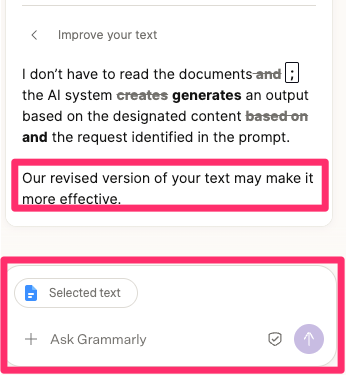
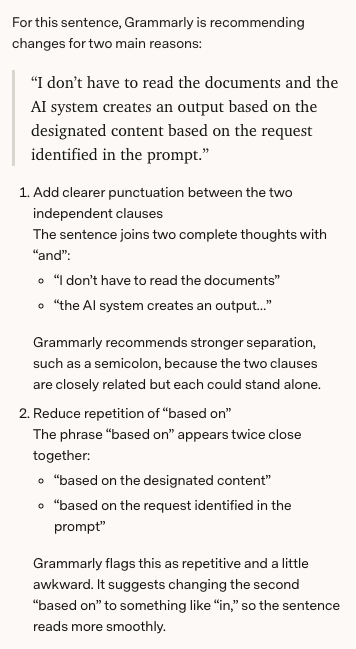
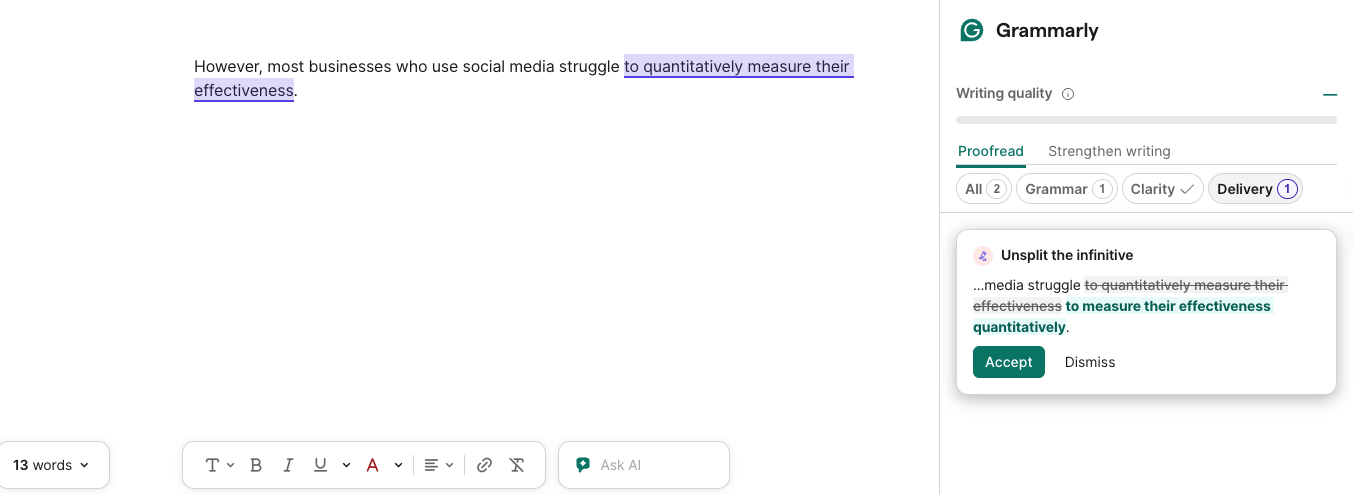
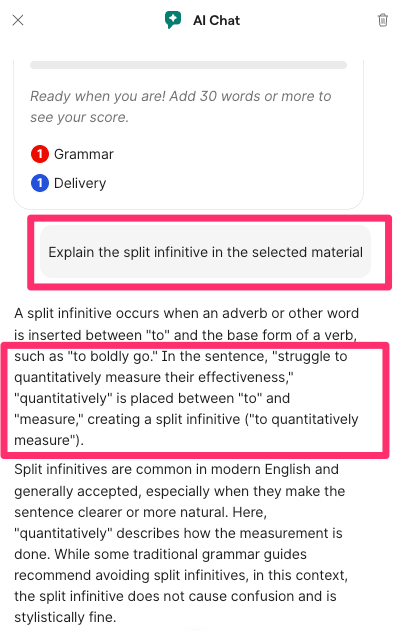
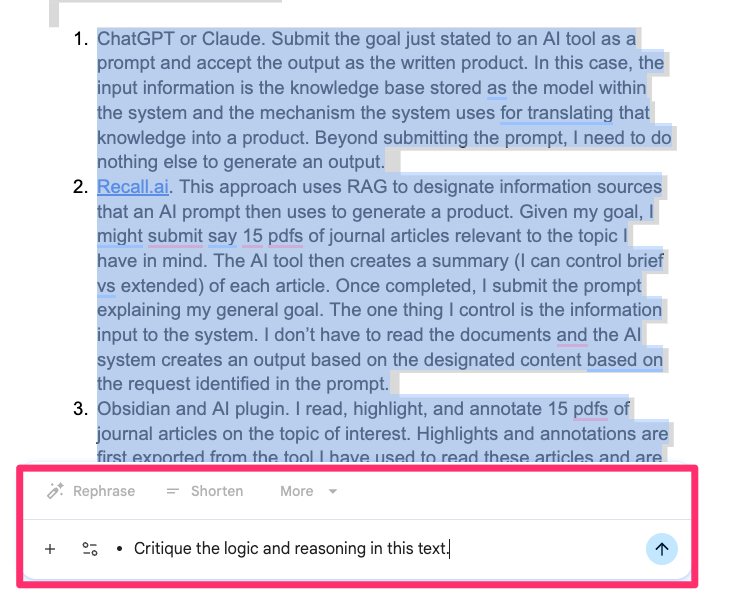

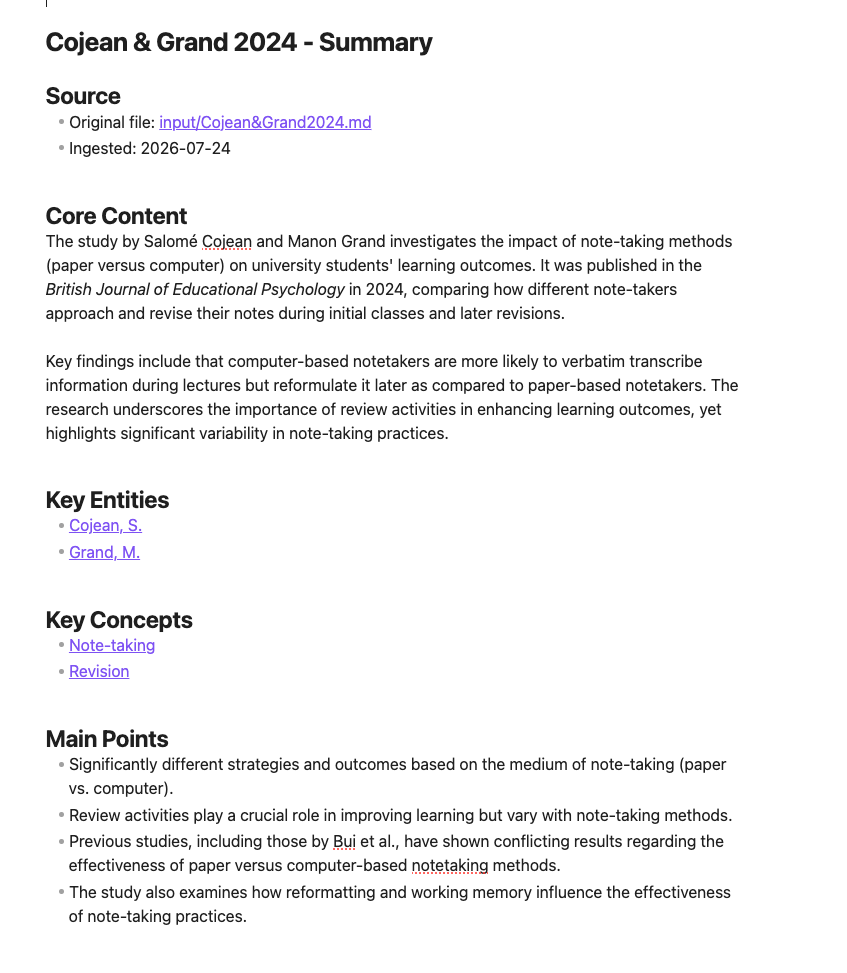
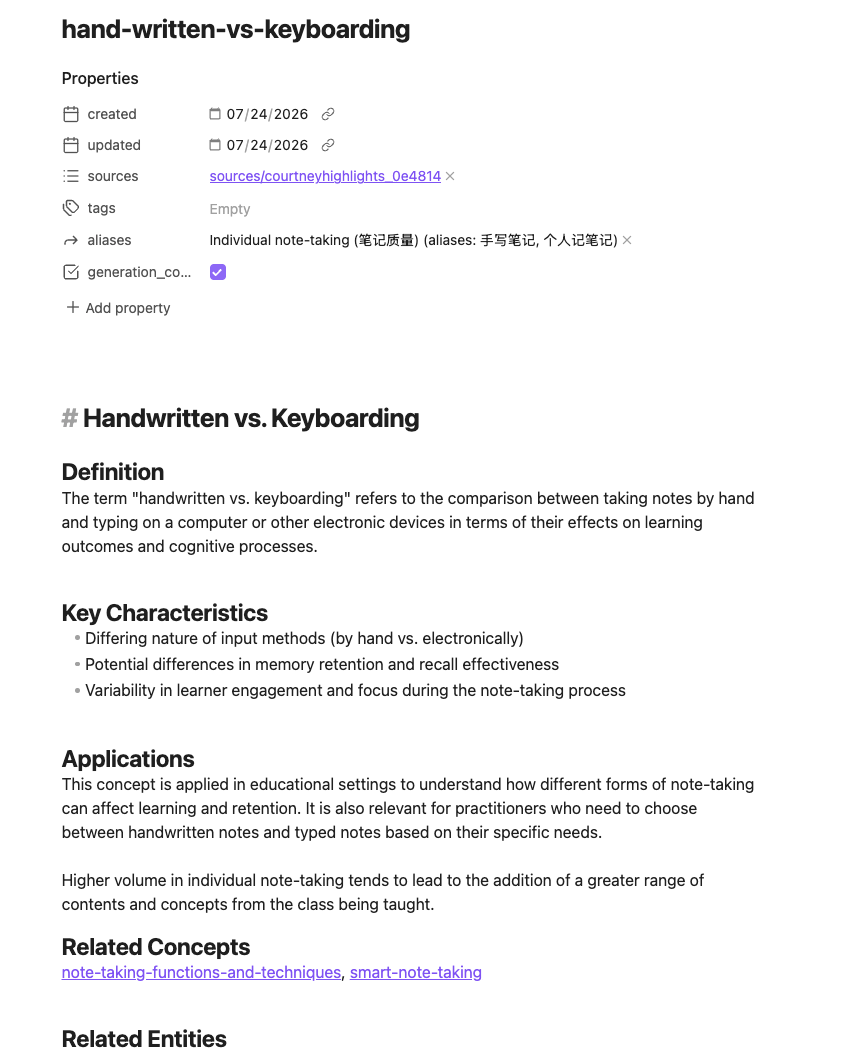
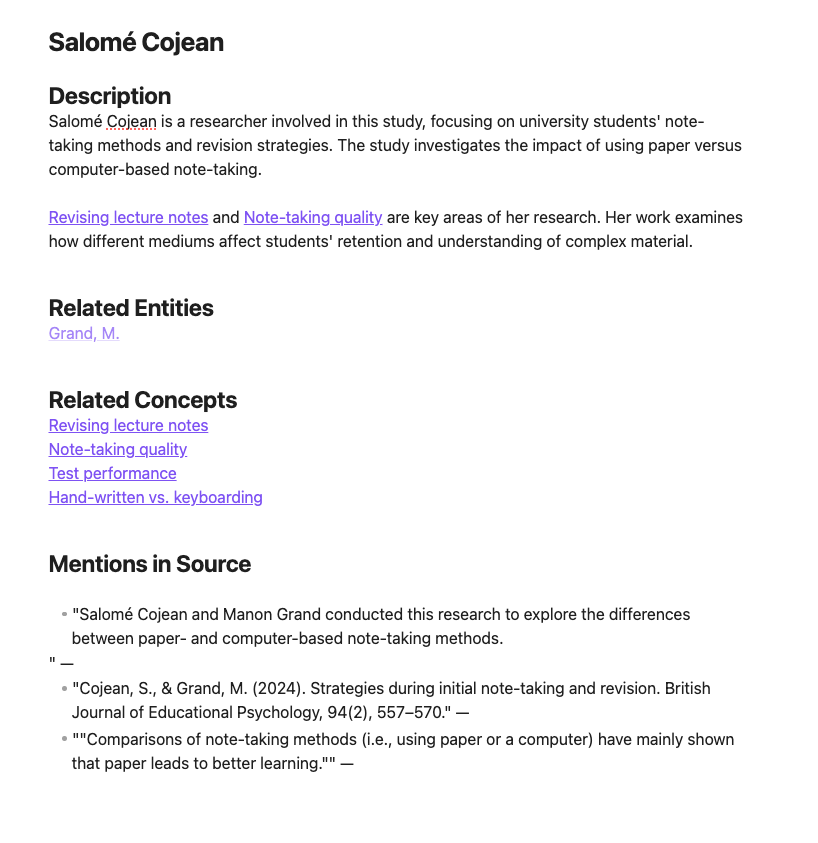
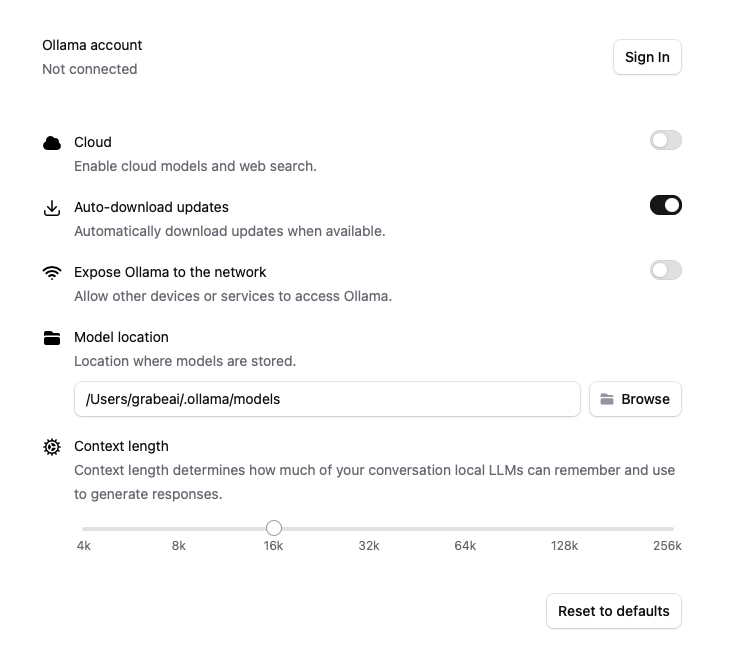
You must be logged in to post a comment.