
AI tools have now been around long enough that those of us who are primarily users rather than product recommenders have found practical and effective ways to make use of these tools. These priorities are based on productivity priorities and philosophical reactions to the capabilities of AI tools. I have settled on using AI tools to explore and write from the highlights and notes I have accumulated since I began reading books and academic journal articles on my computer or tablet. Academics in my field (educational psychology) now have access to more of the relevant resources in digital format than on paper. This is a function of how university libraries purchase access to academic content with more content available digitally.
I have explored a variety of tools for interacting with the content I have accumulated. Lately, I have been using Mem.AI, NotebookLM, and Smart Connections, and have spent many months with these tools. From time to time I describe my experiences, and you are welcome to review some of these descriptions. Here, I’d like to introduce an additional tool.
I purchased a subscription to Recall a few months ago at the recommendation of a friend. My initial reaction was one of disappointment, primarily because I had misread the tool’s capabilities at that time. Because I was interested in the AI capability, I had assumed it would be like the other tools I already used, and I could interact with the total body of content that I would load into Recall. At that time, the chat function was limited to the individual item you had open. Thinking back, this is not that unusual as chatting with the entirety of a pdf might be what many users want to do. Recall has recently added the opportunity to interact with all of the content you have added.
I have come to the conclusion that the designers of Recall had a different vision for how most users would apply the tool. There are both a browser extension and standalone apps, and many of the more interesting features for most utilize the browser extension. When a website is loaded into a browser with the extension active, you can summarize and collect the content from the website and terms in the web content that relate to “tags” you have already created in Recall will be highlighted. Tags is what I would call this identification of concepts by a user and the word recall may be based on the notion that existing content can be explored in reaction to the highlighted terms you see within the browser.
My interest is more focused on PDFs. You upload PDFs so that Recall can store and then work with the content. I read in attempting to broaden my understanding of the product that the company reserves the right to limit the amount of content a user can accumulate. The amount was not stated, but I wonder at what point this limitation might be applied. I have uploaded nearly 100 PDFs so I would guess most folks would not have to worry. Having both the PDF and related notes is not the way many of the other competing services work. Still, I see some value in having access to both the original and any content I have either derived from the original or added myself.
Here is a quick introduction based primarily on the way I use the system. The display you work with in Recall is multiple, vertical windows. Recall refers to these as tabs. The following image shows the Reader Tab and the Notebook tab. Along the left-most boundary of the display you see a type of outline of your tags and the titles of items of content with that tag. I have found that this display quickly gets out of hand, so I seldom use it. You can open and close the various tabs to create the display you want.
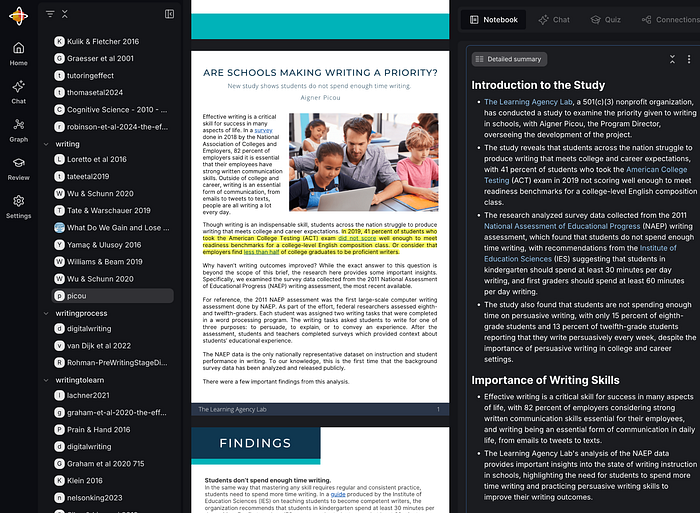
When you first upload or save content from the browser, Recall generates a summary and enters it in the Notebook. You control the amount of detail in the summary, and as you can see from the display, the extended version of the summary is quite long. The “pages” of the notebook are quite flexible, and you can copy and paste, highlight, or write within the Notebook. A feature I would like to see would allow me to highlight content I activate within the Reader, and the highlights would be saved to the Notebook. Recall does not work in this way, and highlighting is only available within content that appears in the Notebook. I have adapted my traditional workflow to compensate for this. I highlight and annotate as I write, using tools that allow me to export my highlights and annotations. I then upload the PDF to Recall, generate a summary that is stored in Notebook, and then copy my own highlights and annotations at the end. When I apply the AI tool, my prompts apply to this combination of material.
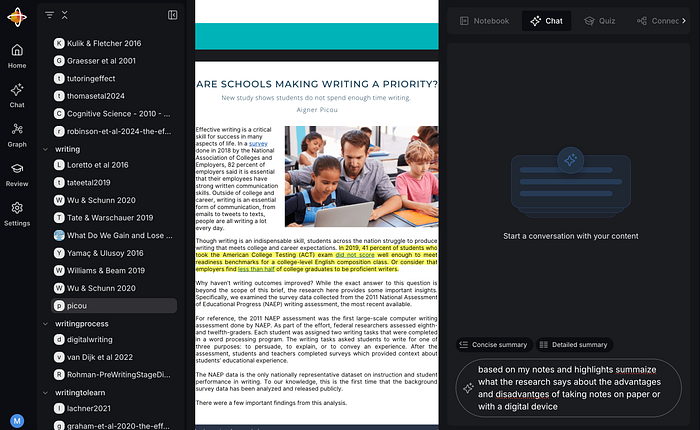
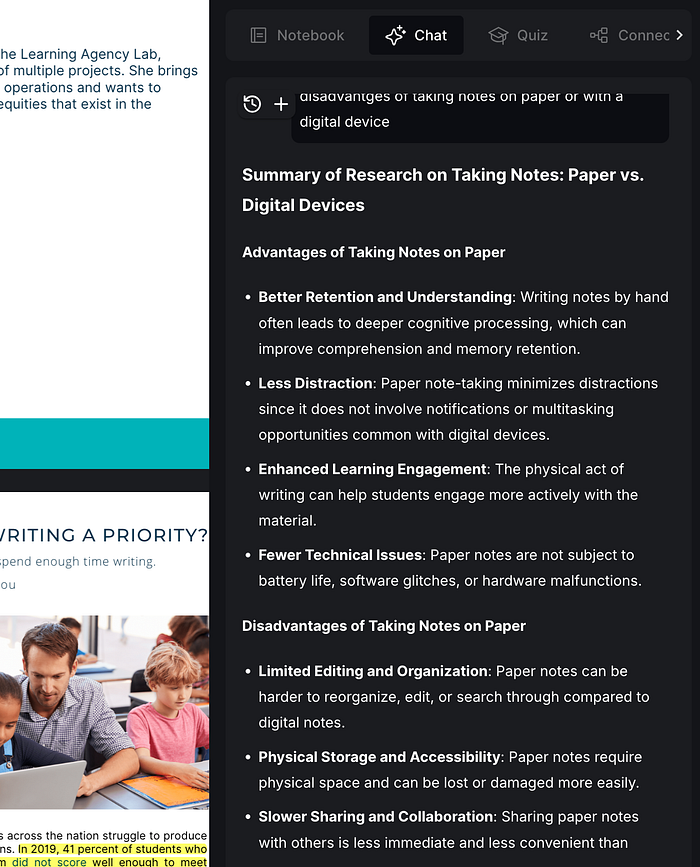
The AI chat capability I keep alluding to is available within a dedicated tab (see following image). The traditional prompt window appears at the bottom of this tab, and the content generated in response appears within the upper area of the window. The final image shows the response I generated, asking what my notes had to say about comparisons between taking notes by hand and using a digital device.
Some are interested in sharing the content they have accumulated, and Recall does allow this capability. I will likely write about it in a future post.
Summary
If you explore AI tools as I do, you’ll likely reach a point where you should focus your attention and money. However, you also find that the different tools offer different features, and you cannot find a single tool or a couple of tools with the perfect collection of features. Some features you find annoying, and some are very useful. Recall keeps adding tags and links to blank notes that I do not find useful. The following is a partial capture of what Recall generated for Adler’s classic, How to Read A Book. This collection would likely be helpful to some, but not to me. There is likely a way to control Recall, but I have yet to figure it out, and the results are simply messy. I simply ignore some of what Recall does at this point.

I find the summarization feature to be of value. I seldom create summarizations myself, but the addition of this content within the notebook entries increases the benefits I get from my use of AI across the entire collection.
Recall is new and developing (note the recent addition of the cumulative application of AI). I am halfway through my subscription year, so I have some time before deciding whether to review.
