Indie Web

I have long been an advocate of maintaining a personal presence on the Internet. Expressing your own perspective is a great way to learn. I also harbor the idealistic view that our collective comments are a way to counter the influence of those able to pay for amplifiers of their own views by way of television and radio. The potential of this approach seems to be slipping a bit as the more traditional information sources are moving online.

The “indieweb” movement is an attempt to keep this idealistic perspective alive. It proposes that we all should have an online presence that we control. The hard core among them do not accept Facebook, Twitter, etc. as a way to do this and argue each of us should have control at the server level. You may believe this is taking things too far, but controlling your own area of the web is not that difficult and informative.

Here are some resources:
A recent podcast from TWIG (this week in Google) contains an extended discussion of the philosophy and implementation opportunities for the indie web.

The software featured in the TWIG podcast is called Known.

Known and the idie web is discussed on GigaOm

I can’t say I have explored Known. As interesting as I find these ideas I already have a 12 year investment in blogging from my own server space and even longer offering what I now now is considered serving indie content. However, if I was starting from scratch, this software would be an interesting option. If you are an educator, listen to the TWIG podcast to understand the role they see for education.

Loading

Posted in Uncategorized | Comments Off on Indie Web

Adding an Android podcast subscription

Wesley Fryer, writing on his Speed of Creativity blog, explains how he imports RSS feeds for podcasts  from iTunes into his preferred podcast player. This is necessary because he prefers a player other than iTunes.

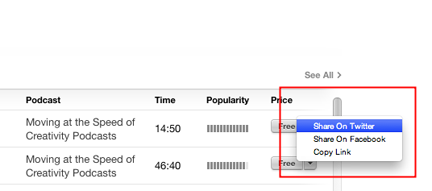
My situation is similar. I have an android phone and want to use the phone to listen to podcasts during our frequent, long car trips. I recommend the Fryer tutorial, but I did find one change I had to make for my situation. I could not find the URL for the podcast I wanted as described by Fryer and I am not certain why. What I found worked was to use iTunes to locate the desired podcast and then I was able to locate the URL for one episode. This address worked as a way to subscribe in my podcast player.

pod1

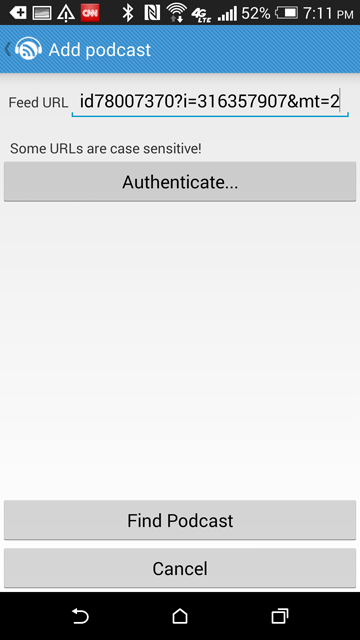
So, to demonstrate, I decided to use the Fryer podcast “Moving at the Speed of Creativity” (same name as his blog). The address identified in iTunes was https://itunes.apple.com/us/podcast/podcast415-igniting-create/id78007370?i=316357907&mt=2. I sent this address to my phone in an email so I could copy the address to my player.

My podcast player of preference on my phone is Podcast Republic.

Podcast Republic asks that you search for the desired feed – in this case I am searching for an episode and not the collection of episodes, but this seems to work.


pod3

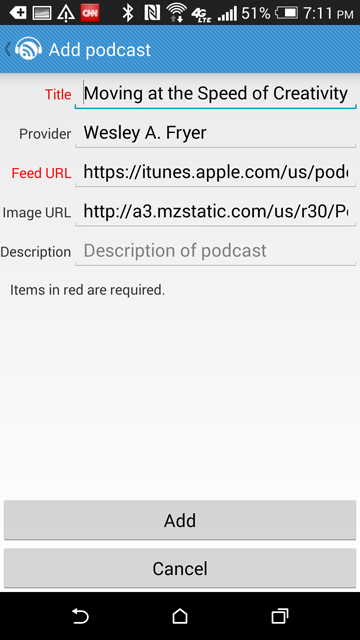
The specifics of the subscription are identified for verification.

pod2

The subscription has been added.

pod4

Loading

Posted in Uncategorized | Tagged | Comments Off on Adding an Android podcast subscription

Big business and edtech

It is back to school time and this seems to have generated a number of articles focused on school districts and large technology purchases. One to one initiatives are being launched and when such purchases involve a district wide decision a great deal of money is on the line.

A common decision now seems to be the commitment to iPads or Chromebooks.This is different and more difficult than deciding which option within a given category makes the most sense. In the comparison between a tablet and a chromebook, each has advantages and disadvantages. If you have the opportunity to use both, you probably use a different device for different activities. I consume content (mostly read) on the iPad and the iPad functions as my discovery tool. I go through Twitter and my RSS reader to discover the content I want to process further and I save and organize that content using Evernote or some other app. I write on a Chromebook. Spending hours writing on an iPad seems less practical. For me, switching devices to take advantages of strengths seems productive.

I wonder how decisions are made for students. The apps available for the iPad must be an advantage, but educators who see a focus on writing probably prefer the Chromebook. Both categories of device can perform most functions so I would assume a logical approach is to consider which device is most efficient or cost effective for predominant activities.

Back to the “news” on this topic. Most are probably aware of the LA plan to purchase a huge number of iPads and then the difficulties that were encountered with the implementation. There appears to be more to the story than I realized. It seems that administrators may have made decisions without buy-in from what probably should have been participants in the decision process although it seems the focus was on moving decisively rather than some other less positive motive. It also seems that this was more than just a focus on the iPad with the desire to use Pearson curriculum material.

In other locations, accounts describe a commitment made to the Chromebook in some and a commitment to the iPad in others. It may be useful to process the rationale given for the different decisions.

Loading

Posted in Uncategorized | Tagged , | Comments Off on Big business and edtech

Google Slides

Google has released a Slides app for android and iOS. You can now create Google “slideshows” using a phone or tablet.

slidesipad


Given options, it would not be my preference to create presentations from a tablet, but students may be limited to this option.

One hint. I was baffled for a while when trying to do much more than add text to slides. I may have missed something in the instructions. The solution appeared to be creating a file and then exporting to PowerPoint before attempting to do things like insert images. Why this works and whether this is necessary is a little unclear to me, but this is what I had to do to access all features.

Loading

Posted in Uncategorized | Tagged | Comments Off on Google Slides

Next Issue

Magazines have not been part of my content consumption effort for many years. Before the internet I used to subscribe to multiple computer magazines to keep up with tech trends. Internet content was sufficient to provide the info I needed and was less expensive.

A new service has caused me to reconsider my magazine decision. Next Issue is an app allowing “all you can eat” access to magazine content for $10 a month. Unlike the Amazon unlimited access book plan, the magazine options cover most of the magazines I am interested in reading. The opportunity to add multiple devices allows my wife and I to share an account.

One warning. The service is dependent on the formatting options allowed by the magazine. Some allow rotation of the page view or alteration of the text size and some do not. The pages look very attractive, but I have trouble with the small size font for some of my choices. The Kindle experience of altering text size to suit personal taste should not be expected. For example, I like the appearance of the content from the free MacWorld web site, but I have trouble reading the articles from the app. The free trial period is a good idea. I would recommend checking out the magazines you value and not being satisfied just knowing they are available.

nextissue

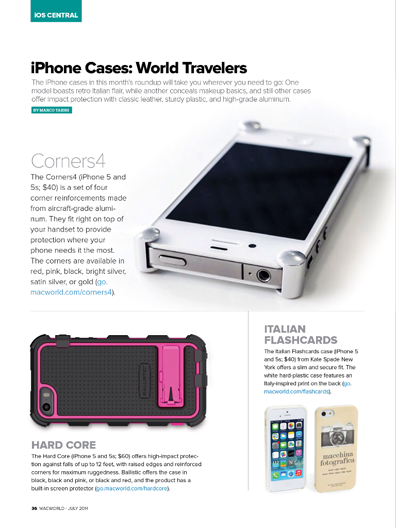
So, this is not actual size, but you can see what I mean by an attractive page layout. The problem is that the pages from several of the magazines I want to read do not adjust themselves well to an expanded view and I need an expanded view to easily read the text.

Loading

Posted in Uncategorized | Comments Off on Next Issue

Rumor – Google may offer <13s a way to satisfy COPPA

Evidently 13 is a magic age when it comes to legal use of social media. After that age, what social services learn from your online behavior evidently can do no evil. We all know that children of younger ages have accounts often with the support of their parents, but this requires that someone, the child or parent, lie. It is rumored that Google will provide a way for young users to have accounts allowing access to gmail and YouTube. The approach will likely involve parental input and the opportunity to review activity.

Loading

Posted in Uncategorized | Tagged , | Comments Off on Rumor – Google may offer <13s a way to satisfy COPPA