No simple solution for complex problems

There is a trend I often see recently. Problems I think about (e.g., Section 230, social media, surveillance capitalism) defy simple solutions yet this is what too many seem to propose.

Here is an example. Google proposes that it is going to block third party cookies in the chrome browser. I have proposed the same thing. There are already ways to do this with extensions to browsers. A third party cookie means that information that can be derived from your visit to a particular web site is sent via cookie to a web service not responsible for the site you are using. So, for example, you search for something on Amazon and see ads for what you were looking at on a different site. In my way of thinking, I should view ads from sites I visit because I am typically using that site at no cost. I am trading my attention to the ads on that site for the free use of the site. The companies responsible for the ads are paying for the service I am using rather than me. However, I don’t feel an obligation to other sites for this information collected from my attention.

Regulators in the U.K. are upset with the Google plan because by not allowing third-party cookies Google is limiting the opportunities of small companies to benefit from Google’s dominant market share. I guess I can see this argument from the perspective of a small company unable to generate the attention paid to Google services, but not from the perspective of a consumer who in a way is being asked to fund services they might not use.

I see no way out of such complex issues unless the entire ad model is abandoned and I don’t see this happening.

Loading

Posted in Uncategorized | Comments Off on No simple solution for complex problems

Educators address the U.S. Capitol Riot

This is probably a day late, but social media has raised the issue of what educators might say to their students following the attack on the U.S. Capitol. Educators often struggle with how to address issues involving politics, but there are some situation that cannot be ignored because students are looking for guidance and reassurance.

EdWeek has responded quickly and made an effort to suggest resources educators might want to review. This would certainly be a place to start.

Loading

Posted in Uncategorized | Comments Off on Educators address the U.S. Capitol Riot

Top vs. latest tweets

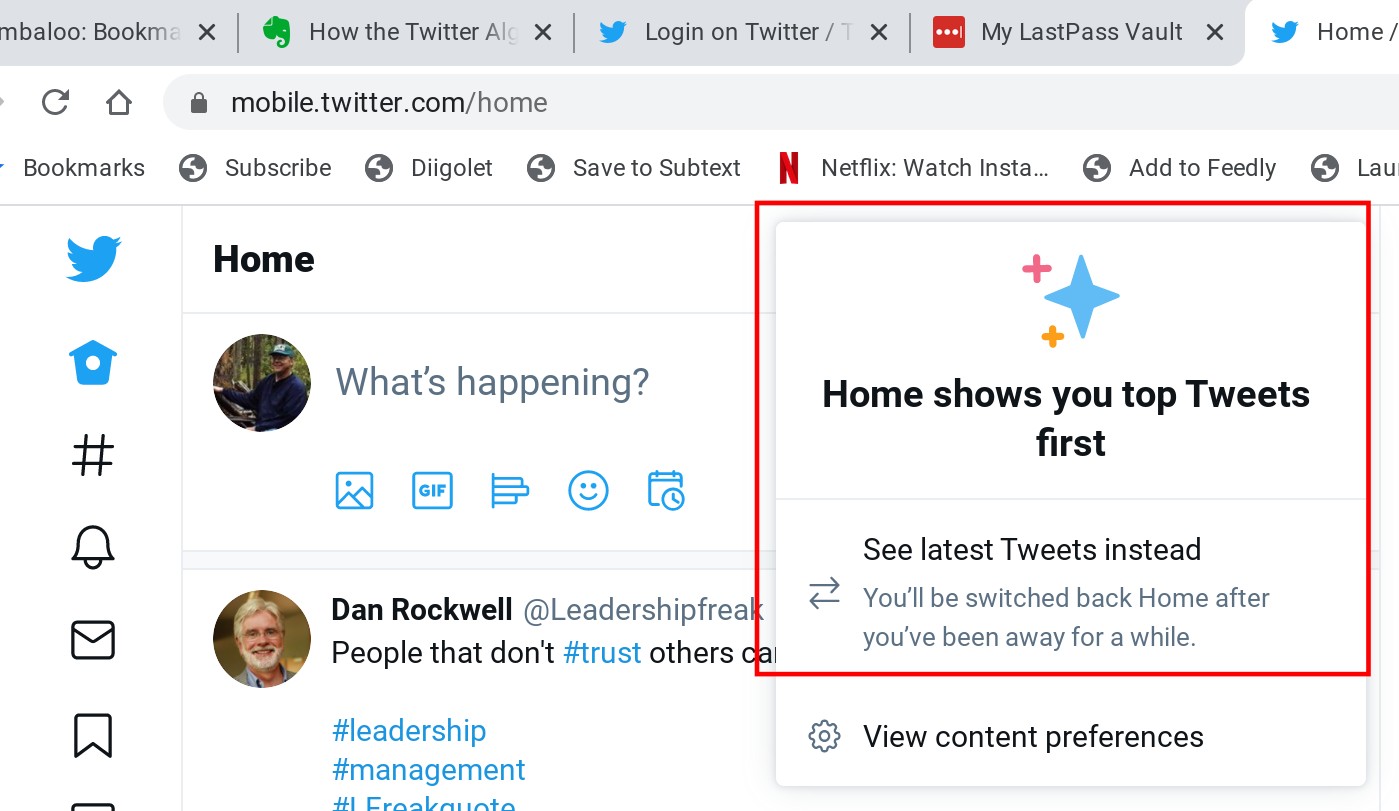
I have been arguing that Twitter is less likely to influence how I see the world than Facebook because it does not use my online behavior to show what it thinks I want to see. It turns out that I am correct as long as I have set Twitter up to function in a certain way. This is the difference between having Twitter set to latest rather than top tweets. To get a less biased view, you want Twitter set to latest tweets. This setting will show you the most recent tweets from those you follow at the top of the feed. While these tweets are biased based on who you have selected to follow, other information from your online behavior does not prioritize within this content.

At the top of your timeline you should see a group of stars. If you click on these stars you will see the drop down shown in the red square above. Here you will find the option of latest or top and to see an unbiased view, you should select latest.

This article from the HootSuite blog explains the Twitter algorithm and offers more information on the signals Twitter uses when you select top.

Loading

Posted in Uncategorized | Tagged , | Comments Off on Top vs. latest tweets

Google alerts

Google describes Google Alerts as a “content detection and notification” service. Think of it as a search service that does searches on a scheduled basis and sends you the top results that have changed since the last search. I would describe it as an RSS system based on the entire web and not sites that you specify. It is a great way to follow topics over time.

Google alerts (https://www.google.com/alerts) works like this. From the Google address (provided to the left), you enter a term you want to follow and then set parameters using the pencil icon associated with that term. You can see I have multiple alerts working.

The settings provided by selecting the pencil icon will bring up a sample listing that will be provided. You can use this sample to make adjustments to your settings. My demo search was for Minecraft

At the interval you specify, the content found will be sent to the email address you provide. You will need a Google account.

Loading

Posted in Uncategorized | Comments Off on Google alerts

Bad passwords

I had a bad habit when it came to passwords. It was not that the password I used would have been easy to guess, but I used the same password on many sites and sooner or later some company would have a breach. Those looking to breach accounts would be most likely to then try these passwords on common sites to see if they would work.

We have been using LastPass now for months and all of my main accounts have been shifted to unique and strong passwords. I still do use a common password when I investigate sites requiring that I create an account because there is a bit of a hassle when creating a new password in LastPass, but I do fix this if I decide to stick with a service.

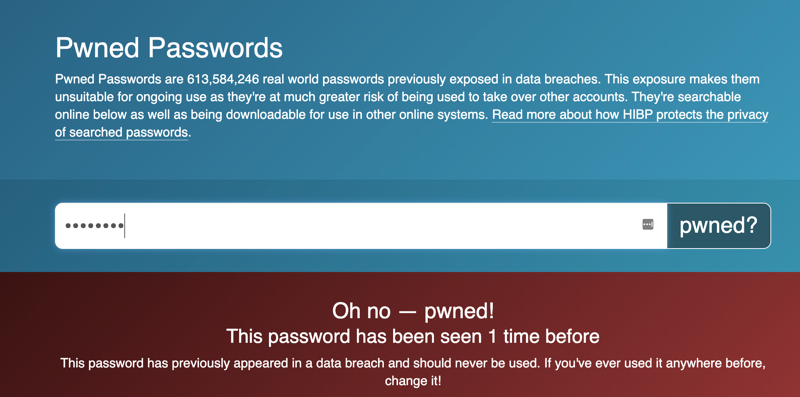
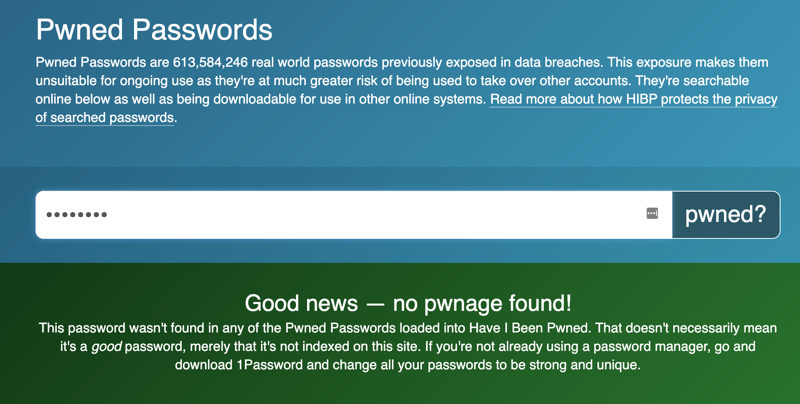
I listen to the EdTech Situation Room and they described a service allowing you to determine if a password was among those the service had been able to find on the dark web. The service is called PWNED Password. I tried a couple of my old passwords and did find that one of them was available to others somewhere.

I have tried to investigate this site as you have to enter a password to determine if it appears somewhere else, but I don’t know how else you would go about providing this service. The service does not ask about services associated with the passwords and all of the info I can find suggest it is a useful service.

BTW – just because the system does not already have a password in a database does not mean that it is not out there somewhere.

Loading

Posted in Uncategorized | Tagged | Comments Off on Bad passwords

EdPuzzle

This is an updated version of a post from 2019. I thought it relevant for educators still faced with teaching online when the new year begins. EdPuzzle allows the addition of elements to existing videos.

I haven’t written about layering tools for some time. I have spent time generating tutorials for multiple layering tools and explaining multiple ways in which layering tools can be used to design educational experiences by building on existing online content. What I have not done is to offer examples from K12 classrooms. In retirement, I no longer work directly with many educators.

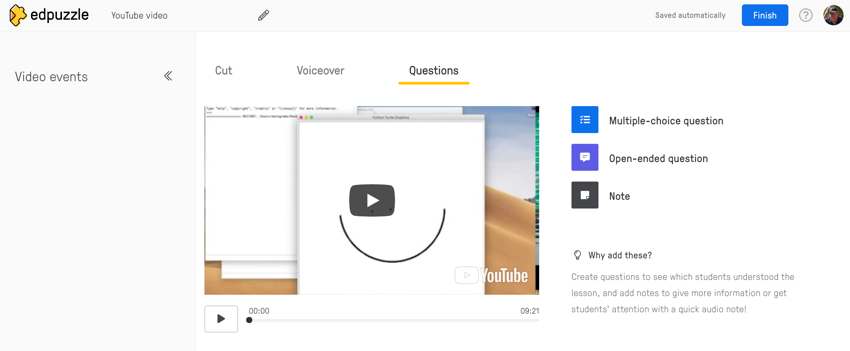
I noticed in reviewing the video I created in 2019 that EdPuzzle looks a bit different now. When using the service as a Chrome extension, you first open the video and then activate the EdPuzzle extension from the browser menu bar. The options for question (open-ended, multiple-choice, and comment) I describe in the video appearing above now look like this. So, you play the video to reach the point at which you want to add one of the question options and then select the desired option. Note – the image that appears below is a screen capture so the play icon is not active.

I came across this classroom example provided by Wesley Fryer. He describes lessons he has developed using EdPuzzle to improve elementary students’ use of Gmail. His lessons take advantage of EdPuzzle to add quiz items to instructional videos.

Loading

Posted in Uncategorized | Tagged | Comments Off on EdPuzzle