Designing Instruction Using Layering Services

I have updated my Primer explaining the use of online services that are available to develop instructional content from existing online web pages and videos. The inexpensive resource explains the capabilities of these design services for adding elements to existing content so that the existing content is more appropriate for instructional use. The Primer explains how best to make use of the elements that can be added and provides tutorials on setting up and using these services. The Kindle book is available from Amazon.
More and more online content is being assigned as resources for learning. Designing Instruction Using Layering Services explores how prompts, annotations, highlights, questions and other adjunct devices can be added to existing online resources by both educators and learners to improve the understanding, application and retention of this content. This short ebook explains proven tactics for developing skill in the use of the recommended study strategies and identifies and explains the use of several existing online services for developing web pages and online video as instructional content. This book is focused on the use of these services in K12 classrooms.

I recently created a video briefly explaining how one of these design services works. Watching the video offers an example of the type of service covered in the Primer.


Loading

Posted in Uncategorized | Comments Off on Designing Instruction Using Layering Services

Parlay for discussion

Cindy just sent me this video of a teacher explaining the use of a new discussion tool environment. The tool is called Parlay Ideas. I must admit I have not used this tool and I tend not to say much until I have explored what the tool can do. I am ignoring my own rule in this case because I think this tool is worth a look and the teacher video does a much better job than I could do with limited exposure. Present circumstances make the potential of this service important to consider. Some of the ideas that have gone into the creation of this tool and are innovative (e.g., student anonymity for discussion, but known to teacher for evaluation).

As seems so often the case, I find the cost for this tool a little high for the teacher who might want to use the tool casually. There is a free version. Again, my own biases are showing here and without experience my conservative reaction may be inappropriate as I find the capabilities of the tool and some of the related capabilities (e.g., discussion starters for many common topics) so well developed.

I really like the capability I see in a tool such as this and applying the principles of argumentation.

Take a look and reach your own conclusion.

Loading

Posted in Uncategorized | Tagged , | Comments Off on Parlay for discussion

Mozilla VPN

A VPN (virtual private network) protects awareness of your browsing activity between your computer and the site you are using. It is most important if you are concerned with awareness of your browsing activity in a public location (e.g., coffee shop) or object to your ISP from collecting and possible selling information about your browsing activity. Individuals regard external awareness of this personal information with different degrees of concern.

Mozilla has just announced a built in VPN you can use to secure your browsing history. The service will cost $5 a month after the initial “try it out” phase.

Loading

Posted in Uncategorized | Comments Off on Mozilla VPN

Kahn Academy

Sal Kahn – ND Innovation Summit

If you have heard the backstory of the Kahn Academy, Kahn discovered the same thing Bloom noted several decades ago. The best instruction is provided by a tutor. Mastery learning originated about the same time (Bloom’s Group Based Mastery, Keller’s Personalized System of instruction). It took this long for technology to offer a way to approximate this at scale.

Loading

Posted in Uncategorized | Comments Off on Kahn Academy

Curriki Studio

Governor on the left / McNealy on the right

I am spending the day watching the ND Governor’s Technology Innovation Summit. One of the guests was Scott McNealy. McNealy (sun Microsystems) is one of the wealthy tech entrepreneurs turning his attention to education. One of his first ventures was the OER sharing site Curriki. His new venture is a content creation tool Curriki Studio [product access]. This is a free service. McNealy promotes the new design environment as promoting more immersive experiences and intends the content developed to be deliverable within any standard LMS.

I can’t say I support McNealy’s politics which were on display during this presentation, but the tool he offers at no cost will likely appeal to educators wanting to create their own learning resources.

Loading

Posted in Uncategorized | Comments Off on Curriki Studio

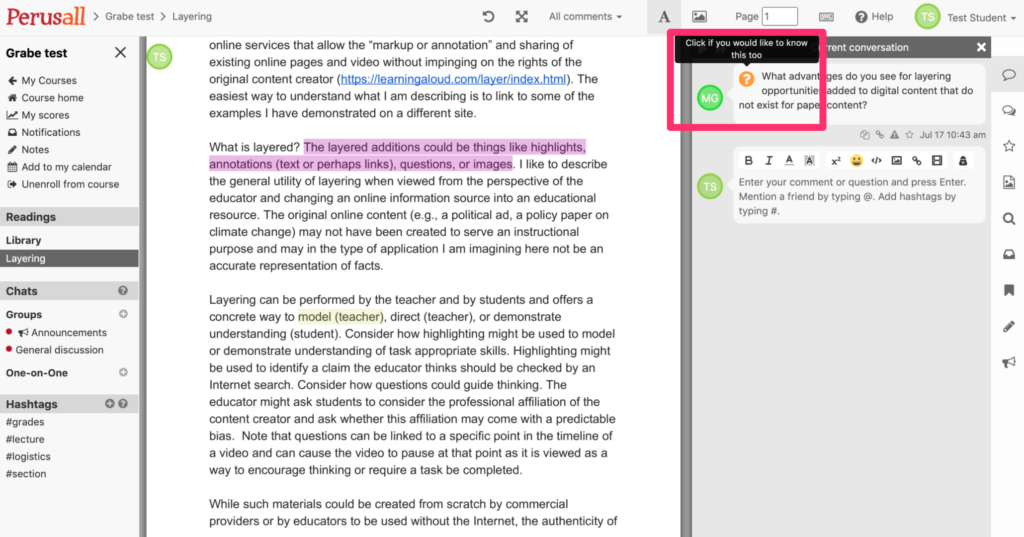
Perusall for social reading

Perusall offers an online environment (hosted by the company or through an LMS) that allows the annotation of pdfs and Word documents. The pdfs are either content the instructor has the rights to use in a course or digital textbooks from companies that sell their content through Perusall. By environment I mean that the service allows an instructor to create courses, assign readings to these courses, sign up students, and check on student use of the assigned readings linked to a grade book if desired.

I place Perusall in a unique category of the multiple layering services I have reviewed because of its collaboration with multiple textbook companies. The opportunity to assign a traditional textbook for layering activities is unique as far as I know. The examples I was able to locate indicate a focus on higher education. I also saw that some instructors had assigned journal articles with the copyright warning you see when you get the library to print a journal article for you. I am unclear on the copyright issues associated with the distribution of journal articles as pdfs which I always assumed was different from having each student using their own library account to download journal pdfs. Again, the opportunity to read a pdf and few the annotations of others requires a common source not available when each student works on their own pdf.

The environment provided by Perusall is similar to that of InsertLearning. Perusall has optimized the way the annotation tool works to encourage a more social form of reading. As a reader, you will see highlighted text (one color for the instructor and a different color for other students). Clicking on an existing colored segment will reveal questions or comments. As a reader looking at existing highlights, you can indicate that you also have a similar question. The count of such questions offers instructors a way to identify topics that could be the focus of a class discussion.

To create a question or comment, the reader highlights text and then enters text (also links to web sites, documents). The system has a unique capacity to determine if readers have satisfied requirements for an assigned number of comments with some type of AI determining the quality of the comment. These can result in entries in a grade book if desired.

Perusall is presently free. It is unclear if this is the long-term business model if Perusall gets a cut when instructors assign a digital book available from several publishers through the system. Setting up a course, adding personal pdfs or Word documents as reading content, and using the system is free at this time.

Additional information for educators from Perusall.

Loading

Posted in Uncategorized | Tagged | Comments Off on Perusall for social reading