I suppose my title would put some off as a political topic. However, all educators who have students make use of online resources should consider online disinformation as an important topic. The resources I provide below came to my attention through a post from educator Wesley Fryer who generated a podcast recommendation on his way to a digital literacy conference.
Raw Data, originated out of a Stanford group, has a series on online literacy. Several episodes present details of the Russian interference in the 2016 election. I recommend this episode if want a taste of the style and content. The featured interview is with previous U.S. ambassador to Russia Michael McFaul. McFaul is now banned from entrance to Russia falsely accused of being a U.S. agent.
If you are taking time this summer to explore possible learning resources for next year, take a look at PBS Learning Media. A media-based company like PBS obviously has a vast store of informative media and PBS has organized relevant content from this collection for classroom use.
Posted inUncategorized|Comments Off on PBS Media Resources
I seldom comment on security issues, but Zoom happens to be the video conferencing service I teach with and the one I recommend. There is a problem with the Mac version that needs to be addressed before it is safe to use. [Description from Life Hacker]
Posted inUncategorized|Comments Off on Remove Zoom from Macs
I have written about the Brave Browser on several occasions (use the blog search box if you are interested in early posts). The company continues to roll out new features and the most recent effort to compensate Brave users for viewing the ads provided by Brave will likely catch people’s attention (description contrasting Brave and most popular browsers from Android Hire).
The opportunity to benefit from viewing ads in combination with the blocking of traditional targeted ads based on the collection of personal information will likely be attractive to many who become aware of Brave. This company offers another opportunity I think is equally important. It allows users of the browser to compensate content creators who are losing potential revenue through ad blocking. This is possible because content consumers either put in some money themselves or no use the revenue they generate from viewing Brave ads to provide this compensation.
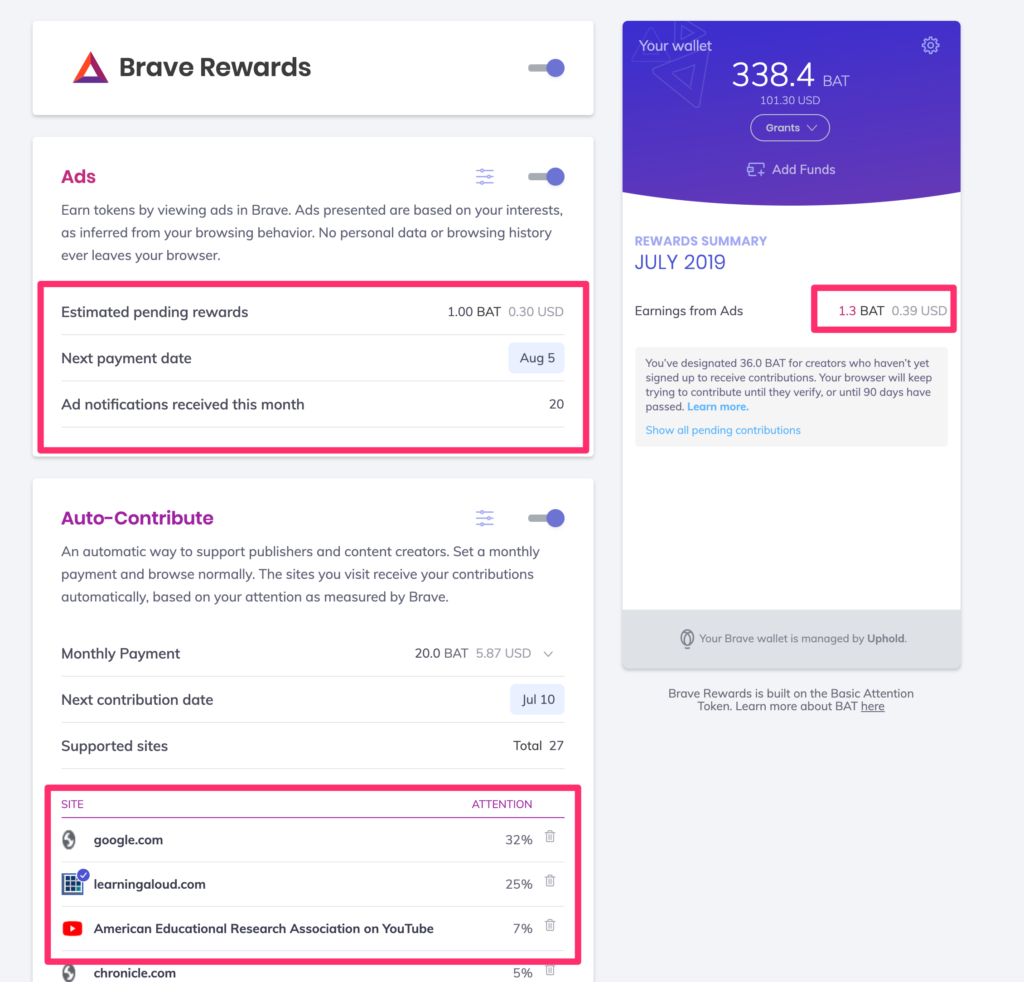
I have been using Brave for some time now as a personal experiment. I put in $50 to fund sites signing on with Brave and I am no enrolled in the compensation for viewing ads program. The following screen capture might give you some idea of the amount of money that is actually involved. Clearly, this is about micropayments, but the concepts are interesting. A problem of Brave at present is that the programs are specific to a given device. This severely limits both the allocation and the receipt of funds because many of us work on many different devices. The exchange of funds at present also does in work with phones and tablets. These changes are coming.
I have identified three distinct areas in my Rewards display. The wallet indicates the funds (either from my contribution of money or the review I have received as an ad user and a registered content provider). The ad section is the income generated on this machine for viewing ads (I have my browser set to the lowest number of ads so this would be the lowest revenue tier). The supported sites window contains the list of sites visited from the machine with the percentage of time spent on each site. The percentages determine the amount of monthly allocation that would be contributed to each content provider (if that provider had signed up for the service).
Posted inUncategorized|Comments Off on Brave Browser
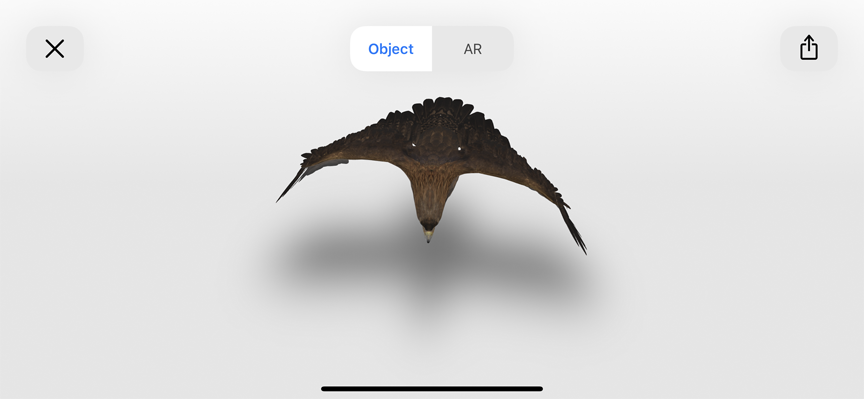
Google has created some 3D animals that you can apply in AR. I have been able to get this to work using the Apple Safari browser. Google an animal (I know bear and lion work). Near the top of the hits you should find the link to the Google 3D animal. Use this link. This should download the 3D animal to your browser. A tab should appear near the top of the display that says AR. With this tab, you can display the animal against whatever your camera displays.
Yes, we are now into summer and students would be unlikely to be able to participate in gardening as a class activity. I know from experience that an issue with school yard projects is keeping these projects going over the summer. If students are around, there are learning benefits from growing and eating garden vegetables. This link takes you to a full description of what students can learn from gardening. In some cases, it may even demonstrate where food comes from. Food you grow yourself is also more interesting to consume. Then there are the benefits of learning science by doing and analyzing. There is also soil science, climate science, composting, and too often, entomology.
The photo is from my own garden. I garden in 4×4 raised beds. We have 11 of these beds around the perimeter of our yard. Here, from front to back are brussels sprouts and lettuce, broccoli, and peppers.
Posted inUncategorized|Comments Off on Learning from gardening
We use cookies to ensure that we give you the best experience on our website. If you continue to use this site we will assume that you are happy with it.
You can revoke your consent any time using the Revoke consent button.





You must be logged in to post a comment.