The Efficacy of K-12 Tutoring: A Look at Recent Research and COVID-19 Era Challenges

Tutoring has long been recognized as a powerful intervention for improving learning outcomes in K-12 education. I have written about tutoring in several recent posts because a) tutoring provides the basis for my promotion of mastery learning, which is now often implemented with the individualization of progress implemented by the use of technology, and b) because of what I believe is a legitimate but yet untested use of AI tools to provide an alternative to the use of expensive and difficult to arrange human tutoring.

This post was prompted when I encountered a disappointing evaluation of efforts to fund some version of tutoring in response to student struggles during COVID. For those of us interested in the applications of technology in education, the COVID-19 pandemic forced all educators to use technology. Of course, the overall results were problematic with high student absenteeism and lowered rates of educational progress. There is still plenty to explore for academic researchers and historians. Moving on, although typically too expensive, tutoring was supported as a means of compensation. Tutoring, a form of one-on-one instruction, has even been touted as the ideal form of instruction against which the success of other methods can be measured (Bloom, 1984). Again, the expected results did not meet expectations, at least to the extent that past research would have led supporters to expect. 

Perhaps COVID and the aftermath, much of which seems political, have resulted in circumstances we must contemplate more broadly. Both educators and researchers must have a tough skin to deal with unrealistic expectations. They can control only what they can control. The best I can do is to focus on the data describing what has proven effective in the past and what experts have to say about what makes present circumstances different and hopefully transitory. The following is my effort to present this case. This post will explore the impressive effects of tutoring, delve into the mechanisms behind its success, and critically examine the factors that may have hindered its effectiveness during the pandemic.

The Impressive Impact of Tutoring

One of the best summaries of tutoring research I have encountered is not a traditional journal article and is therefore written in a less formal style. It is lengthy and does include an analysis of what it calls large-scale tutoring, which represents a way to differentiate the tutoring efforts following COVID and why such efforts are more difficult. The lengthier approach is written more like a book chapter, offering the opportunity to provide readers with a broader understanding rather than relying on what is assumed researchers already know. An analysis of the characteristics that make tutoring effective is useful. The identification of such factors can guide the development other strategies.  Another advantage of this source for some is that it is not behind a pay wall. 

The meta-analysis by Nickow and colleagues analyzed dozens of preK-12 tutoring experiments, revealing an overall effect size of 0.37 standard deviations on learning outcomes. Effect size might be understood as the degree to which an intervention shifts the average performance of a group relative to what that average would have been without the intervention. Bloom suggested that the tutoring represented a two-sigma advantage, which is far greater than that shown in actual implementations, but still a moderate advantage. Bloom’s more idealized claim is based to long-term applications as would be implemented in mastery or personalized learning, which partly has a long-term benefit because learners move ahead at an optimal pace, which prevents the accumulation of gaps in understanding that have an accumulated impact on future learning. This significant tutoring effect does not meet all of these expectations. Still, it underscores the potential of tutoring to bridge achievement gaps and enhance student comprehension across various subjects and grade levels.

The study found that the effectiveness of tutoring varies depending on the tutor’s qualifications and the student’s grade level. Teacher and paraprofessional tutoring programs generally yield stronger impacts compared to nonprofessional and parent tutoring. This suggests that specialized training and pedagogical expertise play a crucial role in maximizing the benefits of tutoring. This factor is important in the challenge of tutoring following COVID, as the magnitude of the challenge could not be addressed by qualified individuals. Furthermore, tutoring tends to be most effective in earlier grades, with reading tutoring showing higher effect sizes in these foundational years, while math tutoring demonstrates increasing impacts in later grades. The timing and structure of tutoring also matter; during-school programs were found to be nearly twice as effective as after-school programs.

Mechanisms of Impact: Why Tutoring Works

Several key mechanisms contribute to the impressive effects of tutoring:

  • Customization of Learning: Tutoring allows for individualized instruction, enabling tutors to “teach at the right level” for each student. This is particularly crucial for students who have missed foundational knowledge, as it prevents them from falling further behind and improves the productivity of classroom time.
  • Reduced Class Size: Tutoring can be viewed as an extreme form of class size reduction, where the student-to-teacher ratio is significantly lowered, often to one-on-one or small group settings. This allows for more focused attention and tailored support.
  • Enhanced Engagement and Feedback: The one-on-one or small group setting fosters greater student engagement and provides opportunities for rapid feedback, which are often not possible in a traditional classroom environment. This immediate feedback loop can significantly accelerate learning.
  • Human Connection and Mentorship: The human connection and mentorship relationship that develops between a tutor and student can be a powerful motivator and contribute to a positive learning experience. This aspect is often lacking in computer-assisted learning programs, which, despite their potential for customized instruction, may miss out on the benefits of human interaction.

Disappointing Results During COVID-19: What Went Wrong?

Despite the well-documented benefits of tutoring, the widespread implementation of tutoring programs during the COVID-19 pandemic often yielded disappointing results. While the specific reasons are complex and multifaceted, several factors may have contributed to these outcomes:

  • Rapid Scaling and Tutor Quality: The urgent need for tutoring during the pandemic led to a rapid expansion of programs, often relying on a large influx of new tutors. This may have compromised the quality and training of tutors. As the research indicates, highly educated, trained, and experienced tutors tend to have stronger impacts.
  • Shift to Remote Learning: The transition to remote learning presented significant challenges for tutoring. Building rapport and providing personalized support can be more difficult in a virtual environment, potentially impacting the mentorship aspect of tutoring.
  • Student Engagement and Access: The pandemic exacerbated issues of student engagement and access to resources. Students facing challenges with internet connectivity, suitable learning environments at home, or increased family responsibilities may not have been able to fully participate in or benefit from tutoring programs. The effectiveness of even the best tutoring program is limited if students cannot consistently engage with it.
  • Focus on Remediation vs. Foundational Skills: While tutoring is excellent for addressing foundational knowledge gaps, the sheer scale of learning loss during the pandemic may have overwhelmed some programs. If students were significantly behind, a limited number of tutoring sessions might not have been sufficient to address the depth of their needs.
  • Program Design and Implementation: The design and implementation of tutoring programs during the pandemic may have varied widely. Factors such as the duration and frequency of sessions, the curriculum used, and the integration with regular classroom instruction could have influenced outcomes. The research highlights the importance of during-school tutoring for greater impact, a model that may have been difficult to consistently implement during periods of remote or hybrid learning.
  • Mental Health and Well-being: The pandemic had a profound impact on the mental health and well-being of students. Stress, anxiety, and other emotional challenges could have affected students’ ability to focus, learn, and engage with tutoring, regardless of its quality.

Moving Forward

The disappointing results of some tutoring initiatives during COVID-19 do not diminish the overall effectiveness of tutoring as an educational intervention. Instead, they highlight the critical importance of careful program design, robust tutor training, and a holistic understanding of the factors that influence student learning. As we move forward, it is essential to leverage the insights from research on effective tutoring practices, ensuring that programs are implemented in ways that maximize their potential to support K-12 students. This includes prioritizing highly qualified tutors, fostering strong human connections, and adapting strategies to address the unique challenges and opportunities of diverse learning environments.

Sources

Bloom, B. S. (1984). The 2 Sigma Problem: The Search for Methods of Group Instruction as Effective as One-to-One Tutoring. Educational Researcher, 13(6), 4-16. https://doi-org.ezproxy.library.und.edu/10.3102/0013189X013006004 

The impressive effects of tutoring on PreK12 learning: A systematic review and meta-analysis of experimental evidence

Tutoring was supposed to save American kids after the pandemic. The results? ‘Sobering’

Loading

Posted in Uncategorized | Tagged | Comments Off on The Efficacy of K-12 Tutoring: A Look at Recent Research and COVID-19 Era Challenges

Recall: Flexible Tool for Content Collection and AI Processing

AI tools have now been around long enough that those of us who are primarily users rather than product recommenders have found practical and effective ways to make use of these tools. These priorities are based on productivity priorities and philosophical reactions to the capabilities of AI tools. I have settled on using AI tools to explore and write from the highlights and notes I have accumulated since I began reading books and academic journal articles on my computer or tablet. Academics in my field (educational psychology) now have access to more of the relevant resources in digital format than on paper. This is a function of how university libraries purchase access to academic content with more content available digitally.

I have explored a variety of tools for interacting with the content I have accumulated. Lately, I have been using Mem.AINotebookLM, and Smart Connections, and have spent many months with these tools. From time to time I describe my experiences, and you are welcome to review some of these descriptions. Here, I’d like to introduce an additional tool.

I purchased a subscription to Recall a few months ago at the recommendation of a friend. My initial reaction was one of disappointment, primarily because I had misread the tool’s capabilities at that time. Because I was interested in the AI capability, I had assumed it would be like the other tools I already used, and I could interact with the total body of content that I would load into Recall. At that time, the chat function was limited to the individual item you had open. Thinking back, this is not that unusual as chatting with the entirety of a pdf might be what many users want to do. Recall has recently added the opportunity to interact with all of the content you have added.

I have come to the conclusion that the designers of Recall had a different vision for how most users would apply the tool. There are both a browser extension and standalone apps, and many of the more interesting features for most utilize the browser extension. When a website is loaded into a browser with the extension active, you can summarize and collect the content from the website and terms in the web content that relate to “tags” you have already created in Recall will be highlighted. Tags is what I would call this identification of concepts by a user and the word recall may be based on the notion that existing content can be explored in reaction to the highlighted terms you see within the browser.

My interest is more focused on PDFs. You upload PDFs so that Recall can store and then work with the content. I read in attempting to broaden my understanding of the product that the company reserves the right to limit the amount of content a user can accumulate. The amount was not stated, but I wonder at what point this limitation might be applied. I have uploaded nearly 100 PDFs so I would guess most folks would not have to worry. Having both the PDF and related notes is not the way many of the other competing services work. Still, I see some value in having access to both the original and any content I have either derived from the original or added myself.

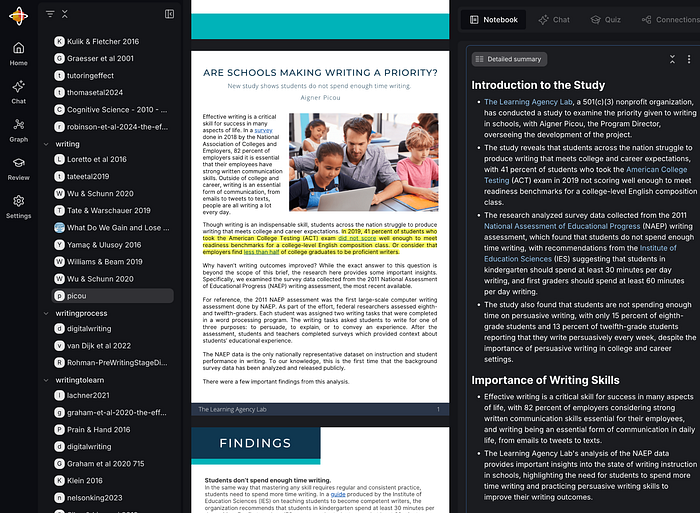
Here is a quick introduction based primarily on the way I use the system. The display you work with in Recall is multiple, vertical windows. Recall refers to these as tabs. The following image shows the Reader Tab and the Notebook tab. Along the left-most boundary of the display you see a type of outline of your tags and the titles of items of content with that tag. I have found that this display quickly gets out of hand, so I seldom use it. You can open and close the various tabs to create the display you want.

When you first upload or save content from the browser, Recall generates a summary and enters it in the Notebook. You control the amount of detail in the summary, and as you can see from the display, the extended version of the summary is quite long. The “pages” of the notebook are quite flexible, and you can copy and paste, highlight, or write within the Notebook. A feature I would like to see would allow me to highlight content I activate within the Reader, and the highlights would be saved to the Notebook. Recall does not work in this way, and highlighting is only available within content that appears in the Notebook. I have adapted my traditional workflow to compensate for this. I highlight and annotate as I write, using tools that allow me to export my highlights and annotations. I then upload the PDF to Recall, generate a summary that is stored in Notebook, and then copy my own highlights and annotations at the end. When I apply the AI tool, my prompts apply to this combination of material.

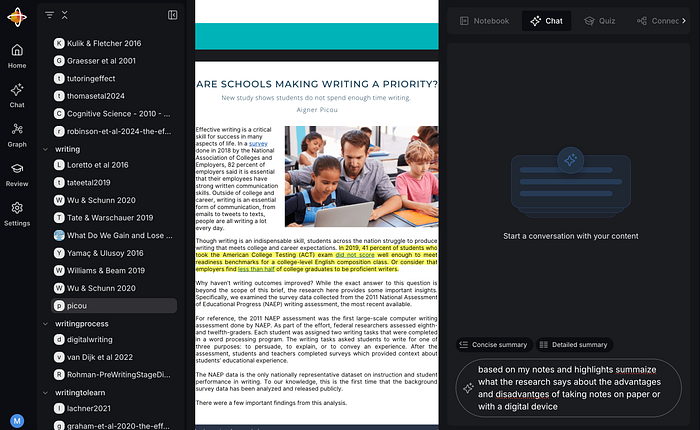
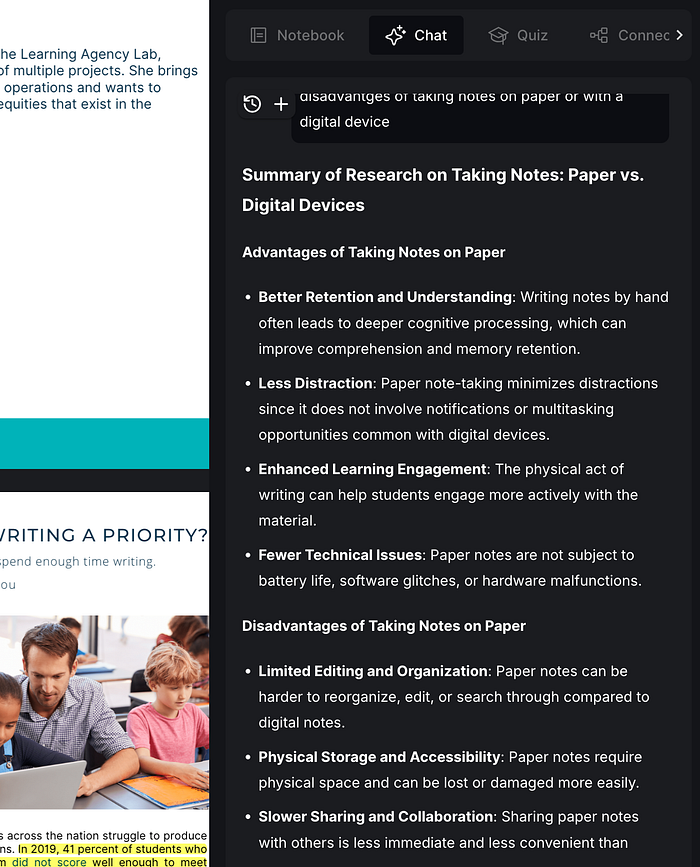
The AI chat capability I keep alluding to is available within a dedicated tab (see following image). The traditional prompt window appears at the bottom of this tab, and the content generated in response appears within the upper area of the window. The final image shows the response I generated, asking what my notes had to say about comparisons between taking notes by hand and using a digital device.

Some are interested in sharing the content they have accumulated, and Recall does allow this capability. I will likely write about it in a future post.

Summary

If you explore AI tools as I do, you’ll likely reach a point where you should focus your attention and money. However, you also find that the different tools offer different features, and you cannot find a single tool or a couple of tools with the perfect collection of features. Some features you find annoying, and some are very useful. Recall keeps adding tags and links to blank notes that I do not find useful. The following is a partial capture of what Recall generated for Adler’s classic, How to Read A Book. This collection would likely be helpful to some, but not to me. There is likely a way to control Recall, but I have yet to figure it out, and the results are simply messy. I simply ignore some of what Recall does at this point.

I find the summarization feature to be of value. I seldom create summarizations myself, but the addition of this content within the notebook entries increases the benefits I get from my use of AI across the entire collection.

Recall is new and developing (note the recent addition of the cumulative application of AI). I am halfway through my subscription year, so I have some time before deciding whether to review.

Loading

Posted in Uncategorized | Comments Off on Recall: Flexible Tool for Content Collection and AI Processing

Journaling Your Travels

I am part of a book club that often reads books about taking notes, personal knowledge management, and even historical topics that are related to early note-taking and the evolution leading to present ideas and practices. Our present read is Roland Allen’s The Notebook: A History of Thinking on Paper.

For those into the present fascination with the types of notes and concepts such as a second brain, which does include me, it is interesting to identify possible origins or parallels to present techniques and conceptions in the chapters of this history: e.g., commonplace books with categories of topics allowing the discovery of relationships among items first placed within categories; notebooks for quick immediate recording of observations (fleeting notes) later to receive further thoughtful analysis and important ideas copied in a more refined form to other notebooks (permanent notes) meant to be shared as evidence of personal eperiences and thinking with others and external storage for personal review (second brain).

The Travel Journal

Allen’s book tracing the history of notebooks devoted several chapters to early notebooks documenting travel experiences, and in addition to the connections to current topics in taking and thinking with notes, several of the descriptions of the motives and methods of early travel journals resonated with my personal experiences.

Chapter 13 describes the travels and notebooks of Heinrich Schickhardt, who received a commission to travel throughout Europe beginning in 1598, sketching and commenting on the marvels he encountered. His sketches and notes were of sufficient quality that when he returned to Venice, his sponsors were able to have master craftsmen recreate some of the engineering marvels Schickhardt had seen. Personal travel continues as an important source of personal discovery and understanding, even though we might now label Schickhardt’s discoveries as industrial espionage. Times change.

More to the point of this post, Chapter 14 considers some of the earliest travel blogs. Allen notes that the accounts of visitors are uniquely valuable to historians because outsiders are often more acute observers than natives and record details that would otherwise be very difficult to document. You learn a lot if you are open to the experiences of travel, and so do those with whom you share such experiences.

My wife and my travels have long been a source of content for our early blogs, and we eventually created some blogs exclusively to document our travels. We have had some unique experiences, often related to my wife’s extended stays in other countries. Cindy focused on classroom applications of technology early on, and her expertise brought attention from Fulbright, and eventually, just her reputation resulted in invitations to visit and interact with local educators to explore the uses of technology in classrooms. She spent an extended period in Japan and made several trips to Russia. Often, she developed a friendship with her interpreters for these trips, and many of these relationships persist to the present. Her connection in Russia resulted in a years-long friendship that saw her interpreter move to the United States and become a citizen. By chance, we were with this couple when Russia invaded Ukraine, and we listened as they received phone calls in real time from both Russia and Ukraine. Such extended trips differ from typical tourism, but she did take me along on one of her trips to Russia that included a good deal of time spent exploring the country.

I find my travel blogs more interesting to review than my photo collection. In the blogs which were originally written for family and friends, the photos are accompanied by a narrative that, after many years, is both interesting to me and, in some cases, because of the uniqueness of the experiences, informative for others. Some folks complain that tourists should live in the moment and not distract themselves by taking photos. I can see that point of view, but I wonder if such critics have an annotated collection of their adventures from decades ago.

The following are a few samples:

As I explained, I first incorporated travel posts into my existing blogs. Here are a couple of examples from our Russian trips.

Travel blogs:

Writing in general offers not just a means of communication, but a way to reflect and explore experiences. This is the basis for writing to learn activities demonstrated to be valuable in an educational setting, and it makes sense to me that it is a way to process the learning potential of travel experiences. I continue to write about our travels, but it was reading Allen’s book that prompted this post on reviewing and sharing travel experiences.

Loading

Posted in Uncategorized | Tagged , , | Comments Off on Journaling Your Travels

The New ChatGPT Study Buddy

I have written previously about how AI can assist in an educationally beneficial way, such as creating a topic outline for a paper (1), evaluating something I have written (1), arguing with me (1, 2), explaining concepts to me (1, 2), and evaluating my understanding (1, 2). 

The new ChatGPT study tool creates a setting for learning that limits what a learner has to request via a prompt. This is a very interesting development available in even the free version of ChatGPT and definitely a capability educators should take a look at before Fall. This version of ChatGPT might be described as a preprompted (yes, I made that word up) version of ChatGPT that attempts to create a style of interaction similar to that of a human tutor. There now seem to be many tutorials you can review, but this tool is simple enough I think i can get you started with just a couple of images.

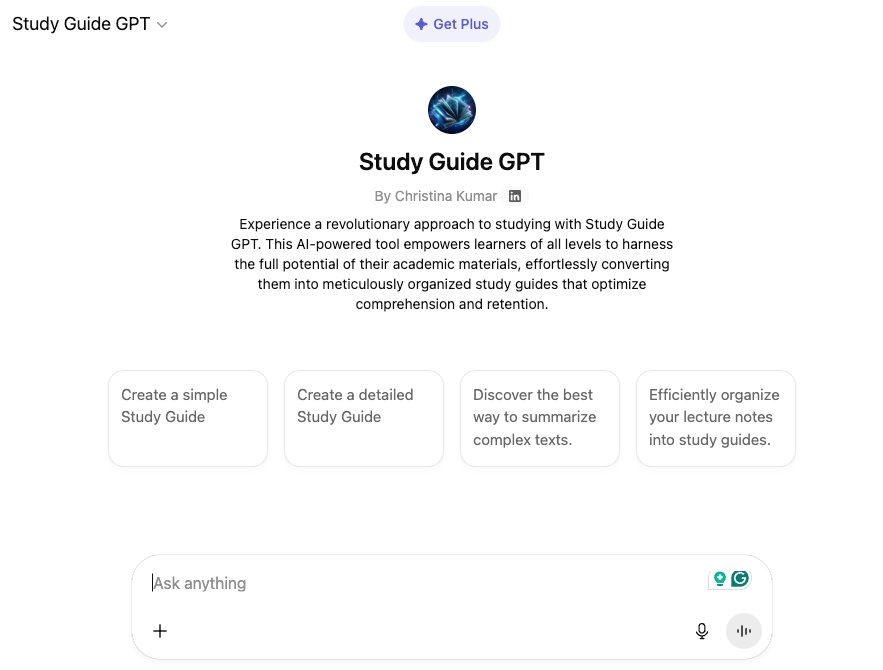
There are two ways to access the Study Guide. You can either go directly to the Study Guide or go to ChatGPT and then select the study tools from among other specialized tools. 

Your access page when using the direct approach looks like this:

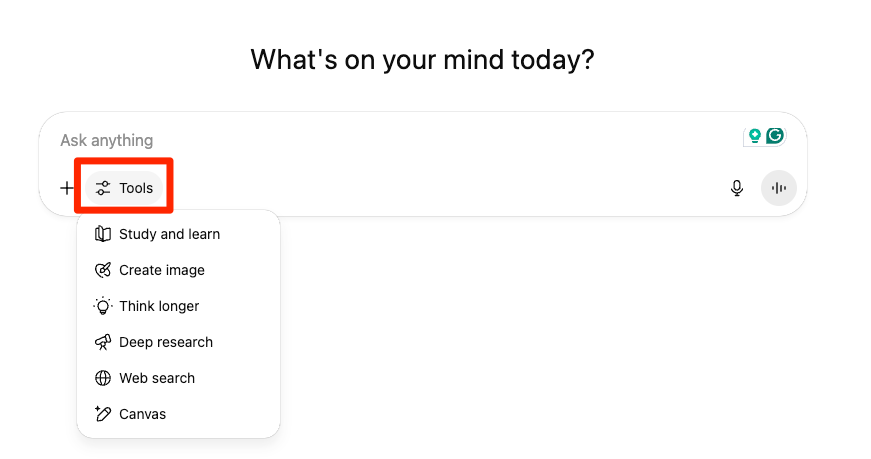
Your access page when first opening ChatGPT appears below. You select the tools icon to reveal a drop down menu with the tool options. You are looking for Study and learn.

You can use the study tools with or without ChatGPT keeping track of your interactions. The advice I read suggests you should allow your interactions to provide a background. This makes some sense as the system can build a model of your background. I had some issues doing this because I wanted to create a description of what it looks like when you start from scratch and the system would not respond as if I was a complete novice. 

You begin by interacting to describe your situation. In your evaluation of this tool for your students I would suggest you pick and topic and situation and create a situation as if you were a student in a class you teach. See how the study help would fit the of students you know. 

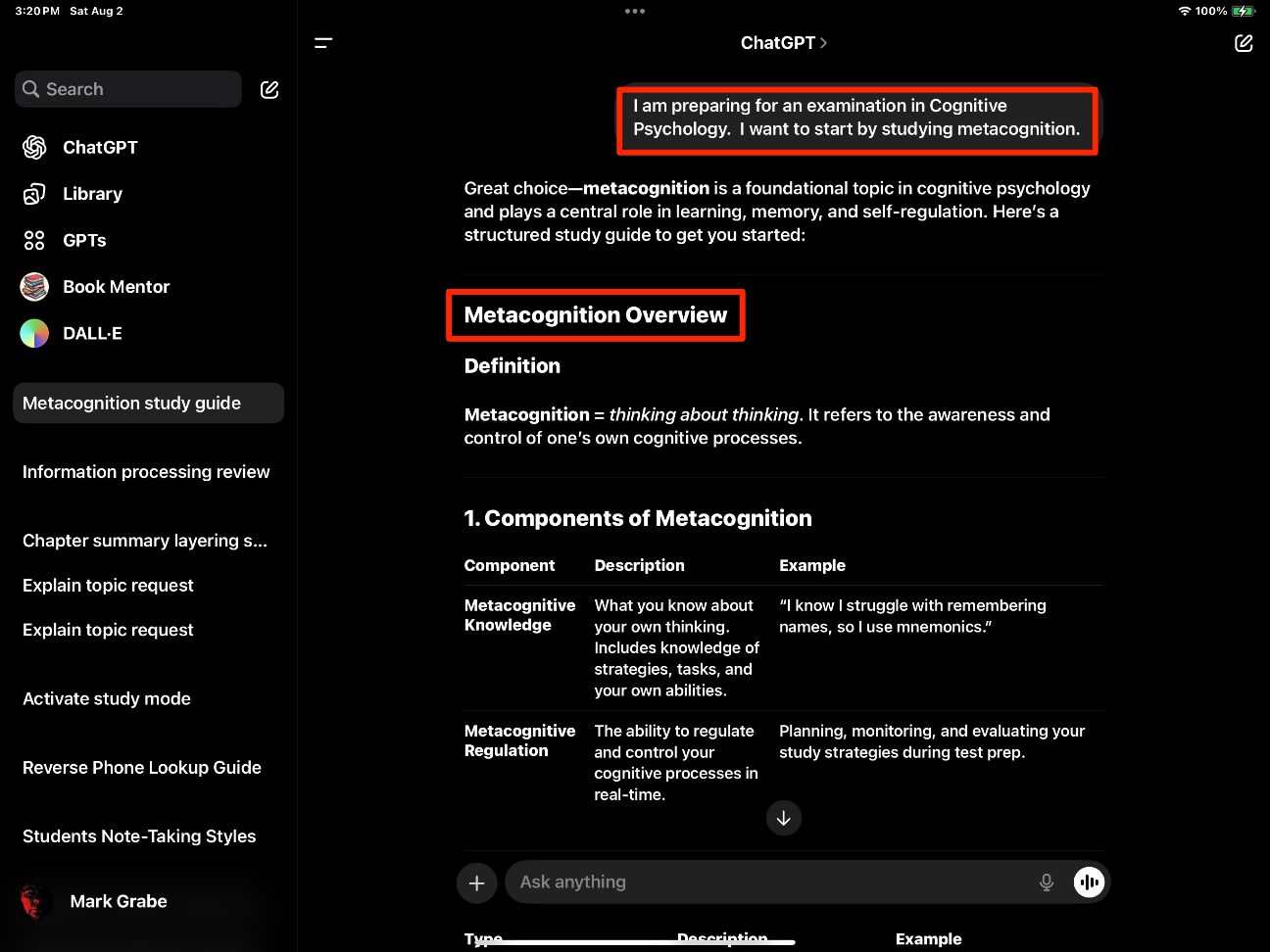
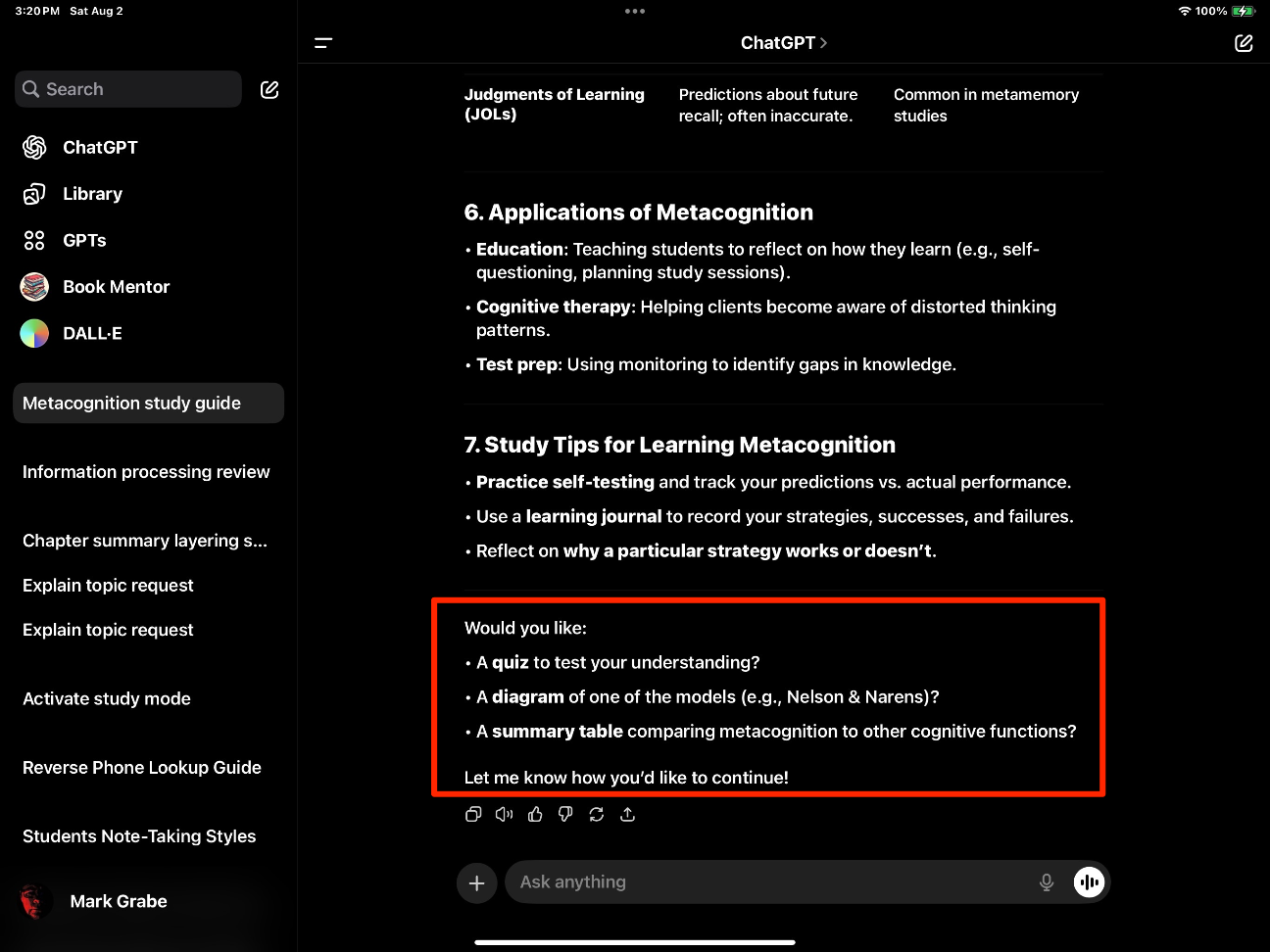
I told ChatGPT I was taking a course in Cognitive Psychology. I wanted some help with XXX in preparation for an upcoming text. I asked about Information Processing Theory and then Metacognition so I could see how the system would treat topics very familiar to me. Those familiar with AI chatting understand that there is always an element of unpredictability such that the same prompt can be submitted and a different response generated. The following two images show the response the prompt I described asking about Metacognition. The first part of this response provided an overview and then ended with multiple suggestions as to what I might try next. Do I want to be asked questions? Do I want to learn about a specific theory? 

One of the ideas even proposes a way to conduct a simple experiment related to the research I used to do. This research focused on using the accuracy of learner predictions about how they would perform on an upcoming assessment. I used to describe this aspect of my research in the following way. You are studying for tomorrow’s exam. How do you decide when you are prepared as you want to be? The difference between anticipated and actual performance varies between more and less successful learners. I even created an online study tool that presented multiple choice questions and allowed learners to wager on the accuracy of each response. The goal was to achieve a set point total to meet the study goal. For each question, you could wager .1, .5 or 1 point and this wager was subtracted if your response was wrong and added if you were correct. The idea was to adjust the length of the study system depending on how well a student knew the material. The task that AI proposes in the response is based on this same idea.

Again, my advice is to explore this environment. Ask the system to try something and see what happens. When you disagree with a response, offer a specific challenge and see how the AI tool responds. May the AI system was wrong and maybe it will offer a response that clears up your disagreement. 

Loading

Posted in Uncategorized | Tagged , | Comments Off on The New ChatGPT Study Buddy

AI Search Downside – Original Content is Ignored

In a recent post, I lamented that my posts were being gathered up by AI services and I was losing the opportunity to have my thinking identified with my content. The best example I could think of was the way Google search now included an AI summary in response to queries and it seemed to me that the position of this summary before the more traditional links would reduce attention to these links. It even seemed to me that this action on Google’s part might be beneficial to Google in the short run, but not in the long run. What I speculated was that by diverting users from possible attention to the content associated with links would reduce the incentives of content creators who might discontinue their efforts or place their content behind a paywall reducing what was available to users and to Google.

What I mean by incentives could involve the funds popular bloggers receive, but there is also perceived value in the attention one receives and the sense that the content creator has offered something of personal value to others.  

The PEW Research on the Inclusion of an AI Summary in Search Results

The PEW Research Center has recently conducted a study as part of its Internet & Technology initiative. The impact of AI has become a topic they study and the researchers decided to ask a question very much related to the issue I raised. Researchers gained permission to collect data from 900 volunteers as the participants made use of Google search. The researchers were interested in the differences between behavior when search results contained or did not contain AI-generated search summaries. Were there differences in the likelihood the user visited a link that appeared in what might be described as the traditional list of links? Given that the AI-summary also listed some relevant links at the end of the summary, did those who opened the full summary make use of these links? 

The PEW researchers found data very much substantiating what I had anticipated. 

  • The analysis found that Google users who encountered an AI summary were less likely to click on links to other websites than users who did not see one, with users who encountered an AI summary clicking on a traditional search result link in 8% of all visits, compared to 15% of visits for those who did not encounter an AI summary.
  • The study also discovered that Google users who encountered an AI summary rarely clicked on a link in the summary itself, which occurred in just 1% of all visits to pages with such a summary, and that users who encountered an AI summary were more likely to end their browsing session entirely after visiting a search page with an AI summary than on pages without a summary.

The researchers made one interesting observation about the basis the AI-summary claimed as a source. The most common link was to Wikipedia. I would be tempted to describe this observation as demonstrating that Google Search provides a secondary summary of a secondary source. 

In my searching on this issue, I found that news services who have made their content accessible to search have reached a similar conclusion regarding search summaries. These organizations were already under pressure from online search and had hoped, I assume, that links would bring greater attention to their content both openly available and behind a paywall. 

Loading

Posted in Uncategorized | Tagged | Comments Off on AI Search Downside – Original Content is Ignored

Sharing Informative Photo Collections

When you generate digital collections, whether it be your notes or your photos, you begin to wonder if anyone but you cares or might have a use for what you have accumulated. I am part of the PKM community and have shared ideas for years about taking, using, and sharing notes. I have started generalizing some of these ideas to think about my photo library. I keep thinking some of these photos, if properly organized and maybe more importantly annotated, might be useful to others. 

A few years ago, we spent a couple of weeks in southern Africa during which I  had the opportunity to view and photograph the amazing wildlife of this area. I took hundreds and hundreds of photos and kept probably half. One task I took on as a project was to select from these images some I thought maybe elementary students might find useful. Yes, you could create a similar collection by going to the zoo, and such a visit by students would be superior to looking at my pictures. However, what I have done is create a collection I am making available under Creative Commons licenses. If you have a use for these photos, download them. I also linked the images to online content offering additional information. This connection between an image and information is what I think may be valuable to share.

For me, the identification of things I see, mountains, plants, and animals, is important, but necessarily something I can accomplish without assistance. Bird identification is not easy and makes a good example. I am not a birder and I easily forgot the identifications provided by our African guides. I used several online tools to try to attach accurate labels to the photos I have. There are several African birding guides available online. I found one of the best tools was Google Lens

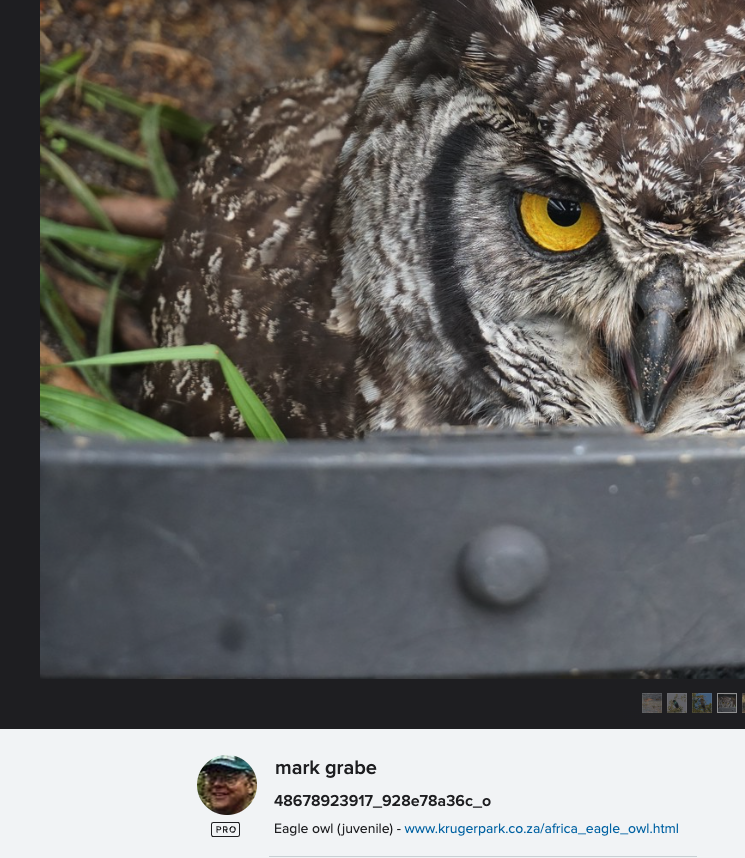
My initial album for students was available through Flickr, and you can take a look if interested. To increase the educational value of this image collection, I found that the “Information” metadata I could attach to each photo would allow me both to identify the animal and provide a clickable link to an online source of information. I used Wikipedia for most of my photos. The idea was that a student could view and download images from this collection and also use the link to learn more. Look below the following image to see the identification and link I added. 

There is a blog post somewhere in which I explain how to create a shareable Flickr album with these characteristics. My focus here is different.  My Flickr Pro license costs me $70+ a year and I understand that many who might host a collection for a local classroom may not want to spend this much money. My collection is over 20,000 images so I need this type of account. I have been exploring Google Photos to see if I could fashion an alternative. 

Google Photo Albums

Google Photos, even at the free level, offers some very useful capabilities and I have been for a day or so trying to duplicate my Flickr photo album with information links for the individual photos. I can’t quite get there because of one simple capability, but perhaps what I can propose is an approach that is close enough to be useful. 

The problem is that the HTML necessary to create a link is interpreted within Google as text. Yes, I know it is text, but what I mean is that when I post the same code into the Information field associated with a photo in Flickr the link is active, and this not the case with Google. 

There seem to be three possibilities for adding text to a Google photo – Information metadata, text added on top of the photo, and as a comment. None of these options allow active links. So, which among these options makes the best substitute?

The approach I found most useful make use of the comment opportunity allowed when images in a photo album are shared. Comments are not available in a personal album which makes some sense, but a common strategy is to create a personal album and then share. My point – don’t look for the comment option until you first share. So, this technique is an obvious kludge and is not the intended use of comments. 

The basic outline of the process follows:

  1. Create an album with the photos you want to use
  2. Share using the link option and load the shared version
  3. Create a comment with what you want to add to individual photos
  4. Turn comments and collaboration off unless you want others to add photos and additional comments

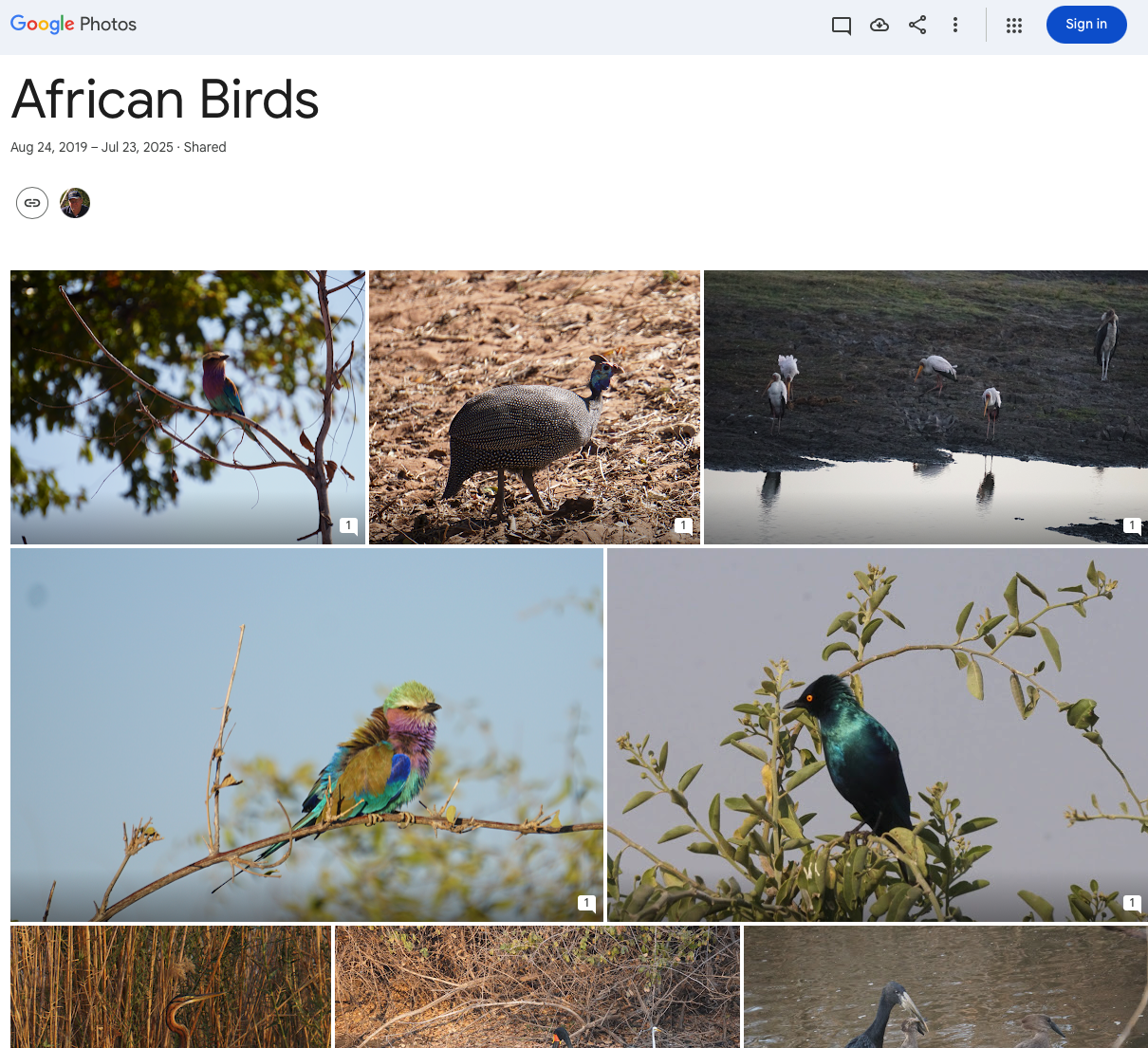
A Google photo album looks like the following image. 

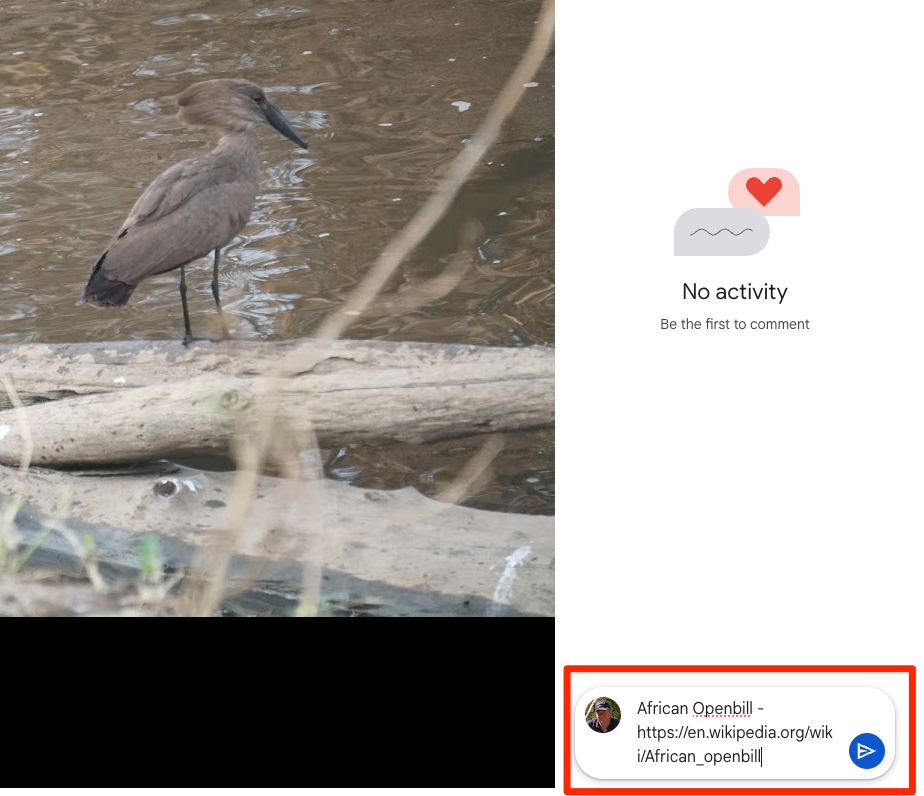
To complete the process of adding Information and a Comment, select one of the images which enlarges that image. The result should look like the following image (see red boxes). Selecting the Comment icon reveals the information that has been attached as a comment (next image).

You can enter a substantial amount of information as a comment if you want. You see the issue I have already described above – a link that is included is not active. The text can easily be copied and pasted into a browser to reach the source, but this workaround is not as elegant as you would find in Flickr.

For the end user, the Comment option appears when you click on a shared image. Clicking on an image shows existing comments and a blank field to add your own. I assume most of us do not want folks we don’t know messing with a resource we have provided to the general public and this is the reason you turn commenting off. This will not remove the initial comment you have provided. 

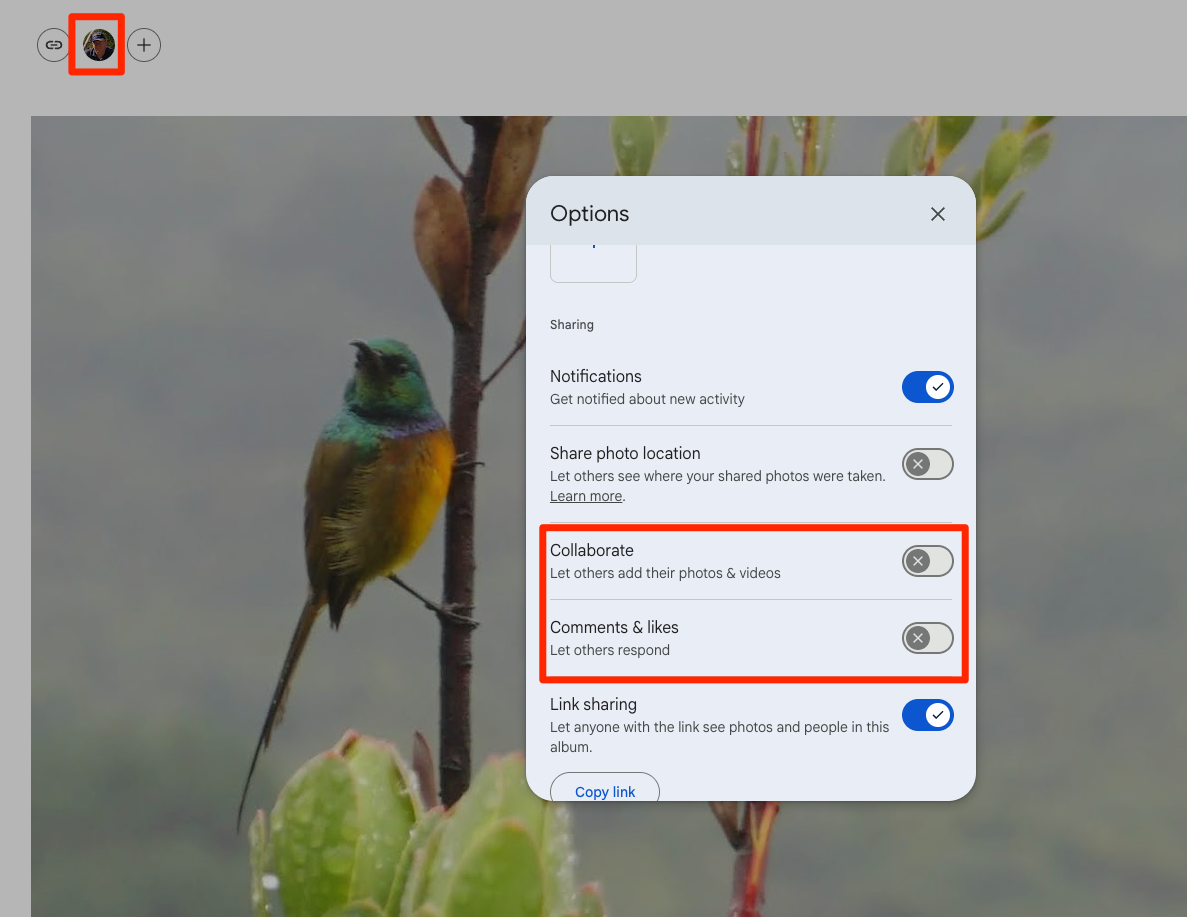
To access the options necessary to block commenting, you first select your own image appearing in the upper right-hand corner of a shared document window (see following image). You then adjust the options to your liking – I prevent collaboration and comments. 

A demonstration of a small number of images from my Flickr collection is available for your examination

Loading

Posted in Uncategorized | Tagged | Comments Off on Sharing Informative Photo Collections