Newsela a unicorn

I happened across this article in TechCrunch describing the recent financial success of Newsela in securing funding bringing the value of the company to one billion dollars. A billion dollar company is tagged as a unicorn and there are not that many education unicorns. Financially successful companies are not always that popular with educators, but this may not be the case with Newsela which has focused on online content as an alternative to or a supplement for textbooks. As is the case for many online educational companies Newsela has done well during the pandemic and is ideal for online situations.

There are both free and Pro versions of Newsela so which an educator chooses likely depends on how extensively they want to make use of the service. To me, the most interesting feature of Newsela is that individual articles are provided written at different levels. I don’t know if the following captures the methodology well or not, but it may help explain what this looks like. The first paragraph is from the most basic level and the second at the next to most advanced level. Levels don’t necessarily map to each other in this manner, but the developers make a serious effort to present the same core of ideas. The idea is that educators can assign the same reading to a class of students differing greatly in their reading competence and still have a class discussion about the content.

In 1900, Zitkála-Šá began writing about her life. As a child, she wrote she was “as free as the wind that blew my hair.”

Yet in 1900, as she began publishing autobiographical essays in some of the nation’s leading literary magazines, she described her childhood self as a free-spirited girl empowered by her single mother: “I was as free as the wind that blew my hair, and no less spirited than a bounding deer. These were my mother’s pride — my wild freedom and overflowing spirits.”
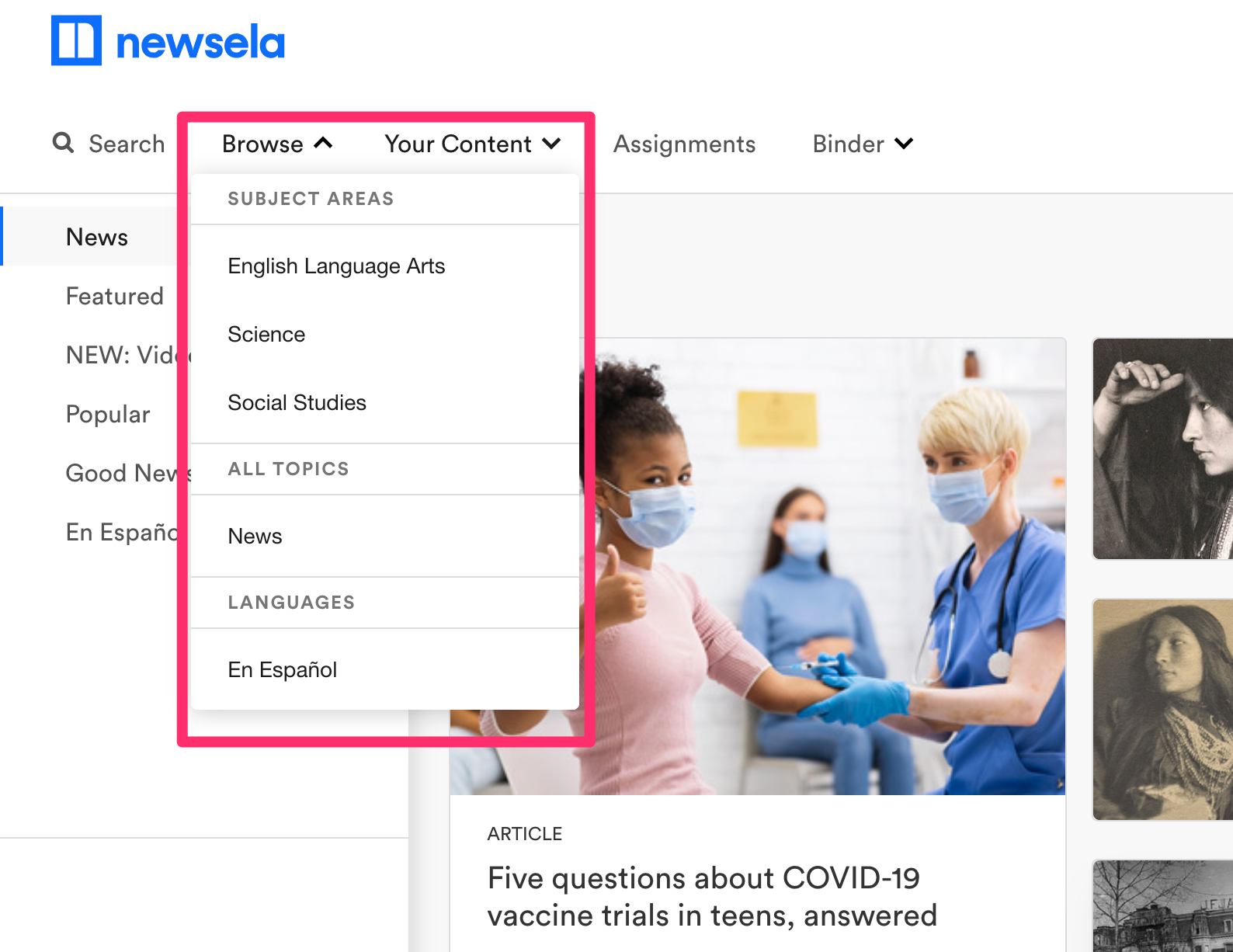
I tend to categorize Newsela as a tool to differentiate reading instruction which it obviously is, but reading to learn is part of pretty much all content areas and when the providers argue they want to offer an alternative to textbooks and you explore the content areas offered, you can see what they mean.


Loading

Posted in Uncategorized | Tagged , , | Comments Off on Newsela a unicorn

Learning with Google 2021

Google recently offered a lengthy session explaining updates in the company’s offerings for education. The event, Learning with Google 2021, was live, but is now available through YouTube. 

The hour and a half presentation was divided into segments – Google Workspace for Education (was G suite), Google classroom, Google Meet, and Chrome. Each segment identified new changes or features and features that will be available for the Fall semester. 

My notes:

Google Workspace for Education – description of levels, cost for premium levels, and features of each level. Free fundamental, Standard level ($3 per student per year), Teaching and Learning upgrade (more for distance education – $4 per option/month), and education plus ($5 per student per year). 

Google classroom – More than a LMS

  • Addons for other tools
  • Student engagement logs
  • Offline option for poor connections
  • Save progress when filling out a form/quiz
  • Citations manager for doc

Google Meet

  • Educator can end Meet for all participants
  • Mute all
  • Teacher must be first in and others must be in class unless teacher approves
  • Works better with low bandwidth
  • Prep breakout rooms in paid version – setup and populate
  • Transcripts

Teach from anywhere

https://teachfromanywhere.google/intl/en/#for-teachers

Loading

Posted in Uncategorized | Tagged | Comments Off on Learning with Google 2021

Doodlebuddy Avatar

I owe Craig Badura for this idea. He suggests that Doodle Buddy can be used to create avatars that resemble students, but still provide some identity protection.

Doodlebuddy is an app that allows the creation of simple drawings. I used the free (ad supported) version for this demonstration.

Here are the steps in creating a personalized avatar (without any artistic talent).

Ignore the photo for a moment. The icons at the bottom of the screen include background. One of the options for a background is to take a photo. So, this is a photo.

Use the paint tool to outline the photo and add whatever embellishments seem appropriate. Great skill only means the avatar will look more similar to your actual photo.

Now return to the background and change the background to white. Save. Reducing the size of the image with a “paint” program generates your avatar.

Loading

Posted in Uncategorized | Comments Off on Doodlebuddy Avatar

Fediverse

The concept of a fediverse or interconnected servers is that multiple independent servers offering the same service exist and are linked. So instead of an approach such as that of Facebook or Twitter in which the same content may come from multiple, tightly integrated machines, a federated service means that users connect to one “instance” of the service, but because the instances are connected can access content or service from other instances. The expression “small pieces loosely joined” used in reference to networks of various types comes to mind. There is a useful differentiation between local and federated content. Instances are typically hosted by individuals or groups with a unique focus that may be identified and this allows users to select an instance suited to their instances and still access the body of the whole. Users may also hold membership in multiple instances. This is the operational way of understanding what is meant by local.

I encourage educational technologists to explore the potential of federated social media services. I encourage a commitment to a federated system simply to encourage competition among social media services and to potentially benefit from the more focused opportunity of an instance more suited to personal interests. Within an instance, the experience is similar to traditional “single host” social media. You work to create your own network of friends (you can extend this network across instances) and you can also see content from the local instance.

Twit.social is a Mastodon instance hosted by Leo Laporte and in the early stages of development has attracted mainly members who subscribe to podcasts from the This Week in Tech (TWIT) network. Mastodon is very similar to Twitter with a larger character limit. Because of the way the instance originated it has a concentrated technology focus and has attracted some educational technologists. An issue I have encountered when joining lesser-known social services is the challenge of building up a personal network. I believe it is easier to build a network when most other participants are in pretty much the same stage of the maturation of a network so I think now is the time to give Twit.social a try.

Loading

Posted in Uncategorized | Tagged | Comments Off on Fediverse

Ngram data

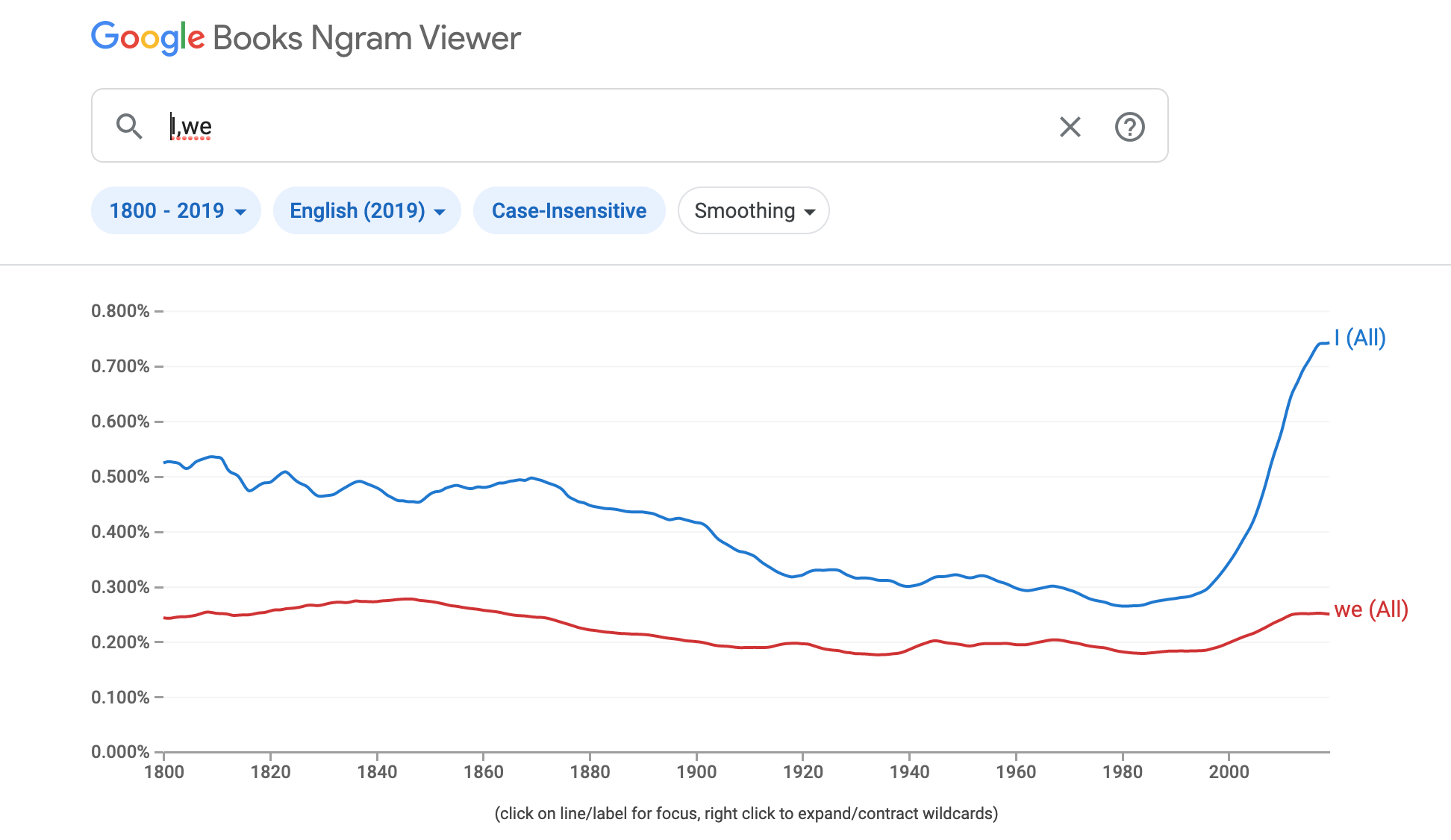
I have been reading Putnam’s “The Upswing” which considers trends in American society between individualism and communitarianism. One interesting data source cited to show various trends is based on the frequency with which different words appear in the writing of authors of a certain period in history. Such data quantified as an Ngram can be explored using the massive collection of books digitized by Google.

Here is my effort to duplicate one of Putnam’s claims focused on the use of the pronouns I and We in literature with the Ngram Viewer. As you can see, there has been a great recent increase in the “I” pronoun consistent with Putnam’s I-WE-I model with a more communitarian view in the 1970s.

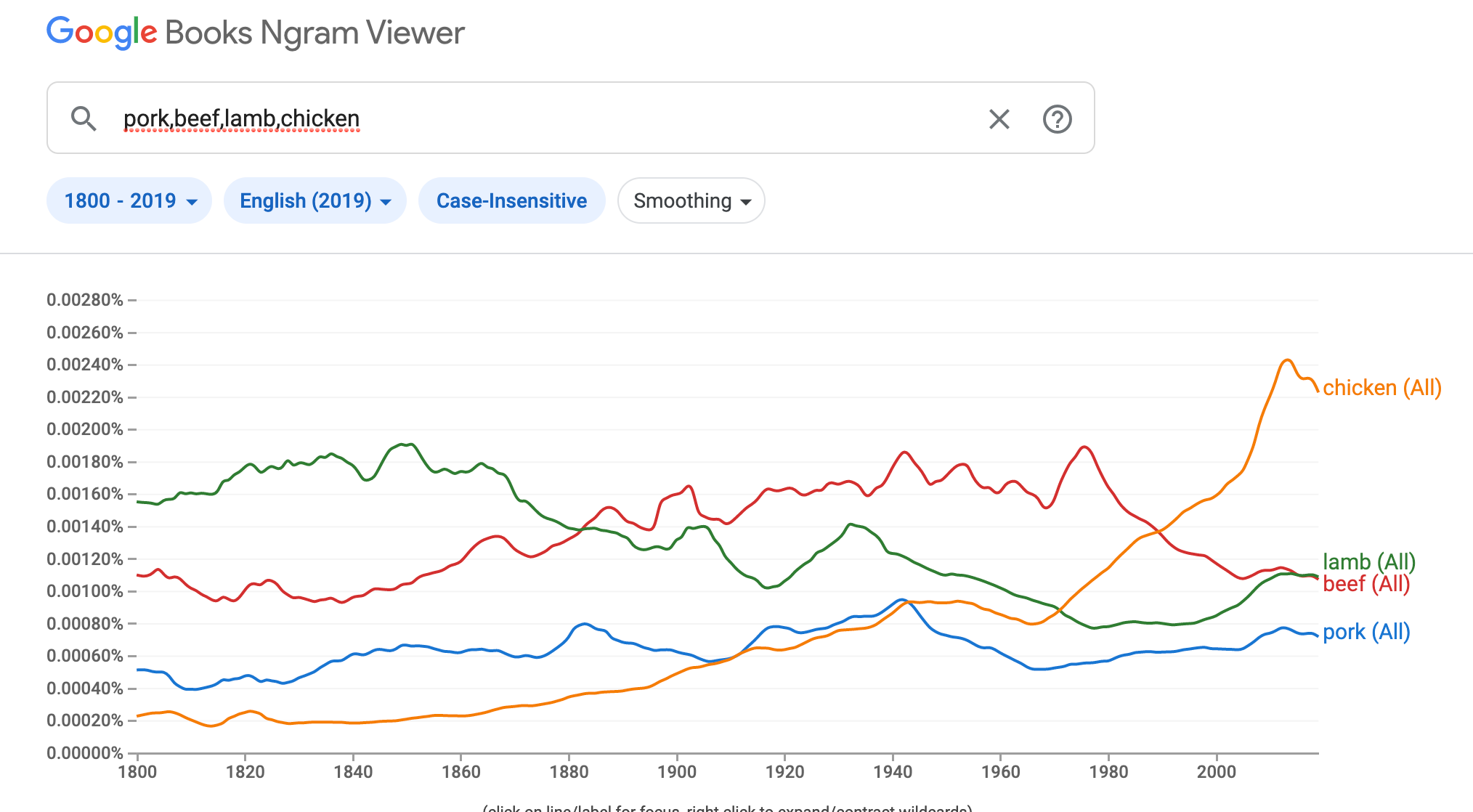
You can compare words reflecting all kinds of possible trends making this an interesting tool for classroom projects.

Loading

Posted in Uncategorized | Tagged , | Comments Off on Ngram data

Power of tutoring

Tutoring is a proven approach to improving student learning. Bloom proposed what he described as the two-sigma challenge suggesting the educational innovations be compared against the known benefits of tutoring. My interest in tutoring has long been in the potential of technology as offering some of the benefits of tutoring. Technology to me has been a practical way to address individual students where they are and advance as these students are able.

Here is an effort to explain the benefits of tutoring. You will note that this article does not accept my position on the potential of technology as an opportunity to meet student needs for individualization. I would only point toward other resources to defend my position. The reality of tutoring whether accomplished ideally with a human tutor or less ideally but economically more feasible with technology is that the benefits cannot be delivered by classroom educators without assistance. This article explaining the benefits of tutoring also explains why this is the case.

Loading

Posted in Uncategorized | Comments Off on Power of tutoring