
Don’t avoid tough topics

I stumbled across this post from a sixth-grade teacher about how she handles tough topics in her classroom. The issue of what teachers at all levels should discuss in their classrooms seems under added scrutiny as some politicians make claims that institutions of higher ed should hire more conservative-leaning faculty members. What about elementary school?

The author’s point is that learners of all ages are observant and pick up on what is going on around them and part of her job is to teach critical literacy and prepare students for the future. She offers some suggestions describing tactics she uses. She proposes that one of the best approaches is to respond to students with questions rather than offer a personal opinion that could easily be interpreted as biased.

Not to be cynical, but I doubt any approach no matter how neutral the position taken will irritate some. I am certainly aware of my perspective which some would without engagement assume to be biased if for no other reason than I teach of about the process of education and consider some topics such as inequity. No matter the data I can offer to argue for the reality of inequity, some will label the approached as biased. I try to avoid going beyond offering the data, but when asked a direct question I am very willing to respond. I guess we all find our own way trying to deal with actual problems and honest opinions.

Loading

Posted in Uncategorized | Comments Off on Don’t avoid tough topics

Studying an ebook

We just finished an update to our integrating technology textbook. In addition to new content, we transitioned our Kindle book from reflowable to fixed format. This distinction is explained in another post and the fixed format is argued to be more appropriate for textbooks.

It takes a while for a new book to be available to download, but today was the day. I tend to read Kindle books on my iPad, but I took a look at our new offering on a computer and I think the larger screen of a computer offers some advantages when it comes to studying an ebook. I am not certain why I have not noticed what the fixed format from Kindle allows before, but I like what I have seen so far.

There is an interesting debate at present as to whether learners are able to comprehend as well when reading from a screen in comparison to a physical book. Many studies suggest that readers do better with a physical book. We did not make the effort to take the extra steps to have our book made available in a “hold in your hands” format. I guess I accept the present research, but wonder what mechanism would account for the difference. It appears that reading from the screen results in poorer metacomprehension with readers overestimating the quality of their understanding. Hence, screen readers do not make as many of the many adjustments we make when we read a paper book (rereading sentences that were not been comprehended, etc.).

I guess my indifference to this work is my interest in studying as opposed to reading. Reading is certainly part of studying a book, but there are other important processes that follow the initial read. I think ebooks offer some advantages when it comes to highlighting, notetaking, and the review of segments deemed to require additional processing by the reader. Studying should not be a read the book the night before the exam kind of thing. Support for study activities are what I was impressed to see in the computer-based Kindle reader. Yes, these activities are there in the tablet approach, but the additional screen size on a computer monitor makes the additional processes much easier to execute.

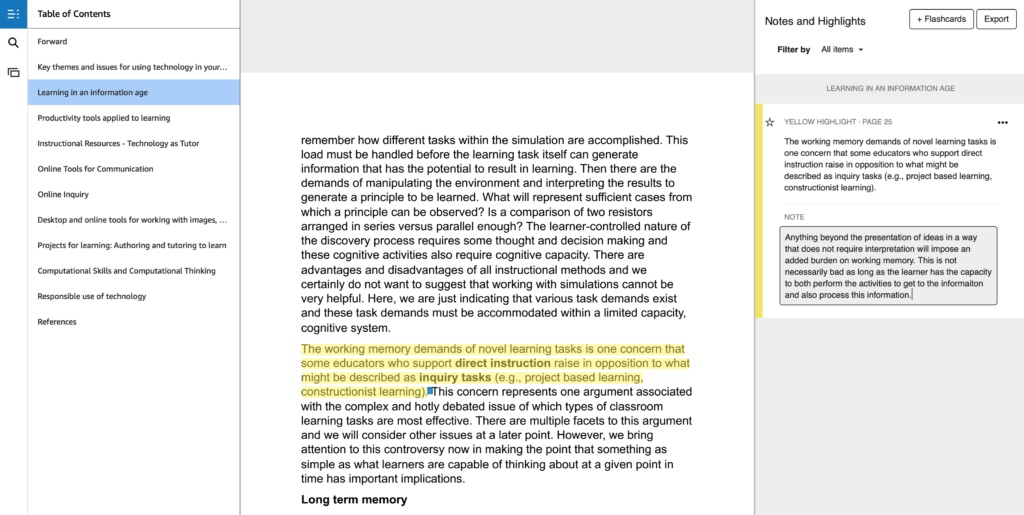
The screen image above shows part of a text page that includes a segment of highlighted text which also appears in the notes window. The reader can then add a personal note to the highlighted segment (right column). So the two-part entry in the right column is the combination of the highlighted content and the additional note contributed by the reader. This column of content can be skimmed at some time in the future and used to take another look at the original text associated with the annotations or this content can be exported for review as a stand-alone resource. You just can do such things with a paper book.

Loading

Posted in Uncategorized | Tagged | Comments Off on Studying an ebook

Is iTunes the platform model for the future of education

This post from Amy Ahean offers a futuristic view of higher education. She sees a three-tier model – basic education likely to be free, credentialed skills focused education, and enhanced residential education.

As I understand her model, the reference to iTunes mostly focuses on the middle tier. She cites Lynda.com, SkillsShare, and Ed2Go as present examples. I used Lynda.com for years mostly to develop programming and technology skills – I completed multiple courses focused on PHP, MySQL, CSS, and Dreamweaver. I paid $25 a month for an “all you can eat” approach. Some months I consumed a lot and some nothing at all.

I had not considered what it must be like to create content for these platforms. Is is kind of like teaching online, but your presentations are recorded and there is no actual interaction with students. Perhaps it would be more like authoring a textbook which I do understand. The EdSurge columnist compares more to what a musician experiences when their products are available via iTunes. The platform makes most of the income.

I am out of higher ed now and still teach a course now and then as an adjunct. I understand the feeling of being at the whims of the platform, but I am sure teaching by the course is better than being recorded once and then receiving a compensated based on views. If this is the future of higher education, I am glad I am watching and commenting from the sidelines. No way to make a living even if you already have the income to be comfortable.

Loading

Posted in Uncategorized | Comments Off on Is iTunes the platform model for the future of education

Brave browser and cryptocurrency

I have been an advocate for the Brave browser and ecosystem, but I admit there are a few things about the business model I can’t quite grasp. I like Brave because it seems to solve the independent issues of compensating content creators and providing privacy protection for web users. What I don’t get is why the system has to be based on a cryptocurrency (BAT).

The money to be distributed across the sites of registered content creators is generated in two ways. Content consumers can put in BAT after converting traditional currency to cryptocurrency and consumers can generate BAT by viewing ads through the Brave browser that does not require that personal information be shared. OK. I put in $50 because the generate a contribution by viewing ads was not available when I joined. I also generate a few BAT from allowing ads to appear (not nearly enough to meet the minimum monthly distribution, but still something). Why am I working in BAT and not allocating a few dollars a month and receiving a few cents per ad viewed?

This article seems to offer an explanation, but I am still not certain I understand. I think the explanation is that Brave, ad providers, content creators, and content consumers are all isolated from each other as far as personal information goes. The consumers will see relevant ads without Brave or the ad producers being able to identify them. I hope this is it as putting money into the system is not a task for the casual user/a

Loading

Posted in Uncategorized | Comments Off on Brave browser and cryptocurrency

It’s time to go out and recapture that HyperCard feeling.

I admit a certain nostalgia when it comes to Hypercard. I also still believe it offers a construction tool that could benefit many and especially many in education. I have noticed several posts lately lamenting the demise of Hypercard (BBC, ArsTechnica). I guess it is the 30th anniversary of HyperCard. I am really getting old. 

The BBS post focuses on HyperCard as a construction tool requiring no programming skill. This is true, but also misleading. HyperCard allowed users to apply a scripting language (HyperTalk) to create sophisticated applications.  The BBS post makes an effort to identify current construction tools which require similar to HyperCard and require no programming. Scratch would probably the online of these tools familiar to tech using educators.

The ArsTechnica article offers a more complete history of HyperCard and explains how the Apple product predicting the online functionality we now call the web. 

It is difficult to explain exactly what Hypercard was and appreciating this past is necessary to accept my argument that an updated tool would offer broader educational applications than many of the coding and content creation tools now used in educational settings. Hypercard was a multimedia construction/presentation tool some might compare to PowerPoint merged with a database, but it was also an object-oriented programming environment capable of implementing sophisticated coding tasks. The Arstechnica subheading summarizes it this way – “Before the web did anything, Hypercard did everything.” 

WordPress (the blogging, content sharing construction tool) is gradually rolling out the Gutenberg block tool for building web content. Others are expanding the blocks that are available (e.g., Atomic Blocks) and some of the blocks add customizable functions that might be moving in the direction of a HyperCard like approach. I would watch this effort rather than the examples mentioned by the BBC as a possible future direction for a versatile content construction environment. 

I have a Google alert set to notify me when a reference to Hypercard surfaces. It is fascinating just how frequently this happens.

It’s time to go out and recapture that HyperCard feeling. [the title is the last line of the BBC article].

Loading

Posted in Uncategorized | Tagged | Comments Off on It’s time to go out and recapture that HyperCard feeling.

NPR podcasting resources

NPR offers a great curriculum guide for educators wanting to teach students podcasting skills. The guide includes specific ordered assignments identifying and developing important communication skills.

I sometimes feel guilty endorsing authoring options I have not implemented or taught. I spent my career speaking to hundreds of people multiple times each week, but I could never really get into creating audio content for sequential distribution. I started to consider why this is the case. This focus on writing also applies to the books I read vs. the books I input as audio. I listen for fun. I read when I want to remember and use.

I have a long-term investment in writing. I have had an active blog or two since 2002. I think my bias is that writing offers greater control. The written word offers the writer and reader to better manage the input and uptake processes. You can stop and think when you want and you can modify your thinking before you share or make permanent. I think I learn from the process of writing and not from the act of speaking. Preparation is ongoing when you write and has been completed when you speak especially when what you say is the end of the process. This is not the case in a conversation.

Listening can be made more active. In a pure lecture situation, the listeners should be participating by taking notes. I can’t say I plan to take notes when I listen to a podcast. I might send myself a note when I hear a nugget I want to remember. The frequency of note taking from podcasts is not that high.

Having identified this distinction, I will also claim that there are ways to make listening a more engaged process. I would point to the services I describe as layering as an example. Some such services allow the listener/viewer to pause (control) the input and annotate. This is not the type of thing you should do while driving your car or mowing your lawn but the active processing of a streamed input can be improved.

Loading

Posted in Uncategorized | Tagged , , | Comments Off on NPR podcasting resources