
There are several ways in which you can add a plugin to your Obsidian setup to explore your notes with AI. I have considerable experience with two and I have decided to transition from the Smart Connections Obsidian plugin to the Copilot plugin. Both plugins have met my personal needs and I will explain the motivation for my change from one to the other.
I have been impressed with Smart Connects and have written several accounts of how I have benefited from this tool (example1, example2). Still, I am changing. I have experienced similar issues with several products. A helpful product is updated and improved, and as a result, is no longer free or increases substantially in cost. With subscription models, you must decide. Are the additional capabilities useful to you and do other services meet your needs at a lower cost?
Smart Connections allowed me to focus AI prompts on my notes (RAG) and perform other useful functions (e.g., identify related notes). I have nothing against paying for AI and I pay for multiple AI tools or other tools that already contain AI capabilities. It is easy enough for me to export batches of my notes from Obsidian to apply AI tools (e.g., NotebookLM). While Smart Connections was free, you had to grant it access to an OpenAI account to engage in chat.
The new, more powerful version of the Smart tool is $20 a month. I am certain it continues to be a great tool and it is reasonably priced for those who rely heavily on Obsidian. However, I would suggest that there is greater flexibility with an API AI approach as the same account can be connected to multiple services and I pay based on what I use rather than a flat fee. Again, the approach that makes the most sense depends on individual interests and needs.
I have moved to Obsidian Copilot. It allows me the opportunity to use the same OpenAI account I used with Smart Connections. There is a Pro version, but again, the free level offers the capabilities I want. As with the original version of Smart Connections, I could use my OpenAI account.
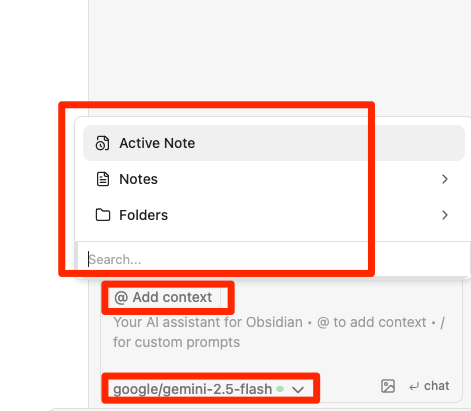
Copilot controls and the content it generates appear in the panel on the right side of Obsidian. The following image shows the controls at the bottom of this column. Red boxes indicate where you set the AI tool you want to apply and the prompt (add context) you intend to focus on. Selecting the “add context” button generates a menu I usually want the prompt to be applied to a folder of notes.
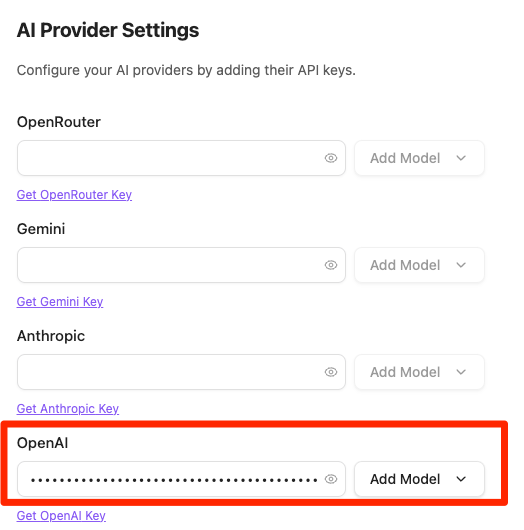
Copilot allows access to multiple AI APIs. I have an OpenAI account, so during setup I entered a key associated with it. When Copilot asks which model I want to apply, I must select one of the models from OpenAI.
The following image shows the entire Copilot display, including some content generated by a prompt I applied to my file of Cognitive notes. The prompt includes

To summarize, my switch from Smart Connections to Copilot has been motivated by the opportunity to use the AI services I already pay for rather than duplicating the subscription cost now required for the latest Smart Connections upgrade. This switch has nothing to do with the capabilities of either system as they appear similar.

You must be logged in to post a comment.