Mastodeck

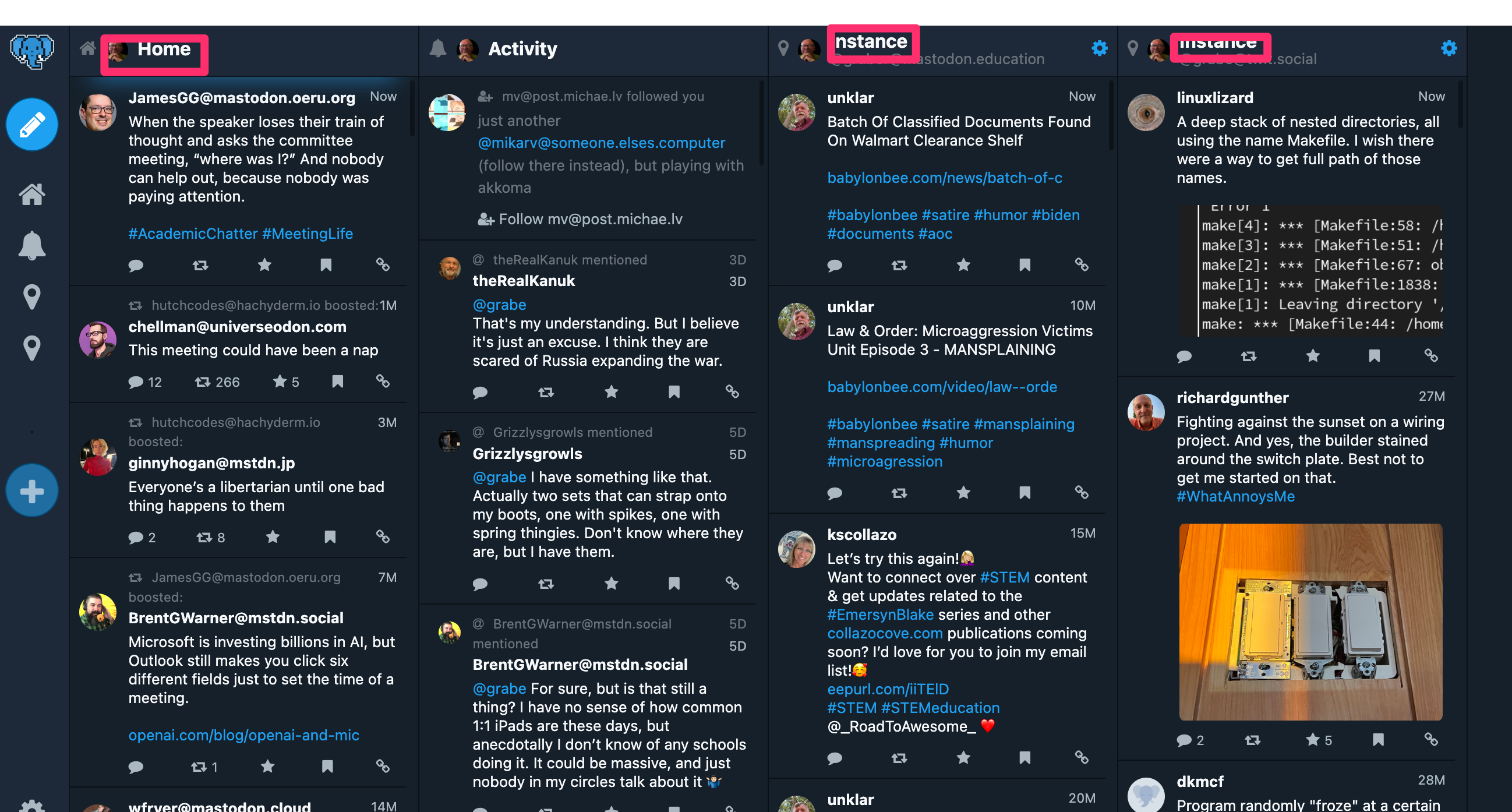
One of the challenges facing those making a transition from Twitter to Mastodon is the variety of instances that they may find interesting. Mastodon is a federated system meaning there are many hosts unlike the single host for Twitter. You may join one instance and invest time building up a group of associates there and then find that another instance may have a focus even better suited to your personal interests. You can join multiple instances and with a little work it is easy enough to switch from instance to instance to catch up, but there is now an easier way.

Mastodeck may remind many of TweetDeck. Tweetdeck was a multicolumn twitter client that allowed a user to follow multiple inputs. Usually, the columns followed your main feed and the others followed different hashtags. Mastodeck provides the same capability for Mastodon, but also allows you to assign your different instances to different columns. This means you can now go to one site to follow all of your instances without having to manually use the preferences of a single client to switch among your instances.
Loading

Posted in Uncategorized | Comments Off on Mastodeck

Crisis and change

Last post of 2022

I have long been a supporter of K12 technology. I think a lot of pro-tech types thought that the COVID situation of 2020-2021 and the related required greater use of technology would generate systemic change. This does not appear to be the case and there may even be a bit of a backlash. The “Zoom experience” was often blamed for boredom and what seems to be multi-month learning loss.

I have been reading a book about educational reform and Horn makes the following observation about crisis and change. Horn claims that studies of leadership during crises show that crises are great for increasing the availability of resources, but not for creativity applied to solutions. He describes what he thinks happened in educators responding to COVID, but also the newspaper industry as ad revenue was suddenly diverted to online posting. Those in leadership doubled down on what they knew and the pressure from the need for an immediate response. They put the stories that would typically go in the paper online often behind a paywall and they tried to run classes online as if they were in a face-to-face environment.

Horn suggests that studies of the response of organizations to challenges show that organizations need a separate group focused on innovation allowed to work independently from those who would normally control decisions. This separation allows a broader focus and more flexibility in the generation of suggestions.

Horn, M. B. (2022). From Reopen to Reinvent:(Re) Creating School for Every Child. John Wiley & Sons.

Loading

Posted in Uncategorized | Comments Off on Crisis and change

Bird Buddy Video

I have described the circumstances that led Cindy to invest in the development of Bird Buddy in a previous post. Quickly, Bird Buddy is a combination bird feeder and motion activated camera that allows the collection of the images that come to the feeder.

One of the most intriguing aspects of the Bird Buddy is that it continues to be improved even once you own one. This comes about through software updates. First, the company improved the battery life. Now, I find that our device can record video. Here is the first recording – a female and then a male Northern Cardinal.

I have made the effort to create several posts about this product because some have continually complained online about the product. First, there were accusations that the company was ripping off those who had invested. I don’t think people understand IndieGoGo and similar ventures. If you invest, you are not guaranteed of anything. You may receive a product if the product materializes. In this case, there is now a product and you can purchase it through multiple sources, but there were no guarantees in the beginning.

They there were complaints about the battery life, the failure of birds to use the feeder, and the failure of the device to capture images. It may take some time for birds to find a new feeder. You learn this if you have fed birds before. The other issues may involve assumptions about how far you can position the feeder from your house and the wireless access required to control the feeder. Other problems involved not understanding how to install the updates and the battery life. This last issue has been improved with updates, but the battery life is an issue. Even with the solar panel, the a charge may be exhausted in a couple of days. Not a huge issue for me, but be warned when making a purchase.

What no one complains about is the quality of the images (and now video) that the device generates. I am completely satisfied with the value we have received for our investment.

Loading

Posted in Uncategorized | Comments Off on Bird Buddy Video

Notetaking basics

I write a lot about the specifics of notetaking. This may not be the ideal way to present notetaking to K12 educators looking for an overview to guide their classroom presentation of notetaking skills to students. I encountered a post authored by Jennifer Gonzales that provides an overview that probably communicates in a more efficient fashion.

Among the specific topics considered is the offering of instructor notes to scaffold learner notetaking and strategies for collaborative notetaking (the sharing of notes between students). Instructor notes and collaborative notetaking are reasonable ways to develop student skills through modeling and through comparison with the content peers record. Since both strategies in my experience are unusual, the article is worth a read.

Loading

Posted in Uncategorized | Comments Off on Notetaking basics

Apple FreeForm

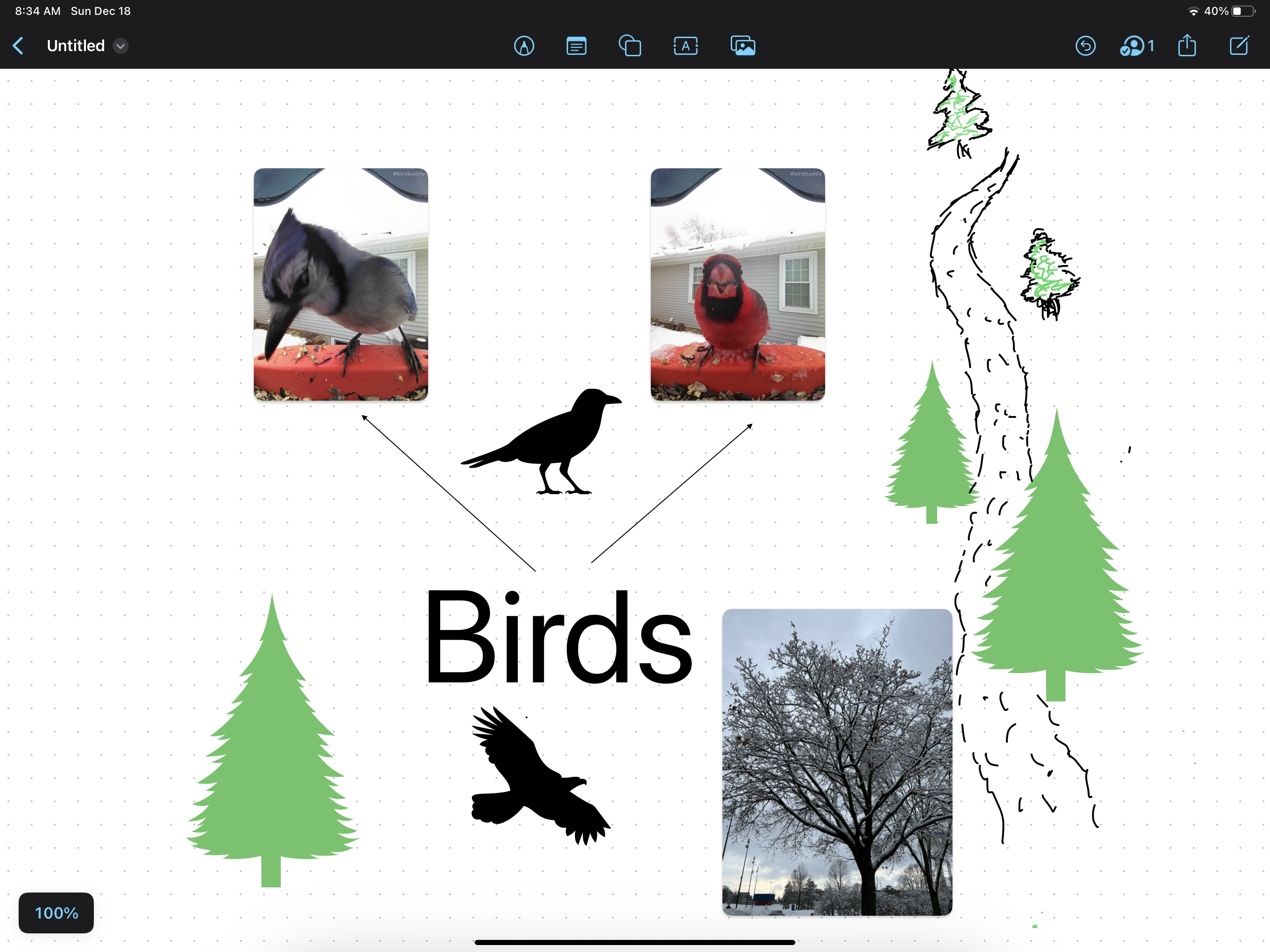
Apple recently introduced a new tool as part of the most recent OS releases (iOS 16.2 and OS13.1). FreeForm is free to all Apple users and is described as an unlimited whiteboard allowing the placement of text, images, videos, objects, and documents. A user can easily create, import, position, move, and resize these elements using the simple toolset that comes with the app. The whiteboard is easily synched across your Apple devices and can be shared with others allowing either viewing or collaborative authoring. FreeForm offers similar functionality to Google JamBoard (previous post) or Padlet (previous post).

The iPad and an Apple pencil are a great combination for this service. You can use the pencil for taking notes if you like, but my handwriting never looks as good as others who show off this tool so I prefer not to embarrass myself by trying to print or write.

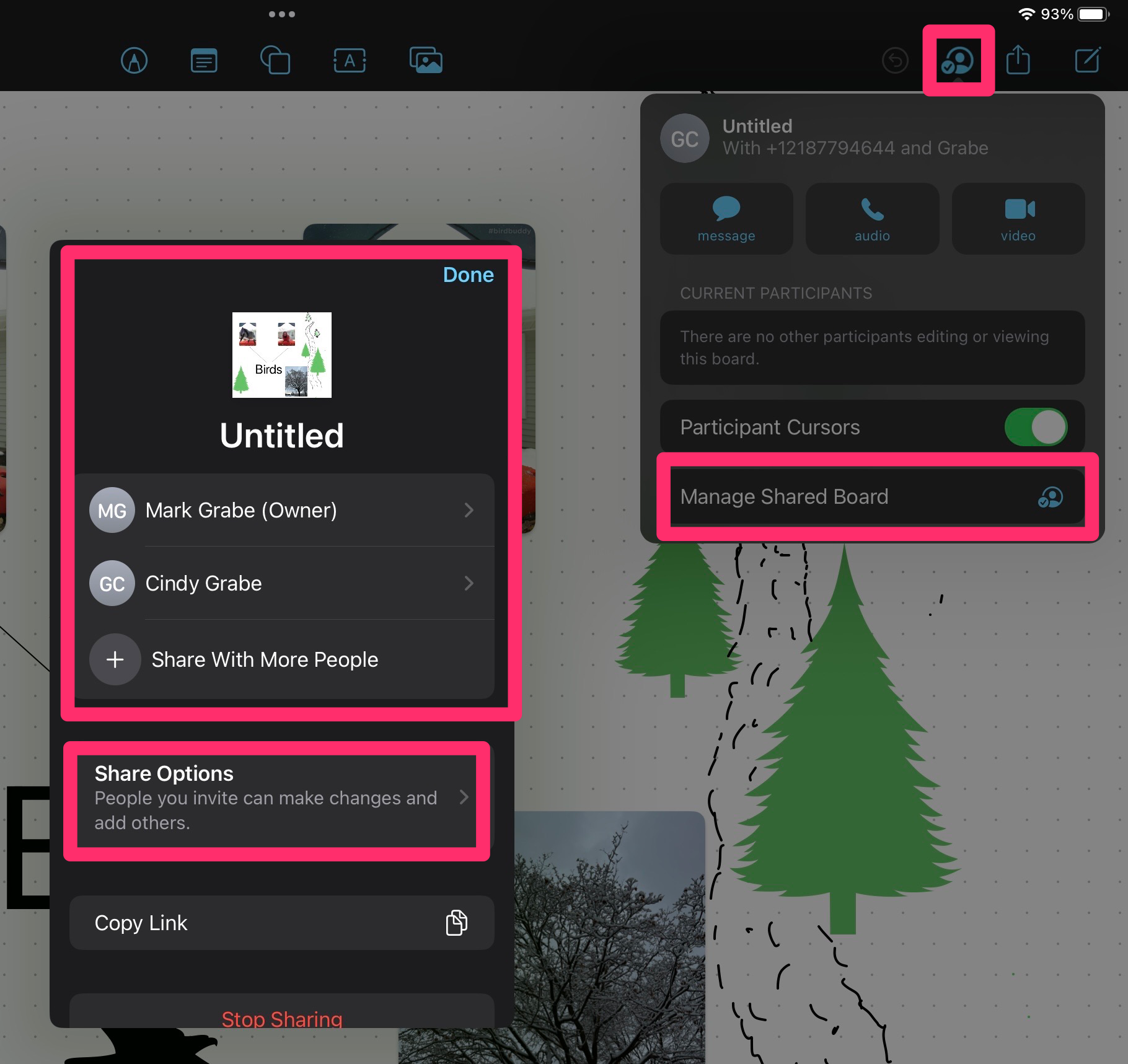
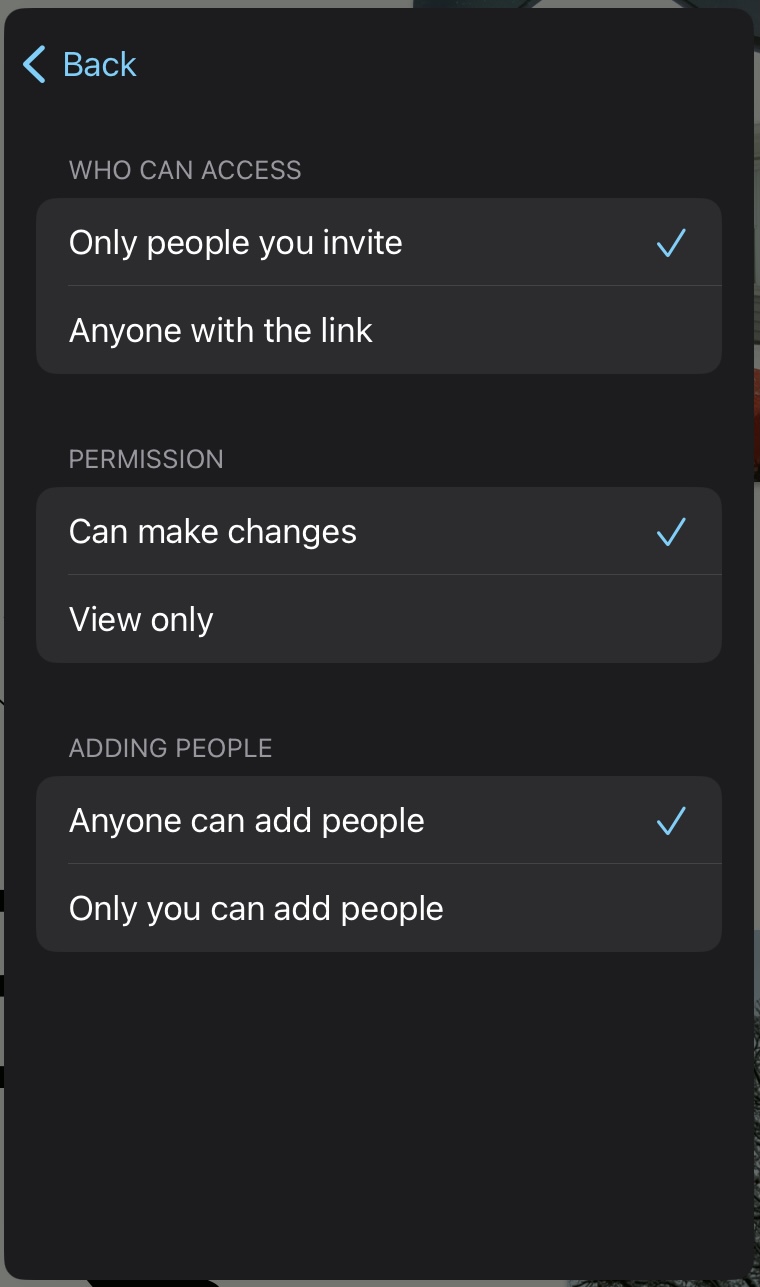
The sharing and collaboration capabilities are an important capability. Those participating must be Apple users with the most recent operating systems. The process requires that you dentify those who should have access. Start in the menubar icons with the people icon. This icon opens a dropdown and you select the shared board option to open a second window for controlling the privileges granted others. The second image shows the privileges you can set when selecting this link.

Loading

Posted in Uncategorized | Comments Off on Apple FreeForm

Another AI experience

Open access to ChatGPT has generated a lot of attention focused on the capabilities of AI writing. Here is another interesting application.

I use Glasp to annotate online articles, to store the annotations I make to Kindle books, and to find others who have used Glasp to annotate the same sources. Glasp includes the AI capability to summarize the notes that were taken from a source. The situation in which I found this valuable or at least interesting is to summarize in situations where I have identified a lot of highlights or taken a lot of notes.

The following is the Glasp section that identifies the Kindle books I have linked to Glasp. In the right-hand column you will see a red box surrounding the link that asks the AI system to summarize your highlights and notes from a given book. The Summary appears in the window that appears below this link. The text in the background includes the original highlights and notes from the source.

The summary I generated is for my Kindle book – Designing Instruction Using Layering Services. I highlight and annotate all of the Kindle books I read including those I have written. The summary appears below so it is easier to read.

Layering services is a concept that involves adding content to raw information to guide learning. Educators and instructional designers can use layering services to influence the learning process by providing prompts, questions, and feedback. This can help students gain attention, inform them of objectives, recall prior learning, present content, provide guidance, practice, feedback, and assess performance. Layering services can also be used to enhance retention and transfer of knowledge.

Just to be clear, AI writing does not copy text it identifies as especially important, it summarizes what it processes. I did not write any of the sentences in the brief summary. The product that the AI process generated seems a reasonable description to me.

Loading

Posted in Uncategorized | Tagged , | Comments Off on Another AI experience