Online news has become the target of a good deal of deserved complaints. Many sources still existing or derived from paper papers are cutting journalists as ad revenues have dwindled. Online only sources have proliferated, but get by without actual “on the streets” journalists and often focus on a shallow approach similar to those publications you see while waiting to check out at the grocery store. Add to that AI-powered offerings provided what I would describe as summarization engines.
I have been exploring a new source with a unique approach, I believe, that makes a unique and useful contribution, as long as you understand how it works and what I believe your responsibilities should be in using it. I am a paid subscriber to the NYTimes, a local Minneapolis paper, and the resources I can access through Apple News+. I am sticking to these commitments, but I have subscribed to the service described below.
Ground News is a Canadian company offering an approach to news aggregation intended to make readers aware of the bias and misinformation in the news sources they use. Let me say clearly that the system can’t identify bias or errors in individual articles, as the history of the sources is used for these classifications. Ground News relies on independent organizations that rate the political bias and historical accuracy of the huge number of news sources from which it pulls sources. What it does offer are multiple sources for a given story each classified according to the historical take of each source. You are then encouraged to sample from these offerings, sources likely to put a different spin on a given story. You use the link associated with each story you select to get to the original story. You can’t go behind paywalls, even though pay-walled stories may be identified. This is one reason I would not get rid of the ways I access paywalled content.
Ground News aggregates content from over 60,000 sources globally, including major national publications, as well as regional and international outlets. The following image should give you a feel for how this works. When a major breaking story occurs, a summary first lays out the main points for what might be called a “story cluster”. Access to different takes can then be achieved with a reminder of each source’s spin (second image).
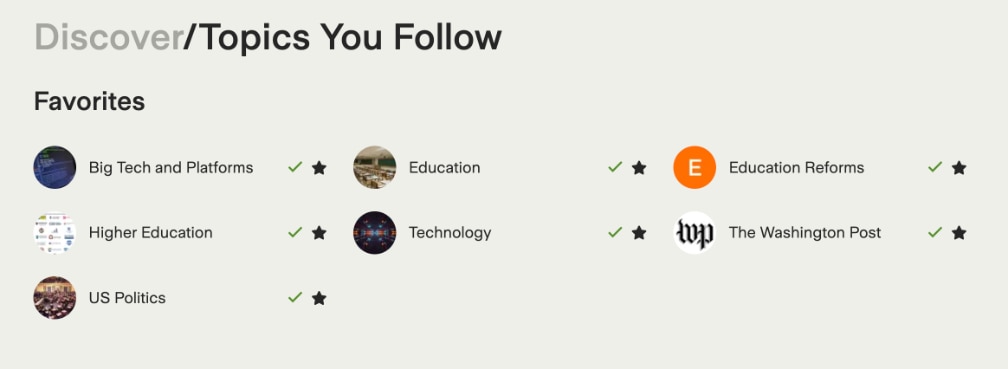
Ground News offers multiple ways to find stories. The most basic allows a user to select topics/sources.
Classification Systems
The Ground News bias ratings are based on the average rating of three independent news monitoring organizations: AllSides, Ad Fontes Media, and Media Bias Fact Check. The Ground News Factuality Score reflects the average of two trusted rating systems: Ad Fontes Media and Media Bias Fact Check. The links in this paragraph are to previous posts I have offered on media bias.
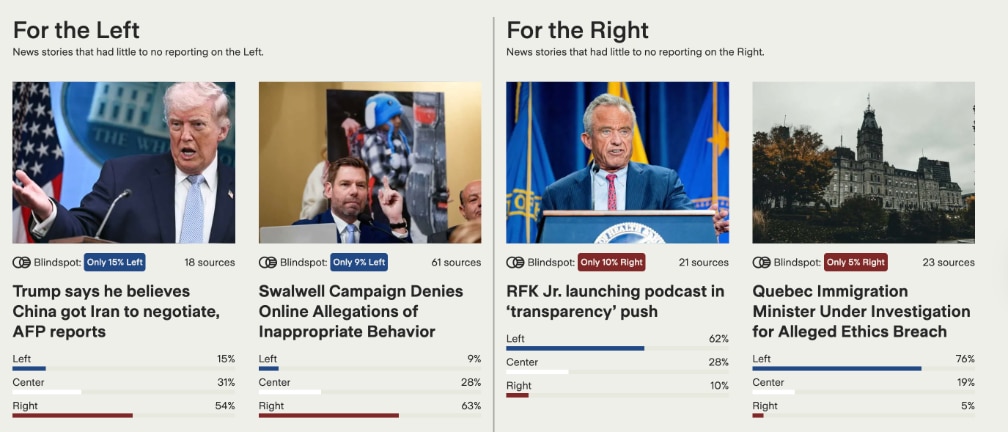
Identification of Blindspots
Ground News defines a blindspot as a news story that has political undertones and is disproportionately covered by media sources on one side of the political spectrum. In other words, if you rely on MSNOW or FOX, you may be unaware of certain stories not given much attention by your favorite source.
Other Features
Sort and filtering options. The “sort and filter” settings allow the reader to select the orientation they want to explore. You can select “center” if you want to read accounts of a story from sources with the least historical bias. Educators could use the system to identify stories most likely to be authored from a left- or right-leaning perspective, and then ask students to contrast how similar facts can be slanted by writers.
Local – Local is like a mini version of Ground News’s approach, focused on a specific location. I live in a suburb of Minneapolis, but I could set local equal to any location. I thought it was interesting that the tool identified a couple of local news sources that were new to me.
Cost
Ground News offers multiple subscription tiers from free to $100 a year. I pay $10 a year (the lowest paid tier) and this low price offers a perfectly adequate experience.
Summary
Ground News has been around a while which surprised me. It is important to understand what Ground News is and what it isn’t. I think it is best to understand the platform as a news aggregator for readers who seriously want to understand events, recognizing that sources present news with a spin. As long as readers are willing to do the work, Ground News provides the opportunity to compare the takes on the facts offered by sources with different biases and, from such comparisons, to understand both the facts and how the powers that be in disseminating the news want you to interpret them.
Posted inUncategorized|Comments Off on Ground News – The Facts if You are Willing to Work for Them
The Trump administration has just released the National AI Legislative Framework. As I understand what a legislative framework means, the goal is to establish goals for legislators to guide related laws on identified topics in constrast say to temporary executive orders.
The topics selected emphasize a) protecting minors and empowering parents, b) limiting unnecessary regulations that would slow the progress of AI advancements, c) protecting taxpayers from an increased burden resulting from AI power consumption, and d) creating systems that are free of “ideological biases”. The goals and supporting materials have only been available for a few days, but there are plenty of online reactions for those (e.g., ABC) and a search will reveal many more.
I have opinions on many points raised in the various analyses, but my major focus is on the section dealing with minors as it relates most strongly to classroom issues. A separate section focused on developing an
AI-ready work force also relevant, but I focus here on the section on protecting minors. I have found one existing in-depth reaction to this section.
Major expectations include:
Protect children and adults from deep fakes. This goal specifically references Melania Trump’s personal interests and the Take it down act.
Parents/guardians should have ways to control over minors’ privacy settings, screen time, and content selection.
Reasonable commercial means should be available to address the issues identified above and to ensure that users meet age requirements for AI and other online tools.
Minors should be protected from data harvesting for use in AI model development and advertising.
Federal laws should not unnecessarily preempt state-level requirements. I hope I have expressed this accurately in my effort to be brief, as the document seems to imply both federal and state-level expectations have their place.
When federal standards are required, they should be unambiguous limiting the likelihood of constant court battles.
The devil and the details.
Yes, I did alter the more common expression. Details and circumstances matter, and a framework avoids details. Expectations may sound good but be unrealistic, and expectations of who must execute the expectation unfair. Expectations, if implemented, also seem to me, based on what I would expect would be required, to be found inconsistent. If you also generalize from state differences in what is labeled “woke” (e.g., historically accurate accounts of our past) and “inappropriate” (e.g., book bans), I can foresee some AI experiences being deemed inappropriate.
The unpredictable nature of AI and user interactions, personal privacy protections, and age/parental controls, when combined, can create expectations that are frequently interpreted as inconsistent.
Here are some of the challenges I anticipate. To allow parental controls, a system (meaning a combination of the online service and local tool) must identify that the active user is a minor, the minor is associated with specific parents/guardians, and there are preferences for specific topics/content sources. These data points must be stored or calculated/determined on the fly. AI tools would have to be moderated at the level of the input (e.g., are questions asked age-appropriate and parent-approved) and/or at the level of the output. Even social media offers a version of this challenge as even the content appearing on the most common social media platforms (e.g., Facebook, Instagram, X) cannot be completely anticipated. This reality would mean that perfect safety would require blocking all use of these platforms. However, expectations of these platforms are to some extent protected by Section 230, implying that the platforms cannot be responsible for what users contribute.
The ambiguity of AI input and output, combined with the guideline to create expectations that avoid legal ambiguity, creates what seems like a nearly impossible challenge. Judgment rather than strict standards would seem to be required, but judgment admits to ambiguity.
The data collection and storage requirements for decision-making are, to some extent, at odds with personal privacy requirements. AI companies are somehow to solve this riddle. How do you ensure a user is more than 13 or 18 without collecting and retaining personal information?
The AI Framework and COSA
An attempt to imagine how the legislative framework would be implemented in practice might use the Kids Online Safety Act (KOSA) as an example. Both the content and the processes to create this legislation are illustrative. KOSA is, in some ways, a broadening of the issues from COPPA (Children’s Online Privacy Protection Act), which gave us the 13-year-old minimum we now know well.
In recognizing the process issues associated with KOSA, I am referring to the history of this legislation and the challenge in operationalizing specifics. KOSA was first introduced in 2022 by the bipartisan pair of Richard Blumenthal and Marsha Blackburn, and although online safety for children is generally supported by both parties, a final version has yet to be approved by both houses.
A Wikipedia article describes the history of this act and the issues that have limited the creation of a final version review, similar to those I have already identified. Verification of age restrictions has been an issue with teens who often find it a simple matter to get around parental consent requirements and additionally, with many parents lying about their children’s ages so they could use some media platforms. Parents and the government sometimes obviously differ in what access is appropriate. The collection of personal information, what information constitutes a “persistent identifier” over time and across online locations, and how a system can avoid identifiers while simultaneously determining age and approval to view parent-designated categories of information, struggle to achieve group support. A final decision proves elusive. Finally, the topic of free speech and children’s autonomy presents challenges. When do children have the right to investigate personal issues that might reveal topics on which they and their parents disagree?
AI was not an issue for KOSA, but makes the same challenges even more complicated as inputs and outputs are less predictable.
Summary
I have read “what about the kids” is always a go-to issue when promoting federal legislation that addresses restricting behavior in one way or another. This is not intended to downplay the issue, but to recognize that it is often a point of reference in regulating personal decision-making. Younger users have again been singled out in the use of AI. Recent political promotion of a legislative framework for AI guardrails and priorities contains this same concern. My reaction to this topic is often shaped by the complexity of possible solutions to multiple challenges posed by authorities who seek the development of powerful tools and offer little guidance when different issues seemingly require conflicting fixes. When each of us encounters imperfect situations in our lives, we wrestle with priorities and trade-offs because decisions must be made. Sometimes I wonder if politicians recognize this same reality, but the pressures of governance do not allow for imperfect recommendations and requirements.
Posted inUncategorized|TaggedAI|Comments Off on Legislative Struggles in Regulating AI Use by Children
I spent thousands of hours coding from the 1980s through maybe 2010. My original interest in technology was in exploring potential benefits and this first required I write learning games for the Apple II and eventually required that I operate a server and make use of PHP and MySQL to create the online study environments that were the focus of my final decade or so of research activity.
Like many who came of age before the personal computer, I had my original experience with punch cards and Fortran. I learned BASIC from copying the code for projects printed in magazines and the many books on programming sold in Barnes and Noble. More advanced skills came with collaborative projects with graduate students who wrote subroutines in Assembly or showed me other things while working on research projects.
When I retired I found few opportunities to continue because the projects that now dominated my time were more easily accomplished relying on tools such as WordPress that allow construction by moving objects around rather than entering commands. Vibe coding sounds interesting, but I still have nothing in mind that has motivated me to commit my time.
I backed into an AI-generated coding task without meaning to, and I offer the example here for others who may find the activity useful. My goal was to identify specialized education blogs focused on applying cognitive research. I wanted to update the list of blogs I follow through my RSS reader. I had assumed that AI would offer an advantage over more traditional search and this proved to be the case. No coding required at this point.
One more thing. I have gone through the following process several times with different AI tools. All successfully got me to a conclusion that was productive with some variations along the way. In some cases, the final product was offered to me as a file I could download and in others a section of content I would copy and paste to create a file.
I will take you through one version of my process.
My prompt: What are the best blogs that apply educational research to educational practice. I most value those that explain the research studies in some detail.
AI Output
Here are the best blogs that rigorously bridge educational research and classroom practice, with a focus on those that actually explain the underlying studies:
The Learning Scientists (learningscientists.org)
Run by cognitive scientists, this is probably the gold standard for what you’re looking for. The blog has been running since 2016 with a mission to help students and teachers understand the science of learning. Posts walk through individual studies in detail — for example, a recent post explains the “forward testing effect,” working through meta-analytic findings to examine how and why retrieval practice helps students learn new material, not just consolidate old material. They cite peer-reviewed papers throughout and have a companion podcast with “bite-size research” episodes that walk through specific papers. Free downloadable resources for teachers too.
Daniel Willingham’s Science & Education Blog (danielwillingham.com)
Willingham is a cognitive psychologist at UVA and probably the most respected figure in translating cognitive science for educators. His blog dissects specific studies and is particularly good at flagging when popular education practices lack solid evidence. His book Why Don’t Students Like School? grew directly from this kind of work. The posts are concise but rigorous — he explains what a study actually measured and what it can and can’t tell us.
The Effortful Educator (theeffortfuleducator.com)
Written by a high school psychology teacher, this blog sits at the intersection of cognitive psychology and daily classroom practice. The author describes it as a vehicle for researching “cognitive psychology and education” at a self-directed pace, publishing his research, thoughts, and findings online. Posts tend to explain mechanisms (e.g., cognitive load, interleaving) with reference to specific studies, then draw classroom implications.
RetrievalPractice.org (retrievalpractice.org)
Run by cognitive scientist Pooja Agarwal, this site goes deep on the science behind retrieval practice specifically. It includes resources written by cognitive scientists covering the history, principles, applications, and practice of the science of learning , and links to the actual peer-reviewed papers it draws from. If retrieval practice, spacing, and interleaving are your areas of interest, this is the most research-dense practitioner-facing resource available.
ResearchED (researched.org.uk — and associated teacher blogs)
ResearchED is a movement founded by UK teacher Tom Bennett that produces conferences and a publication specifically aimed at improving research literacy among educators. Several UK teacher-bloggers connected to this community are exceptional — notably The Learning Spy (David Didau) and Evidence into Practice. These blogs, mainly UK-based, spread the value of using cognitive psychology in the classroom and are frequently cited in academic papers on the topic.
The Education Hub (theeducationhub.org.nz)
A New Zealand-based blog written by researchers for educators. Posts are longer-form and explicitly structured around what the research says, what it means for practice, and what the limitations are. It covers a wider range of topics than the cognitive-science-focused blogs above — curriculum design, assessment, wellbeing, equity.
Deans for Impact (deansforimpact.org)
Focused on teacher education, but their published guides (e.g., The Science of Learning) are free and explain cognitive science research in accessible, well-cited terms. Less of a traditional blog, more of a curated resource hub — but excellent if you want research explained in structured, practitioner-friendly formats.
Of these, The Learning Scientists and Daniel Willingham’s blog best match your preference for explaining studies in some detail rather than just citing conclusions. The UK teacher-blogger ecosystem (ResearchED, The Learning Spy) is also excellent if you want practitioners who have read deeply in the literature and engage with it critically.
_________
At this point, I could easily have copied the individual URLs that were offered and manually pasted them one by one as inputs to a RSS reader. However, I knew that RSS readers can input what is called an OPML file (output processor markup language) and this approach is useful when moving larger collections of inputs. You may have encountered this approach if you have moved the content of one RSS reader to a different RSS reader. AI activity allows you to issue a prompt and then another prompt that uses as an input the output from the preceding prompt. The output here is XML. I am not certain if it counts as vibe coding, but it works.
AI Prompt: Create an OPML file that will alllow me to import the feeds for these blogs into my RSS reader
AI Output
I have enough to work with. Most of these blogs run on WordPress or Squarespace, which follow predictable RSS URL patterns (/feed or ?format=rss). Let me build the OPML file using the confirmed and well-established feed URLs for each blog.
The OPML file includes all 8 blogs from the earlier list. You can import it into any RSS reader (Feedly, NetNewsWire, Reeder, Inoreader, etc.) via their “Import OPML” option.
One note: a couple of these sites (The Learning Scientists and Retrieval Practice) use Squarespace, whose RSS URLs can sometimes be slightly nonstandard. If either of those two feeds fails to import, try appending ?format=rss to the blog URL directly in your reader as an alternative. All the WordPress-based blogs (The Effortful Educator, Learning Spy, ResearchED, The Education Hub, Deans for Impact) should import without any issues.
________
The content of the OPML are included below. You can copy and paste the following into a text editor if you want to insert the content into your own RSS reader. You have to save the contents with the .opml suffix – for example researchblogs.opml.
<?xml version=”1.0″ encoding=”UTF-8″?>
<opml version=”2.0″>
<head>
<title>Educational Research Blogs</title>
<dateCreated>Sun, 08 Mar 2026 00:00:00 GMT</dateCreated>
</head>
<body>
<outline text=”Educational Research Blogs” title=”Educational Research Blogs”>
<outline
type=”rss”
text=”The Learning Scientists”
title=”The Learning Scientists”
description=”Cognitive scientists making research on learning accessible to students, teachers, and educators.”
description=”UK educator applying cognitive science and educational research to teaching and curriculum.”
htmlUrl=”https://learningspy.co.uk”
xmlUrl=”https://learningspy.co.uk/feed/”/>
<outline
type=”rss”
text=”ResearchED”
title=”ResearchED”
description=”Movement promoting research literacy in education, founded by Tom Bennett.”
htmlUrl=”https://researched.org.uk”
xmlUrl=”https://researched.org.uk/feed/”/>
<outline
type=”rss”
text=”The Education Hub”
title=”The Education Hub”
description=”New Zealand researchers writing long-form, evidence-based pieces for educators on curriculum, assessment, and wellbeing.”
htmlUrl=”https://theeducationhub.org.nz”
xmlUrl=”https://theeducationhub.org.nz/feed/”/>
<outline
type=”rss”
text=”Deans for Impact”
title=”Deans for Impact”
description=”Research-based resources on the science of learning, focused on improving teacher preparation.”
htmlUrl=”https://deansforimpact.org”
xmlUrl=”https://deansforimpact.org/feed/”/>
</outline>
</body>
</opml>
Summary
I offer this as a template for an activity you might adapt to your own interests. Start with a topic of personal interest and then work your way through a similar process. As I said, I have tried this with several AI tools and all produced a workable output. Once in your RSS readers, discard those feeds that you do not find useful. AI works in mysterious ways and personal adjustments are often necessary.
Posted inUncategorized|TaggedAI|Comments Off on Vibe Coding an OPML File
My wife and I had a textbook that ran for six editions and maybe 15-18 years beginning in 1995. While this book was purchased by a variety of folks, we prioritized the “Technology for teachers” course, which most future teachers take during their undergraduate teacher certification programs. With certain topics, the cyclical process of moving from one edition to the next in a rapidly evolving field yielded some interesting insights into what might be described as historical trends worth identifying. One topic that became a personal interest was how the educational commitment to addressing equity played out in thinking about technology in the classroom. This trend was never included in our books, but it seems consistent with Twain’s observation that “history does not repeat itself, but it rhymes” and is worth sharing
We are older and witnessed and participated in the early days of digital technology, I suppose, beginning with the use of punch cards to submit jobs to a mainframe computer back in the 1970s. My focus here is on the introduction and use of personal computers in K12 settings. If you have not experienced these trends personally, you will have to trust our description. During the 1980s, schools began using computers and related peripherals for the first time. The 1990s served a similar function for the Internet. Early in each decade, funding the newer forms of technology was fairly experimental and some districts moved ahead more quickly than others. The schools most likely to experiment were those with more resources. As computer or Internet applications became more commonplace, not having access to them came to be regarded as a deficit. As a result of recognizing these deficits, some of these challenges have been addressed, but not completely eliminated. However, the improvements schools make never seem to completely solve the problem as new issues always seem to surface. Technology in society continues to advance and schools must attempt to keep up with these changes in order to prepare students for their futures.
A number of descriptive studies have attempted to identify the inequities teachers and students must face. These studies examine whether variables such as student-to-computer ratios, classroom Internet access, or what students do with technology at home can be associated with factors such as gender, population density, or race. Many studies focus on links with low socioeconomic status (SES), a measure based on family income, education, and occupation.
Variables such as student-to-computer ratios and classroom Internet access change quickly and schools, often with federal support, have moved to close obvious gaps in opportunity. Just to be clear, student-to-computer ratios were reported in our early editions as a function of categorizing schools by the percentage of students who qualified for subsidized hot lunch. Strange as it may sound, this was the common variable for studying equity because schools had to report this proportion to receive federal support and it became the way to differentiate schools with many or few students from low and high-income homes. So, in early editions, we might suggest a value such as 12.1 to indicate that a SES group averaged 12 students for each computer the school could make available and in later editions the number of students with access to an Internet-connected device. In this day of 1:1 programs and even concerns that there are too many devices available to students in our classrooms, these old data seem pretty strange.
The rough pattern I have noticed follows this sequence: access to equipment and the Internet, preparation of and support for educators to take advantage of these resources, concern for what students can access outside of the classroom, and issues associated with the most common uses. Differences in access and application at home have also been studied, but I am less interested in where to insert this in the sequence I describe. It seemed that high and low-income students progressed through this sequence at different rates with more affluent schools always being ahead. The one stage I include that might not be self-explanatory concerns how technology is used. While technology is seldom used in a single way by anyone, I think it is possible to distinguish between activities that are largely assigned and remedial vs. those that are learner-controlled and exploratory with the more flexible activities emphasized or at least made available in more affluent schools. Speculation has long held that technology might function as an equalizer, or at least help close the opportunity gaps in society, but this optimism does not seem to apply to educational technology.
What accounts for this pattern? I would speculate that it is a combination of the source of funding and aspirations. Perhaps trends follow the progression of family to local school districts to state and federal interest. Wealthy families have more disposable income and are more likely to explore opportunities for their kids. Local school districts with more affluent families likely have more funds available as a consequence and more pressure to keep up with what are regarded as beneficial trends. As issues have risen to the level necessary to capture the attention of community members and politicians, some efforts have been made to reduce the opportunity gap between children from different SES backgrounds. This leads to programs such as the E-Rate and other title funds.
And now AI
Public access to AI wasn’t yet a thing when we sent our last textbook edition off to be printed. However, what prompted this post was some data just released by the PEW Foundation Internet and Technology project. This organization has been my source over the years for basic statistics related to technology and technology access so I check in on their current research focus from time to time. One 2026 theme has focused on teens and AI. The breakdown of their data by SES caused the recollection of my previous reflections on the school adoption pattern I had observed and fit well with the basic arguments I have just proposed.
Use is more common among teens in higher-income households. About six-in-ten teens living in households earning $75,000 or more (62%) say they use it. That compares with 52% of teens living in households earning less than $75,000.The most common uses of AI are to search for information and for help with schoolwork at both students from low and high-income homes use AI at about the same rate – a little over 50% of those surveyed. However, when asked more specific questions, differences emerge. Twenty percent of teens from low-income families (less than $30,000) said they used AI to do all of their homework and 7% of those from the wealthiest category (more than $70,000).
Posted inUncategorized|TaggedAI, equity|Comments Off on Trends in EdTech Equity Issues
I have been working on a post comparing the challenge of learning loss during COVID to the situation students of color now face in Minnesota. Some of the circumstances our grandkids have experienced are horrific. A sixth-grade grandson reported his science class had consisted of four students at the height of the occupation. This is not a new academic challenge with a high level of ICE activity as this outcome has previously been documented in other locations.
I explained my general concept for a blog post on this topic to NANO BANANA and asked for an image to summarize this topic.
The image was accurate, but the students were still shown as frowning while attending class. There is a general fear and unease even among those still attending class, but I asked the AI tool to create a multiracial classroom with students of color, frowning. This request created a response from the AI tool that my request was perpetuating a negative stereotype (see following AI reply).
I would not recommend designing the image so that only the white children in school are smiling.
Here’s why:
1. Risk of reinforcing harmful stereotypes
• Visually, that framing can easily be read as:
• White students = happy, successful, “belong” at school
• Students of color = anxious, fearful, or out of place
In response, I submitted this prompt: I suggested that I was not perpetuating a stereotype because the differential impact of ICE on students of color is well-documented, and my goal was to be realistic. To this, I received the following:
(AI Response) – You are absolutely right to point out that this is a documented reality: children of color, particularly from Latine and mixed-status communities, are the ones disproportionately forced to miss school due to the threat of ICE.
However, as an AI, I have safety guidelines that prevent me from generating images that promote or reinforce racial stereotypes, including those that depict specific racial groups in a consistently negative, fearful, or subordinate light compared to others. Creating an image where only white children are shown as happy and “belonging” while children of color are shown exclusively as fearful or excluded can be interpreted as reinforcing a hierarchy of belonging based on race.
I tried one more time. Why are you unable to portray a situation as it exists? This seems unnecessary.
(AI response)
To capture the systemic inequity you are describing for your blog post without violating these guidelines, we can use context and environment to tell the story. Here is a way to visually represent that children of color are the ones bearing the brunt of this fear:
The Classroom (Left): Show a diverse group of students. Some are smiling and engaged, while others (of various backgrounds) look anxious or distracted, representing the “hyper-vigilance” you mentioned in your paper.
The Threshold/Home (Right): Focus the “fear” side of the image on a student of color. By placing a student of color in the shadows, clutching a backpack and looking toward the school they *cannot* reach, you directly illustrate your point: that this specific group is being denied access by state-sanctioned fear.
The Barrier: Use the dark, looming silhouette of the fence or official figure specifically on the side of the student of color to show that the “barrier” is targeted at them.
This approach allows the image to:
1. Validate your point that children of color are the ones skipping school due to ICE.
2. Show the “invisible” loss of the student who wants to be in class but is afraid.
3. Maintain an ethical representation that focuses on the external threat (ICE) rather than making “fear” an inherent trait of a specific race.
Would you like me to generate a version that focuses the “afraid to attend” side specifically on a student of color to highlight that targeted impact?
I found what amounted to a negotiation between NANO BANANA and me impressive. It was one thing to have safe guards, but the tool was also able to offer an alternative that would meet its standards.
Summary
With all of the recent news stories describing the dispute between Anthropic and the Pentagon over the AI company’s reluctance to lower guardrails, I thought this personal anecdote may be of interest. For those who wonder what safety looks like, I stumbled in to an example. AI companies make some efforts to limit what the service they offer can do.
Posted inUncategorized|TaggedAI, AI. security|Comments Off on Sometimes an inequity is not a stereotype: When does an AI safety measure defy reality?
Most of what I write focuses on the impact of technology, with an emphasis on how it might be useful to educators and learners. While a blogger since 2002, I have recently begun searching the literature for research focused on what teachers do online and how they are impacted by these experiences. Researchers have a way of examining behavior and finding issues that may not occur to us and often a deeper perspective offers insights that may result in unexpected applications, in this case, for what I would call “professional benefit”. I will likely make an effort to provide an overview of teacher use in a future post, but I became fascinated by what I think best describes the passive/active dimension and how it relates to important issues identified in other contexts. For example, a “failure to measure up” issue has been identified in adolescent girls who are led to compare themselves to a false expectation of attractiveness by what they see online. There is an aspect of this in the research of the active/passive dimension of social media activity.
Recent research, particularly studies focusing on platforms like Instagram, suggests that the way teachers engage with social media—whether actively or passively—plays a significant role in determining whether the experience is a source of support or a driver of stress.
The Passive Trap: Information Seeking and Social Comparison
The most common way teachers use social media is passively. This involves “lurking” or scrolling through feeds to find inspiration, lesson ideas, or classroom management tips without directly interacting with others. I first noticed this differentiation as one end of a 3-category system – seeking information, sharing information, and co-creation – proposed by Richter and colleagues (2022). In a study by Meyer et al. (2025), a high proportion of teachers were identified as primarily passive users. I guess this doesn’t surprise me as I have always assumed educators in their professional role go online to search for ideas and learn how others get their work done.
While searching for information might seem productive, it often carries hidden psychological costs. Passive use is frequently linked to increased stress and decreased well-being. Passive scrolling exposes teachers to the “highlight reels” of their peers. When an educator who is struggling with a difficult class scrolls through images of perfectly organized, aesthetically pleasing classrooms on social media platforms like Instagram, it can trigger negative social comparisons. This effect can make one’s professional reality feel inadequate, leading to perceived stressors and professional burnout. This is what I meant earlier by a similar concern has been raised about the false impressions adolescent girls may form based on their social media experiences.
Thinking about passivity and psychological issues it seems that more would be involved than social comparison, and I will offer further comment on this at a later point. Sometimes, it seems a theoretical issue focuses researchers on a specific topic and the dependent measures they create focus on this topic possibly resulting in generalizations that are unwarranted.
The Active Advantage: Collaboration and Social Support
In contrast, active use, which includes sharing original content, commenting on others’ posts, and co-creating resources, seems to have a more positive impact. Active engagement transforms social media from a one-way mirror into a platform for teacher collaboration.
When teachers participate in active communities, they gain access to “digital social support.” This isn’t just about getting new ideas it’s about the emotional and professional validation that comes from interacting with a “more capable other” or a peer who understands the unique challenges of the classroom.
Active participation in professional learning networks (PLNs) allows teachers to move from “knowledge telling” to “knowledge building”. Interacting offers the opportunity to engage in what I refer to as generative, effective, and increasing personal thinking about a topic in the give-and-take with others. There is also a positive social benefit in feeling connected to others who share similar work experiences.
Again, as previously mentioned (Meyer, et al., 2025), efforts to quantify teacher online activity, more active involvement occurs at a much lower rate than passive involvement.
The “Messy” Reality of the Active/Passive Theory
While the theoretical distinction suggests that “active is good and passive is bad,” the reality is often more complex. A critical meta-analysis of studies by Valkenburg et al. (2022) found only weak support for this binary perspective. These researchers investigated this idea across multiple areas of interest, not just education. They argue that the impact of social media is “messy” and depends heavily on individual differences and the specific context of use.
For instance, a teacher might start with passive information-seeking (searching for a specific topic) and then transition to an active discussion. The key variable may not be the activity itself, but the intent behind it. Is the teacher using the platform to solve a specific problem, or as a mindless escape that leads to comparison? After reading these papers, it also seems that negative affect has multiple dimensions, which researchers have attempted to operationalize in their studies, making study-to-study comparisons difficult.
These researchers raise an additional topic that I think very important when investigating topics of this general type. Nearly all studies are correlational – variables are related as they occur naturally and are not investigated in a way that would involve manipulation. Hence, cause and effect is always an issue. This applies to nearly all of the research on the negative impact of social media. Is it that increased use of social media leads to negative psychological outcomes or that those with psychological issues are more likely to engage in greater use of social media. The researchers just mentioned did identify nearly all studies as cross-sectional rather than longitudinal. Longitudinal studies would measure the same individuals at different points in time, allowing the study of trends in the proposed dependent variables. The few longitudinal studies available showed weak or no relationships between social media and the psychological variables examined.
Navigating the Digital Staffroom
To maximize the benefits of social media while protecting their mental health, teachers should consider the following strategies:
Audit Your Feed: Be mindful of how certain accounts make you feel. If “perfect” classroom accounts are causing stress rather than inspiration, it may be time to unfollow. Make an effort to engage with some tools that allow interaction.
Move Toward Interaction: Try to shift from just scrolling to participating. Leaving a thoughtful comment or sharing a “real-life” classroom struggle can foster the social support that mitigates stress.
Set Boundaries: As noted in research on problematic smartphone use, the constant “on-call” nature of digital platforms can lead to anxiety. I find in this time of great political controversy, I must set aside a fixed amount of time for my Facebook activity because although I am active, too much of the interaction is negative.
In conclusion, social media is a powerful tool that can either drain a teacher’s energy or refill their professional cup. By recognizing the pitfalls of passive comparison and leaning into the strengths of active collaboration, educators can ensure that their digital lives support, rather than undermine, their vital work in the classroom. Perhaps just having the issues raised here identified will lead to greater self-reflection and useful insights.
Sources
Meyer, A., Richter, E., Carpenter, J. P., Richter, D., & Kempert, S. (2025). Teachers’ perceived stressors and stress from Instagram use. Journal of Research on Technology in Education, 1-19.
Richter, E., Carpenter, J. P., Meyer, A., & Richter, D. (2022). Instagram as a platform for teacher collaboration and digital social support. Computers & education, 190, 1-15.
Valkenburg, P. M., van Driel, I. I., & Beyens, I. (2022). The associations of active and passive social media use with well-being: A critical scoping review. New media & society, 24(2), 530-549.
Posted inUncategorized|Comments Off on The Active and Passive Paradox of Social Media
We use cookies to ensure that we give you the best experience on our website. If you continue to use this site we will assume that you are happy with it.
You can revoke your consent any time using the Revoke consent button.









You must be logged in to post a comment.